
Wyatt.Burke
New Member
- First Name
- Wyatt
- Joined
- May 6, 2020
- Threads
- 1
- Messages
- 4
- Reaction score
- 0
- Location
- South Carolina
- Vehicle(s)
- Gladiator Overland
- Occupation
- Engineer
- Thread starter
- #1
Since my dealer, STAR, nor @JeepCares can’t seem to be motivated to figure this out, I’m going to toss my feeble brain into the resource pool and hope the forum collectively can help do what the experts don’t care to do.
I used to have 5 custom nav icons on my 8.4C as in this post : https://www.jeepgladiatorforum.com/forum/threads/unable-to-change-gps-icon.17738/post-292320
I lost all (and more) after a dealer UConnect service and head unit replacement and they can’t put it back to what I bought.
I need y’all’s help - if you have more than than one nav icon option, can you note what your “Software version” and “Application version” via the Dealer mode on the UConnect 8.4C? FYI - to enter dealer mode, simultaneously press and hold the driver side up and down temperature and the front defrost buttons for 5-10 sec, then open “Radio Part Information”.
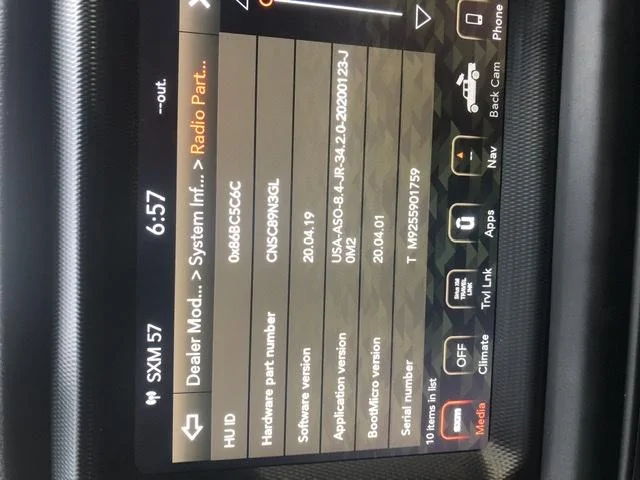
As in the photo, I have:
Software version: 20.04.19
Application version: USA-ASO-8.4-JR-34.2.0-20200123-J0M2
Thanks!

I used to have 5 custom nav icons on my 8.4C as in this post : https://www.jeepgladiatorforum.com/forum/threads/unable-to-change-gps-icon.17738/post-292320
I lost all (and more) after a dealer UConnect service and head unit replacement and they can’t put it back to what I bought.
I need y’all’s help - if you have more than than one nav icon option, can you note what your “Software version” and “Application version” via the Dealer mode on the UConnect 8.4C? FYI - to enter dealer mode, simultaneously press and hold the driver side up and down temperature and the front defrost buttons for 5-10 sec, then open “Radio Part Information”.
As in the photo, I have:
Software version: 20.04.19
Application version: USA-ASO-8.4-JR-34.2.0-20200123-J0M2
Thanks!
Sponsored


