

Toro34
Well-Known Member
- Thread starter
- #1
I had a small (nitpicky) issue with the Album Art not displaying on my Uconnect when listening to mp3 (actually FLAC) files. After some searching I ended up on the Dodge Dart forums and someone there had a fix, so I thought I would share here for anyone that still occasionally uses music files via USB.
The Album Art is recognized and displayed using the Gracenote database, you can read more about that here if you'd like. Essentially, in the olden days, you would occasionally need to burn a CD (compact disc for the unacquainted) with the most recent database, place it in your stereo and update the database manually. WIth today's 'connected' vehicles, that is no longer necessary... What IS necessary however is to ensure that your music files have the correct metadata in order to be recognized (and have the correct Album Art displayed)
This can be accomplished fairly easily using Sony Music Center for PC, that's main purpose was to transfer music to the Walkman devices.
Download Link:
PC - https://www.sony.com/electronics/support/articles/MC4PC020001
(there's also a Mac version which I have NOT tested, YMMV)
- Download, install and point it at your music files.
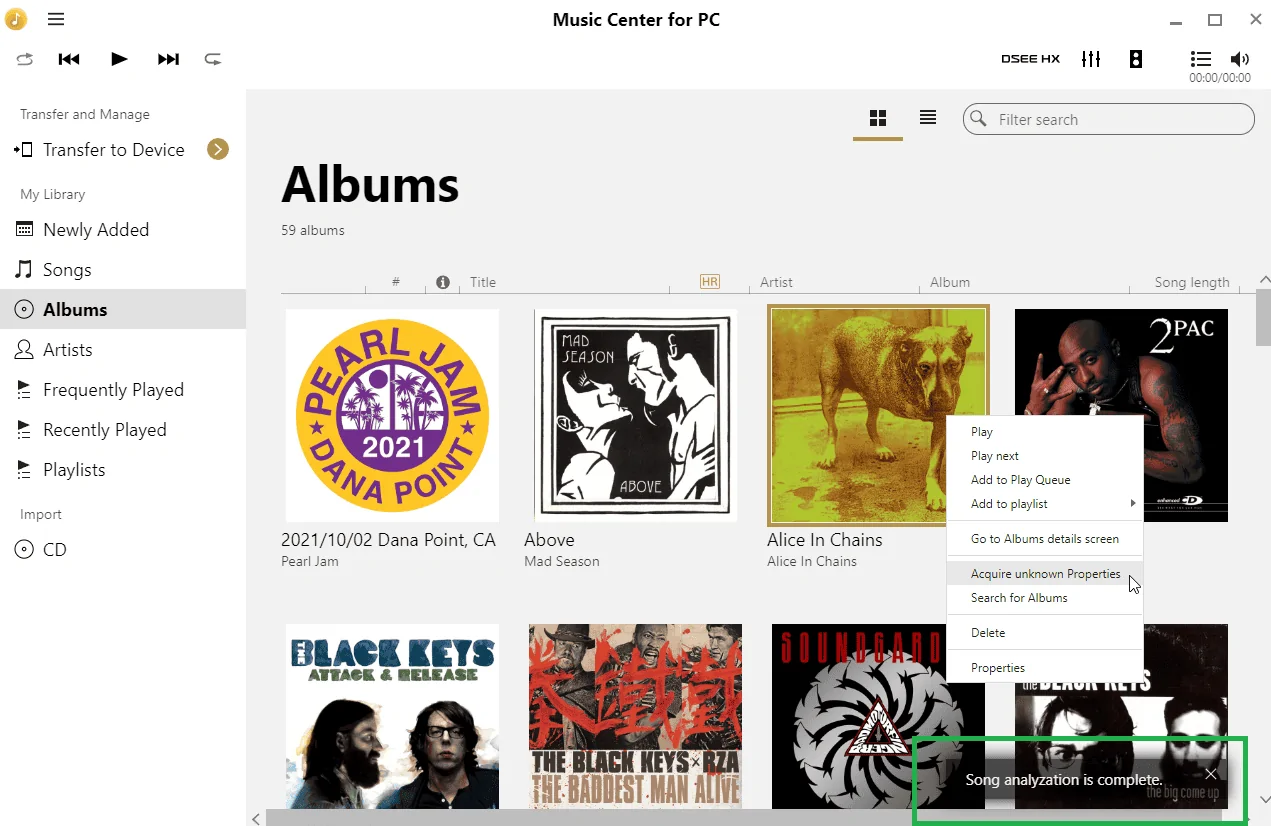
- Right click any album that doesn't display, and select 'Acquire unknown Properties'
- Wait for the scan to complete, and for the Album Art to appear
- Close the Music Center software, find the original folder with your music, then move the files back over to your USB drive
- Album Art should now display on the Uconnect as expected

Hopefully this helps the few people like me who hate seeing the generic Music Note icon where the Album Art should be
The Album Art is recognized and displayed using the Gracenote database, you can read more about that here if you'd like. Essentially, in the olden days, you would occasionally need to burn a CD (compact disc for the unacquainted) with the most recent database, place it in your stereo and update the database manually. WIth today's 'connected' vehicles, that is no longer necessary... What IS necessary however is to ensure that your music files have the correct metadata in order to be recognized (and have the correct Album Art displayed)
This can be accomplished fairly easily using Sony Music Center for PC, that's main purpose was to transfer music to the Walkman devices.
Download Link:
PC - https://www.sony.com/electronics/support/articles/MC4PC020001
(there's also a Mac version which I have NOT tested, YMMV)
- Download, install and point it at your music files.
- Right click any album that doesn't display, and select 'Acquire unknown Properties'
- Wait for the scan to complete, and for the Album Art to appear
- Close the Music Center software, find the original folder with your music, then move the files back over to your USB drive
- Album Art should now display on the Uconnect as expected
Hopefully this helps the few people like me who hate seeing the generic Music Note icon where the Album Art should be
Sponsored
Last edited:


