Sponsored

garzilla

Well-Known Member
First Name
Fred
Joined
Apr 2, 2021
Threads
16
Messages
313
Reaction score
437
Location
Helotes, TX
Vehicle(s)
2021 Jeep Gladiator
Occupation
Software Engineer
Are the JT mounts discontinued? I have a Sport S (no adaptive cruise). Don't really want to mount it to the windshield.
Sponsored
 

RubiNewbCB

Well-Known Member
First Name
Chris
Joined
Jun 1, 2022
Threads
20
Messages
1,068
Reaction score
1,382
Location
757, Coastal VA from the 810 Thumb of the Big Ol'
Vehicle(s)
22 JTRD, 21JGCL, 07 Mustang GT, 05 Chebby Hoe, 90 Fox body stroked and poked393W
Occupation
USN NSW Seabee (1994-2021Ret.) / Current status DoD PMC
Are the JT mounts discontinued? I have a Sport S (no adaptive cruise). Don't really want to mount it to the windshield.

That's a great question because I just ordered one with their mount and I also do not want to mount it to my windshield. What a waste of money if that's the case.
 

WILDHOBO

Well-Known Member
First Name
Dan
Joined
Sep 24, 2021
Threads
73
Messages
11,725
Reaction score
17,857
Location
Colorado
Vehicle(s)
2021 Gladiator Rubicon
Occupation
Network Engineer
Vehicle Showcase
1
That's a great question because I just ordered one with their mount and I also do not want to mount it to my windshield. What a waste of money if that's the case.
I ran mine for months with the straps, and it really wasn’t a problem. It’s very solid. I did order the mount after some time, just out of boredom. It’s not necessary though.
 

RubiNewbCB

Well-Known Member
First Name
Chris
Joined
Jun 1, 2022
Threads
20
Messages
1,068
Reaction score
1,382
Location
757, Coastal VA from the 810 Thumb of the Big Ol'
Vehicle(s)
22 JTRD, 21JGCL, 07 Mustang GT, 05 Chebby Hoe, 90 Fox body stroked and poked393W
Occupation
USN NSW Seabee (1994-2021Ret.) / Current status DoD PMC

WILDHOBO

Well-Known Member
First Name
Dan
Joined
Sep 24, 2021
Threads
73
Messages
11,725
Reaction score
17,857
Location
Colorado
Vehicle(s)
2021 Gladiator Rubicon
Occupation
Network Engineer
Vehicle Showcase
1

Sponsored

Gatorized

Well-Known Member
Joined
Sep 13, 2019
Threads
8
Messages
1,880
Reaction score
1,762
Location
ME/NH
Vehicle(s)
‘14 Mazda3, ‘20 JTR (Gator), ‘25 RAV4 PHEV

garzilla

Well-Known Member
First Name
Fred
Joined
Apr 2, 2021
Threads
16
Messages
313
Reaction score
437
Location
Helotes, TX
Vehicle(s)
2021 Jeep Gladiator
Occupation
Software Engineer
Wolfbox mount came back in stock on Amazon. Ordered one. I also might dash mount it. I'm 6'2" w/ long torso so getting the mirror out of the way might be nice.
 

RubiNewbCB

Well-Known Member
First Name
Chris
Joined
Jun 1, 2022
Threads
20
Messages
1,068
Reaction score
1,382
Location
757, Coastal VA from the 810 Thumb of the Big Ol'
Vehicle(s)
22 JTRD, 21JGCL, 07 Mustang GT, 05 Chebby Hoe, 90 Fox body stroked and poked393W
Occupation
USN NSW Seabee (1994-2021Ret.) / Current status DoD PMC
Wolfbox mount came back in stock on Amazon. Ordered one. I also might dash mount it. I'm 6'2" w/ long torso so getting the mirror out of the way might be nice.
Thanks for the heads up, I just ordered one too!

Also, dash mounting is a great idea.
Then I could do a CMM/Ram mount to occasionally mount my TT Furrion Camera screen as needed.
 

JTPatriot

Well-Known Member
Joined
May 22, 2020
Threads
59
Messages
668
Reaction score
870
Location
Kansas
Vehicle(s)
2020 Jeep JT Rubicon
Occupation
Proto Shop Technician
Has anyone come up with a good location to mount the rear camera if you do not have a rack or topper to mount it to, so as to keep it higher?
I saw one that cut a hole in the tailgate handle's cover. Not a bad idea but want to keep it as clean as possible.
Bumper mount is ok, but will that be high enough to get a good view?
 

Sponsored

ErylFlynn

Well-Known Member
First Name
Brett
Joined
Aug 15, 2023
Threads
40
Messages
449
Reaction score
404
Location
Washington
Vehicle(s)
2023 Punkn Mojave, 2008 JK Unlimited Det Yellow
I would love for any system and external camera for my dashcam. The tint on the hard top really hurts image quality.
 

Sarge502

Well-Known Member
Joined
Jul 3, 2021
Threads
46
Messages
1,313
Reaction score
2,486
Location
Kentucky
Vehicle(s)
2020 Jeep Gladiator Overland
Build Thread
Link
Occupation
Thin Blue Line
Vehicle Showcase
1
@WOLFBOX

So I'm going to be completely transparent here.

I just finally got my Wolf box G900 tri pro bumper version installed a couple days ago after taking advantage of the Black Friday sale. Was super excited to get it installed although I hate doing wiring. Nonetheless got everything hooked up and versus using the direct connection to the fuse box, I have the auxiliary switches in my gladiator and thanks to the help and direction of @WILDHOBO was able to direct connect to the cabins secondary connections under the glove box that are present for those who have the auxiliary group. Goes for a lot cleaner, looking connection in my opinion, and less to run outside of the Jeep.

Overall, I like it's functions and abilities. Hence the whole reason I made the purchase in the first place.. however I'm having a handful of random issues and don't even know where to begin.

First of all, the system randomly just shuts down in the middle of driving, which I find odd. And usually doesn't come right back on immediately without unplugging the power and plugging it back in.

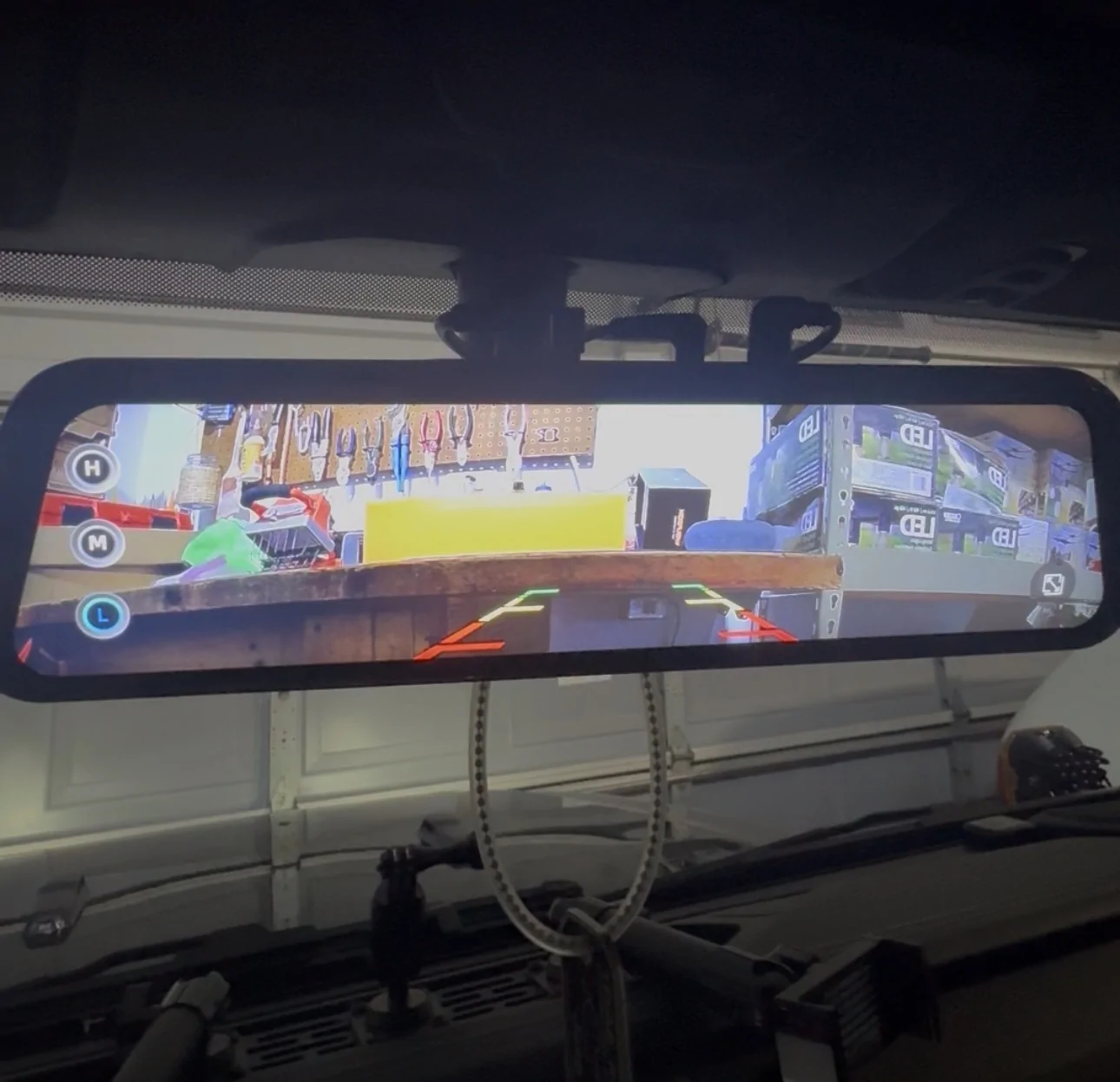
Secondly, at one point, the screen, even after rebooting would get stuck on my rear camera specifically under the grid lines screen as if I was adjusting the lines L M or H etc. (which I don't even have set for the rear mind you) but on top of that doesn't even give me the back arrow at the bottom left to go back to the original screens or even the Settings menu. Was literally stuck on that screen. The only thing that got rid of it is power cycling. I've done a factory reset and it seemed to get rid of that problem. (Atleast for now).

Lastly, and I'm not sure if this is due to an update or something on my end, but on all cameras I cannot slide the brightness up and down from the camera screen as I've seen others do before on the right side of the screen. Also I'm not sure which cameras have the function but I can only zoom in on the rear.

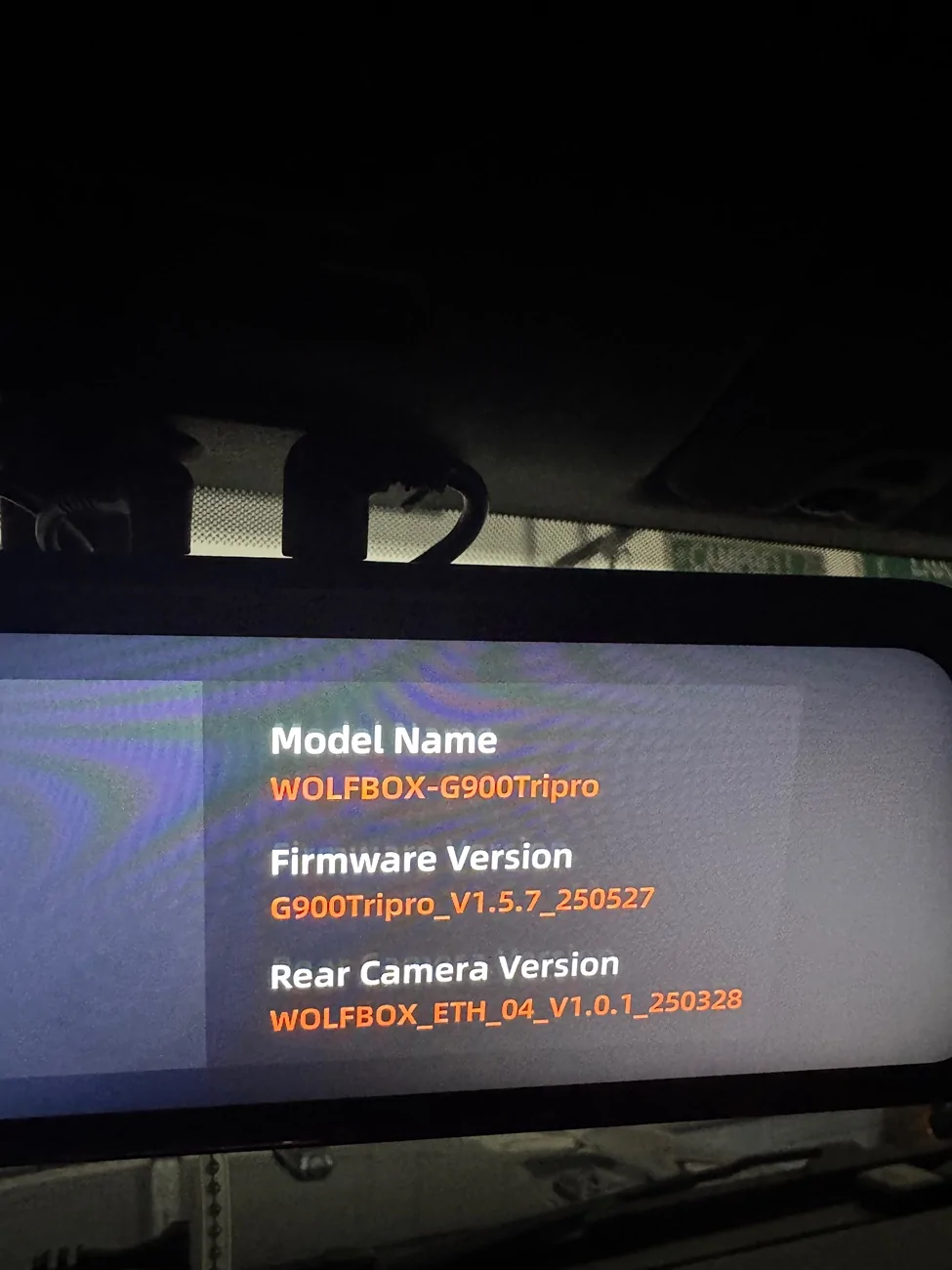
I'm not sure if I need a firmware update or what but even that seems complicated and I can't find much information. I just want it to work properly. First photo is the screen it was stuck on. Again this has seemed to be fixed for now. But with the random shutting off, not sure if it will happen again.

Jeep Gladiator WOLFBOX G900 Tripro Dash Cam - Designed for Off-roading! Up to $50 off IMG_7805


Jeep Gladiator WOLFBOX G900 Tripro Dash Cam - Designed for Off-roading! Up to $50 off IMG_7802
 
Last edited:

WILDHOBO

Well-Known Member
First Name
Dan
Joined
Sep 24, 2021
Threads
73
Messages
11,725
Reaction score
17,857
Location
Colorado
Vehicle(s)
2021 Gladiator Rubicon
Occupation
Network Engineer
Vehicle Showcase
1
@WOLFBOX

So I'm going to be completely transparent here.

I just finally got my Wolf box G900 tri pro bumper version installed a couple days ago after taking advantage of the Black Friday sale. Was super excited to get it installed although I hate doing wiring. Nonetheless got everything hooked up and versus using the direct connection to the fuse box, I have the auxiliary switches in my gladiator and thanks to the help and direction of @WILDHOBO was able to direct connect to the cabins secondary connections under the glove box that are present for those who have the auxiliary group. Goes for a lot cleaner, looking connection in my opinion, and less to run outside of the Jeep.

Overall, I like it's functions and abilities. Hence the whole reason I made the purchase in the first place.. however I'm having a handful of random issues and don't even know where to begin.

First of all, the system randomly just shuts down in the middle of driving, which I find odd. And usually doesn't come right back on immediately without unplugging the power and plugging it back in.

Secondly, at one point, the screen, even after rebooting would get stuck on my rear camera specifically under the grid lines screen as if I was adjusting the lines L M or H etc. (which I don't even have set for the rear mind you) but on top of that doesn't even give me the back arrow at the bottom left to go back to the original screens or even the Settings menu. Was literally stuck on that screen. The only thing that got rid of it is power cycling. I've done a factory reset and it seemed to get rid of that problem. (Atleast for now).

Lastly, and I'm not sure if this is due to an update or something on my end, but on all cameras I cannot slide the brightness up and down from the camera screen as I've seen others do before on the right side of the screen. Also I'm not sure which cameras have the function but I can only zoom in on the rear.

I'm not sure if I need a firmware update or what but even that seems complicated and I can't find much information. I just want it to work properly. First photo is the screen it was stuck on. Again this has seemed to be fixed for now. But with the random shitting off, not sure if it will happen again.

IMG_7805.webp


IMG_7802.webp
Did you ignore the reverse circuit wire and just tape it up, or put a close end connector on it? I forgot to mention that wire. It’s not required. If it were being triggered, it could hold you on the reverse camera.

my brightness is on a bottom icon bar. Then is a left/right slide.
 

Sarge502

Well-Known Member
Joined
Jul 3, 2021
Threads
46
Messages
1,313
Reaction score
2,486
Location
Kentucky
Vehicle(s)
2020 Jeep Gladiator Overland
Build Thread
Link
Occupation
Thin Blue Line
Vehicle Showcase
1
Did you ignore the reverse circuit wire and just tape it up, or put a close end connector on it? I forgot to mention that wire. It’s not required. If it were being triggered, it could hold you on the reverse camera.

my brightness is on a bottom icon bar. Then is a left/right slide.
yes for the rear I just ignored it. Thanks for that clarification too. Figured so. It's zip tied to the rest of the rear wire neatly. I preferred not to used the reverse wire considering my stock backup camera works fine.

And yeah I also have the brightness indicator on the bottom task bar, but I've also seen others be able to also zoom, pan, and adjust brightness right from the camera screen too. Not a major concern if that's normal. I've just seen videos where others can. Unless there were recent changes to this or I need a firmware update.

Still doesn't explain the random shutting off. I've had this installed for about two full days now and haven't even driven much and it's done it about 3x now (when driving) not after sitting and automatically powering off
 

WILDHOBO

Well-Known Member
First Name
Dan
Joined
Sep 24, 2021
Threads
73
Messages
11,725
Reaction score
17,857
Location
Colorado
Vehicle(s)
2021 Gladiator Rubicon
Occupation
Network Engineer
Vehicle Showcase
1
yes for the rear I just ignored it. Thanks for that clarification too. Figured so. It's zip tied to the rest of the rear wire neatly. I preferred not to used the reverse wire considering my stock backup camera works fine.

And yeah I also have the brightness indicator on the bottom task bar, but I've also seen others be able to also zoom, pan, and adjust brightness right from the camera screen too. Not a major concern if that's normal. I've just seen videos where others can. Unless there were recent changes to this or I need a firmware update.

Still doesn't explain the random shutting off. I've had this installed for about two full days now and haven't even driven much and it's done it about 3x now (when driving) not after sitting and automatically powering off
I’d make sure the end of that reverse trigger wire is insulated. I’ve never had mine zoom, but I can pan up and down to adjust what shows in the mirror. But only when just one of the cameras is being viewed.
Sponsored


Top