Sponsored

DIY front camera Jscan settings?

Haley

Well-Known Member
First Name
Bill
Joined
Jul 1, 2021
Threads
4
Messages
127
Reaction score
120
Location
Phoenix, AZ
Vehicle(s)
2021 Gladiator Mojave, 1981 CJ8
Occupation
Landscaping
I'm trying to get a DIY front camera set up using the following items:

Camera: Natika backup/front camera

Power harness: ebay cigarette lighter pigtail

And RCA connector: zautomotive connector

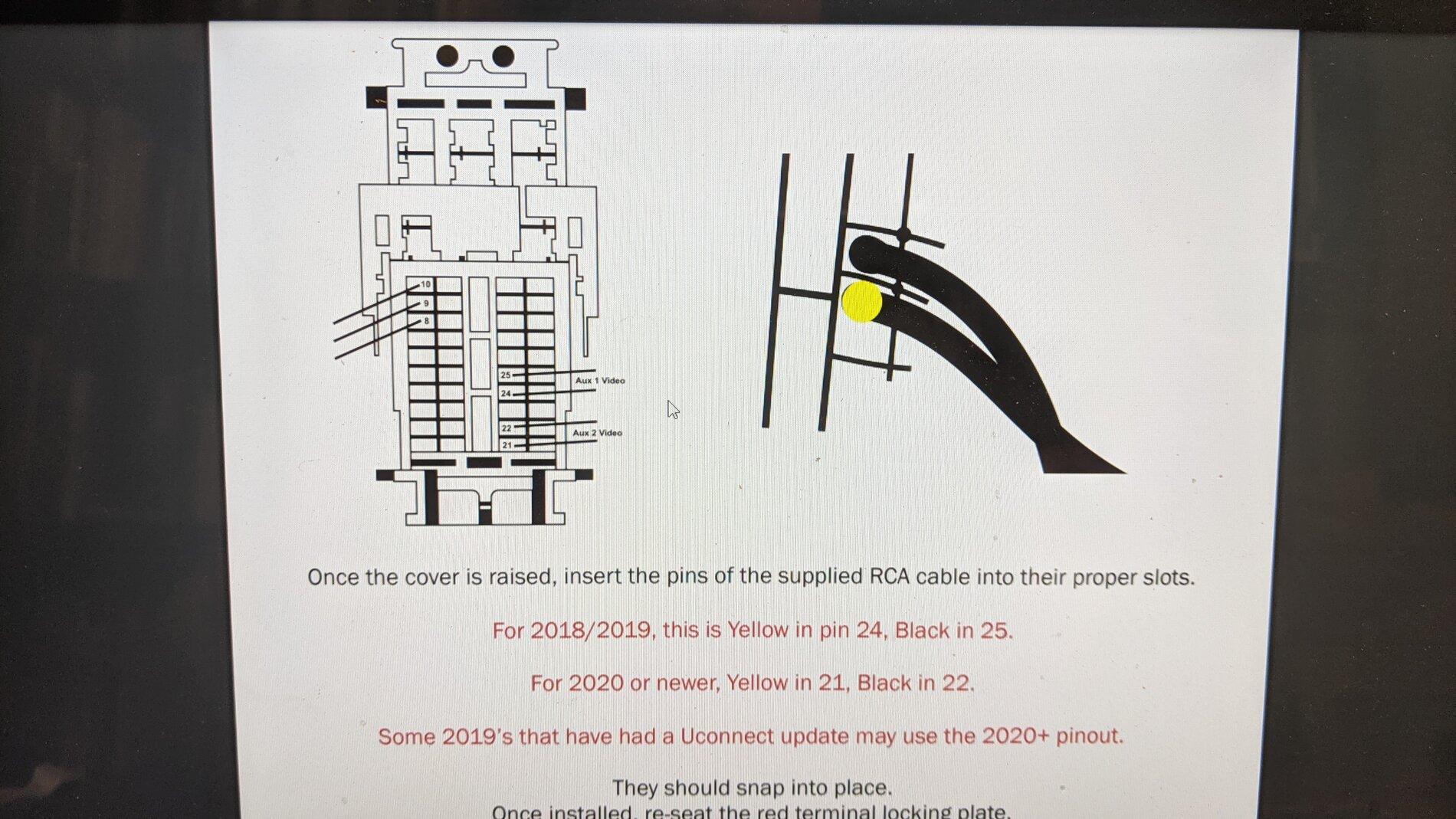
I've installed roughly using zautomotive's instructions, using pins 21 and 22 of the radio (2021 JT). I've used jscan to enable the cargo cam and it shows up in my controls settings.

However, all I see is the blue screen. I know the camera works because it was just working on a different head unit. I know the 12v pigtail is working because I checked for 12v.

That leaves either the RCA connection - maybe it's not pins 21 and 22 any longer, or I haven't completely enabled the camera via jscan.

Any ideas what settings should be changed with jscan?

TIA.
Sponsored
 

jeepin48

Well-Known Member
First Name
Jake
Joined
Sep 10, 2020
Threads
10
Messages
418
Reaction score
437
Location
Michigan
Vehicle(s)
JT Overland 3.0L
Occupation
Engineer
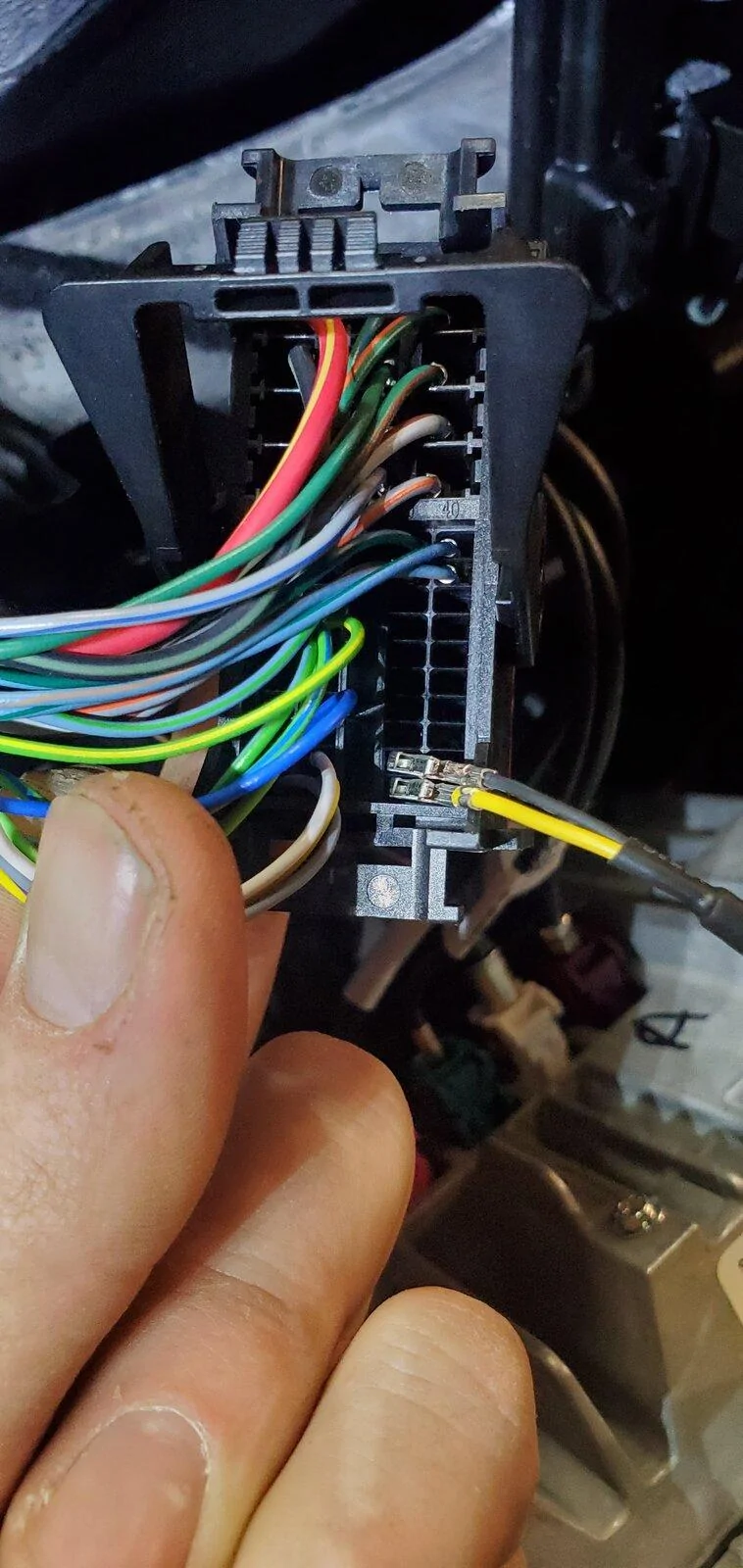
This is where I was pinned. I did the full Z Automotive setup and it works great with their camera or the Metra BBBPC camera. I power mine from the trailer connector.

Jeep Gladiator DIY front camera Jscan settings? 20210502_220054
 
OP
OP
Haley

Haley

Well-Known Member
First Name
Bill
Joined
Jul 1, 2021
Threads
4
Messages
127
Reaction score
120
Location
Phoenix, AZ
Vehicle(s)
2021 Gladiator Mojave, 1981 CJ8
Occupation
Landscaping
This is where I was pinned. I did the full Z Automotive setup and it works great with their camera or the Metra BBBPC camera. I power mine from the trailer connector.

20210502_220054.webp
Same. That helps rule out most wiring details, making me lean more towards not having the necessary settings through jscan.

Only thing I've done is activated the cargo camera/chmsl (which coincidentally also automatically activates front view camera/cargo camera.)

I feel like there's probably something I'm missing...
 

jeepin48

Well-Known Member
First Name
Jake
Joined
Sep 10, 2020
Threads
10
Messages
418
Reaction score
437
Location
Michigan
Vehicle(s)
JT Overland 3.0L
Occupation
Engineer
Same. That helps rule out most wiring details, making me lean more towards not having the necessary settings through jscan.

Only thing I've done is activated the cargo camera/chmsl (which coincidentally also automatically activates front view camera/cargo camera.)

I feel like there's probably something I'm missing...
If you hit the camera button it should show the cargo camera at the top of the screen. If that shows up that you are setup properly with your scan tool. Mine was a Nov 2020 build 2021 8.4". Somewhere in the Z Automotive instruction it said there could be other pins.
 
OP
OP
Haley

Haley

Well-Known Member
First Name
Bill
Joined
Jul 1, 2021
Threads
4
Messages
127
Reaction score
120
Location
Phoenix, AZ
Vehicle(s)
2021 Gladiator Mojave, 1981 CJ8
Occupation
Landscaping
If you hit the camera button it should show the cargo camera at the top of the screen. If that shows up that you are setup properly with your scan tool. Mine was a Nov 2020 build 2021 8.4". Somewhere in the Z Automotive instruction it said there could be other pins.
The icon is showing up in the menu, and when I'm in reverse, but selecting it just gives me the blue "camera not available" screen.

I feel like I'm so close, just can't figure out what I'm overlooking. Only thing it could be I guess is some conflict with the pin info, and I should either try switching to 24/25 or maybe try turning on the side camera toggle? Mine is an April 2021 build.

Jeep Gladiator DIY front camera Jscan settings? PXL_20210802_220427754
 

Sponsored

FutureOdin

Well-Known Member
Joined
Sep 29, 2020
Threads
30
Messages
491
Reaction score
310
Location
Massachusetts
Vehicle(s)
2021 JLU Sahara
I don't think it's a JSCAN issue if you're able to see the cargo cam option. It seems that it's not getting a signal, hence the blue screen. If you've checked for 12V at the camera, then power doesn't seem to be an issue--could be either the wiring harness you installed?
 
OP
OP
Haley

Haley

Well-Known Member
First Name
Bill
Joined
Jul 1, 2021
Threads
4
Messages
127
Reaction score
120
Location
Phoenix, AZ
Vehicle(s)
2021 Gladiator Mojave, 1981 CJ8
Occupation
Landscaping
I don't think it's a JSCAN issue if you're able to see the cargo cam option. It seems that it's not getting a signal, hence the blue screen. If you've checked for 12V at the camera, then power doesn't seem to be an issue--could be either the wiring harness you installed?
That's where I checked for 12v - the +line of the lighter harness that I have my camera + connected to. There's a -line in the lighter harness that I've tried both grounded and ungrounded, though the camera does have a body ground at the grill.

I can try double checking the 12v at the camera, but the camera was for sure working with the current wiring on the HEIGH10 I just pulled (to replace with my OEM 8.4).
 

FutureOdin

Well-Known Member
Joined
Sep 29, 2020
Threads
30
Messages
491
Reaction score
310
Location
Massachusetts
Vehicle(s)
2021 JLU Sahara
That's where I checked for 12v - the +line of the lighter harness that I have my camera + connected to. There's a -line in the lighter harness that I've tried both grounded and ungrounded, though the camera does have a body ground at the grill.

I can try double checking the 12v at the camera, but the camera was for sure working with the current wiring on the HEIGH10 I just pulled (to replace with my OEM 8.4).
Yeah, if you're getting 12V at the camera, it should be fine. If it's grounded to the body, you shouldn't need the (-) on the wiring harness to be connected.

I was thinking that the RCA harness you got might not be any good? Or maybe the pins aren't making full contact in the plug?
 
OP
OP
Haley

Haley

Well-Known Member
First Name
Bill
Joined
Jul 1, 2021
Threads
4
Messages
127
Reaction score
120
Location
Phoenix, AZ
Vehicle(s)
2021 Gladiator Mojave, 1981 CJ8
Occupation
Landscaping
Yeah, if you're getting 12V at the camera, it should be fine. If it's grounded to the body, you shouldn't need the (-) on the wiring harness to be connected.

I was thinking that the RCA harness you got might not be any good? Or maybe the pins aren't making full contact in the plug?
Agreed, that's about where I'm at if the settings are all good. The pins both clicked and I cannot pull them out, but I will double check, and triple check they're in the right orientation and location. Next step would be to turn on the side camera in Jscan and see if it pops up there. If it does, I'll either leave it or move the pins to 24/25 to see if it then shows up under cargo cam.

If none of those, then I'll have to revisit the pins to make sure they're making good contact. I've noticed that the harness connector is somewhat sensitive - if I don't shove it in there really good before latching, the touchscreen doesn't work. As of now, it's shoved in good and the touchscreen works so I assume all contacts should be good.
 

FutureOdin

Well-Known Member
Joined
Sep 29, 2020
Threads
30
Messages
491
Reaction score
310
Location
Massachusetts
Vehicle(s)
2021 JLU Sahara
I think if you check continuity between the pins in the back of the connector and the RCA jack, that should rule out if that is bad?
 

Sponsored

OP
OP
Haley

Haley

Well-Known Member
First Name
Bill
Joined
Jul 1, 2021
Threads
4
Messages
127
Reaction score
120
Location
Phoenix, AZ
Vehicle(s)
2021 Gladiator Mojave, 1981 CJ8
Occupation
Landscaping
I think if you check continuity between the pins in the back of the connector and the RCA jack, that should rule out if that is bad?
I'll give that a try, too. That one slipped my mind. ?
 

Mr._Bill

Well-Known Member
First Name
Bill
Joined
Jul 22, 2019
Threads
38
Messages
6,646
Reaction score
7,727
Location
North Las Vegas, NV
Vehicle(s)
2023 Gladiator High Altitude - 2013 Nissan Leaf SV
Vehicle Showcase
1
The Tazer instructions for their camera kit are available on their website. Read through that and you should be able to get it working. What you are trying to add (RCA) will only display on the cargo camera input.
 
OP
OP
Haley

Haley

Well-Known Member
First Name
Bill
Joined
Jul 1, 2021
Threads
4
Messages
127
Reaction score
120
Location
Phoenix, AZ
Vehicle(s)
2021 Gladiator Mojave, 1981 CJ8
Occupation
Landscaping
The Tazer instructions for their camera kit are available on their website. Read through that and you should be able to get it working. What you are trying to add (RCA) will only display on the cargo camera input.
Yep, I've gotten through that so am guessing I have it narrowed down to the RCA connection somewhere.
 
OP
OP
Haley

Haley

Well-Known Member
First Name
Bill
Joined
Jul 1, 2021
Threads
4
Messages
127
Reaction score
120
Location
Phoenix, AZ
Vehicle(s)
2021 Gladiator Mojave, 1981 CJ8
Occupation
Landscaping
RCA is good, continuity as expected. Power and ground at the camera.

Swapped pins to 24/25 - still blue screen.

Tested pins outside of the connector, they sit firmly.

Placed back in 21/22 and seated the brick connector firmly. Waiting for the unit to reset to show the settings again.

I've hit a deadend, obviously. Either the pins aren't seating well when plugged in (in the connector) or somehow between last week and this week the camera went bad.

Guess I could order a new camera and bench test it?
 

XraytecH

Well-Known Member
First Name
Bernie
Joined
Jan 14, 2021
Threads
208
Messages
1,897
Reaction score
2,787
Location
South San Francisco
Vehicle(s)
2021 Jeep Gladiator Sport
Occupation
Xraytech
Vehicle Showcase
1
RCA is good, continuity as expected. Power and ground at the camera.

Swapped pins to 24/25 - still blue screen.

Tested pins outside of the connector, they sit firmly.

Placed back in 21/22 and seated the brick connector firmly. Waiting for the unit to reset to show the settings again.

I've hit a deadend, obviously. Either the pins aren't seating well when plugged in (in the connector) or somehow between last week and this week the camera went bad.

Guess I could order a new camera and bench test it?
Yeah, sounds like camera is bad.

My issue was not the Blue Screen Of Death but on occasion the camera was sending a distorted Fisheye image to the head unit. Bought the same kit and swapped out the camera and have not had the issue since.
Sponsored


Top