Sponsored

Navigation map disappeared

tomwilson74

Member
First Name
Tom
Joined
Apr 22, 2026
Threads
1
Messages
5
Reaction score
4
Location
Weat Virginia
Vehicle(s)
2026 Gladiator
Occupation
retired
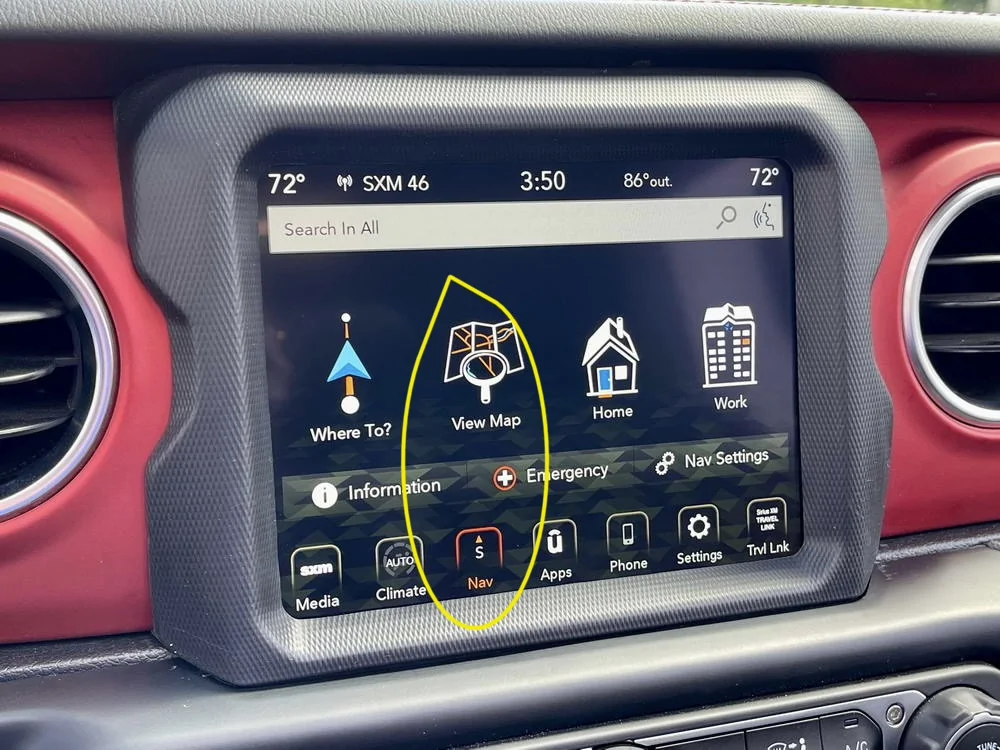
I’m a new Gladiator owner. Yesterday my map disappeared. I have pushed every button but can’t seem to find the map now. How do I get it back??
Sponsored

 

ArcticDreadnought

Well-Known Member
First Name
Thomas
Joined
Apr 2, 2025
Threads
9
Messages
217
Reaction score
349
Location
Alaska
Vehicle(s)
2024 JT/M
Build Thread
Link
Occupation
Oilfield Emergency Response
Hi! First, define which map. Was your phone connected to your UConnect when it was up? Were you only using the map that is part of your UConnect system, or was it Google/Apple Maps projecting through?

Few more details, and we can very likely get this squared away.
 
OP
OP

tomwilson74

Member
First Name
Tom
Joined
Apr 22, 2026
Threads
1
Messages
5
Reaction score
4
Location
Weat Virginia
Vehicle(s)
2026 Gladiator
Occupation
retired
I don’t see the “nav” button.
 

Gregj

Well-Known Member
First Name
Greg
Joined
Jul 4, 2019
Threads
2
Messages
488
Reaction score
501
Location
West Texas
Vehicle(s)
2018 JLU, 2018 JLUR, 2023 JTuRD, 2017 JKRR
Press the apps icon and see if it got knocked off the bottom row.
Gregj
 

Sponsored

OP
OP

tomwilson74

Member
First Name
Tom
Joined
Apr 22, 2026
Threads
1
Messages
5
Reaction score
4
Location
Weat Virginia
Vehicle(s)
2026 Gladiator
Occupation
retired
It’s the google map. It was working fine until I deleted my phone and paired it again. I had it working through uconnect. I think I got it now though. I have to push the CarPlay button to switch back and forth from Spotify and the google map
 

ArcticDreadnought

Well-Known Member
First Name
Thomas
Joined
Apr 2, 2025
Threads
9
Messages
217
Reaction score
349
Location
Alaska
Vehicle(s)
2024 JT/M
Build Thread
Link
Occupation
Oilfield Emergency Response
Ah. That's likely it. You can also fool around with the order those buttons are placed on your UConnect to put them where you want to. If you are connecting through Android Auto, then the small buttons to the left of the main screen (but not the leftmost UConnect buttons) will be in the order of latest app used, top to bottom.

Good luck!
 

JLPeekaboo

Active Member
Joined
Mar 14, 2026
Threads
0
Messages
31
Reaction score
22
Location
Atlanta, Georgia
Vehicle(s)
Jeep Gladiator
Occupation
Auto repair, IT
Ah. That's likely it. You can also fool around with the order those buttons are placed on your UConnect to put them where you want to. If you are connecting through Android Auto, then the small buttons to the left of the main screen (but not the leftmost UConnect buttons) will be in the order of latest app used, top to bottom.

Good luck!
I almost got stuck with mine, but this helped, Thanks for the info.
Sponsored


Top