Sponsored

Uconnect box error

RADuck77

Member
First Name
Rick
Joined
Feb 19, 2025
Threads
4
Messages
12
Reaction score
6
Location
Central Texas
Vehicle(s)
‘24 Gladiator Sport
I have been getting the error in the picture below. I hit ok and everything seems to work fine. I live very rural and driving into a dealer is a rather big hassle. Any way I can diagnose and repair this myself?
Jeep Gladiator Uconnect box error IMG_5834
Sponsored


FLY-DOG

Well-Known Member
First Name
Kerry
Joined
Jan 6, 2026
Threads
0
Messages
96
Reaction score
84
Location
Green Cove Springs, Florida
Vehicle(s)
2025 Jeep Gladiator Mojave X - Bright White
Occupation
Retired - USN 30 yrs + Delta Air Lines 22 yrs
I have been getting the error in the picture below. I hit ok and everything seems to work fine. I live very rural and driving into a dealer is a rather big hassle. Any way I can diagnose and repair this myself?
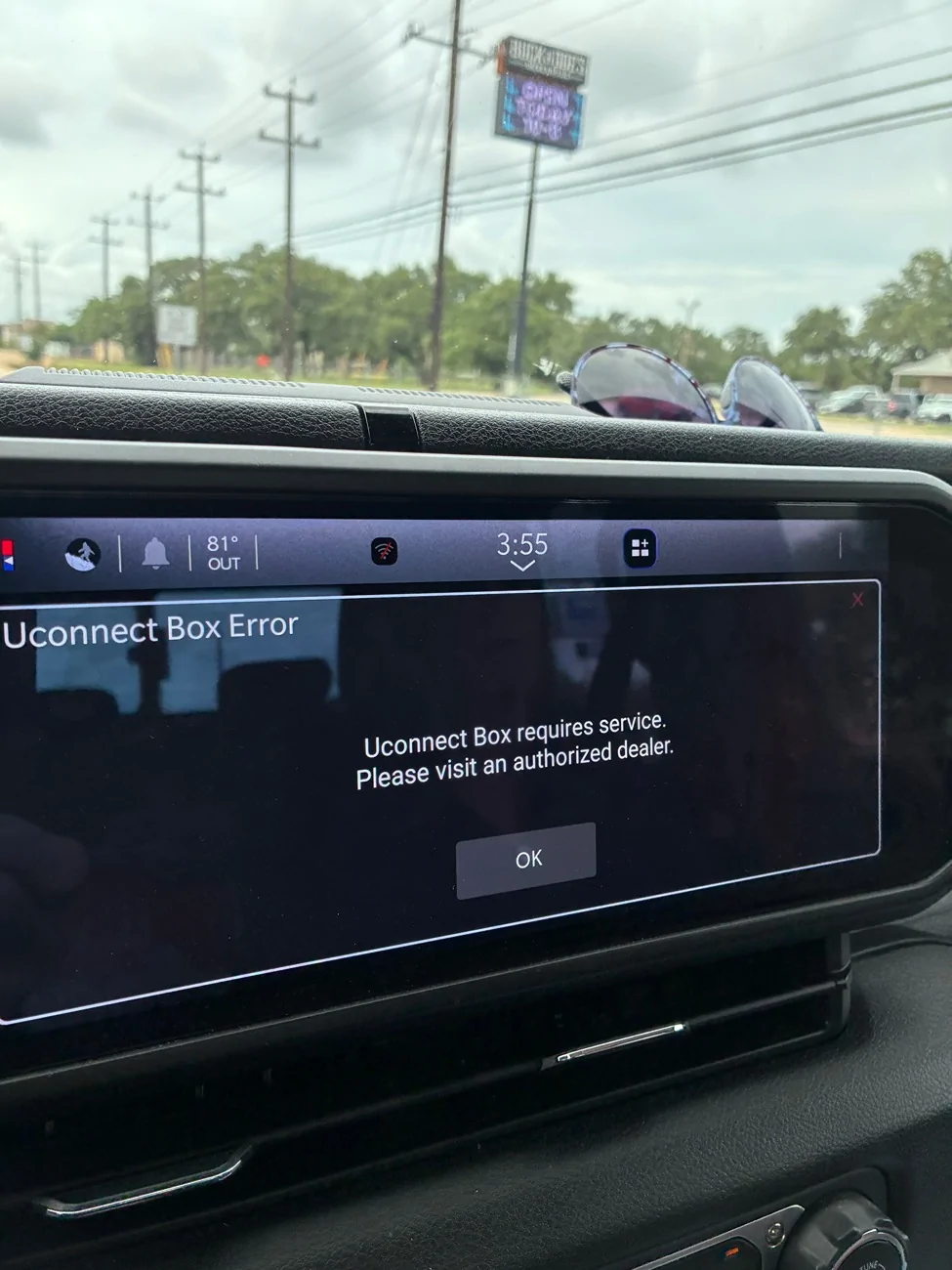
IMG_5834.webp
Grok says:
For your 2024 Jeep Gladiator, this is a very common "Uconnect Box requires service" (or "Connect Box") error tied to the Telematics Box Module (TBM) / connectivity system. It affects many 2024–2025 Jeeps (Wrangler, Gladiator, etc.) and doesn't usually impact core driving or basic radio functions, but it disables or glitches connected services like remote start, Jeep app features, SOS/Assist, and navigation connectivity. Most Common Causes on 2024 Gladiators
  • Loose or poor antenna connections (especially the roof shark fin antenna cables feeding the TBM) — very frequent.
  • Faulty or intermittent coaxial connectors at the TBM.
  • Software/certificate issues or failed server communication.
  • Less commonly: TBM module itself, internal battery, or wiring harness.
DIY Troubleshooting Steps (Try These First)
  1. Basic Reset:
    • Park in a strong cellular signal area.
    • Leave the vehicle running (or accessory on) for 20–30 minutes to allow it to download updates/certificates.
    • Full power cycle: Turn off, remove key, wait 10–15 minutes (or disconnect negative battery terminal briefly if comfortable).
  2. Check/Reseat Connections (Highest Success Rate for This Issue):
    • TBM Location: On 2024 models, it's typically under the driver's side dash, near/behind the steering column (accessible from the footwell after removing the lower dash panel). Look for colored FAKRA-style coaxial connectors (often pink, blue, grey, etc.). Firmly unplug and reseat them.
    • Roof Shark Fin: Some owners access the antenna connections by carefully lowering the headliner (passenger or driver side) and reseating the roof antenna cables.
  3. Dealer Visit Recommended:
    • This is almost always warranty-covered on a 2024 Gladiator.
    • Ask them to scan for codes (common one is B1560 or similar for antenna/TBM issues).
    • They can perform a software reflash, certificate update, or replace the antenna harness/TBM if needed. Many reports show a simple update or tightening connections fixes it.
Note: Disconnecting antennas yourself will likely trigger the exact same warning plus illuminated SOS/Assist lights, so it's not a clean workaround.If you've already tried resets or have any other symptoms (e.g., SOS lights on, no Jeep app connectivity, poor GPS), let me know for more targeted advice. Take it to your dealer soon while under warranty — document the popup dates/times. This is a known annoyance in the JL/JT platform but usually resolvable.


Top