Sponsored

Garmin Tread XL Overland Sideloading PSA

Wolf Island Diver

Well-Known Member
Joined
Apr 14, 2021
Threads
26
Messages
1,130
Reaction score
2,477
Location
Virginia
Vehicle(s)
2021 JT Rubicon EcoDiesel
Occupation
Software Engineer
I switched from an iPad Pro 12 + Dual + Gaia to the Garmin and haven’t looked back. I really wanted to love Gaia but I found it to mostly be a PITA and getting my Bluetooth Dual GPS to work happily with Gaia on the iPad was always a crapshoot. I really like the Garmin, but it’s not all roses. My unit has this particular issue where it won’t screen rotate when needed. It gets “stuck” in portrait or landscape. Garmin’s terrible support offered to replace it but honestly they didn’t give me any confidence in their knowledge of the issue. This seems like a software issue to me and what’s a new device going to do?

I was planning on grabbing the Garmin guys at Overland Expo East this October but today I decided to try and get my Renogy App installed and ended up getting my rotation issue fixed too.

I had heard about sideloading since this is an Android device but hadn’t tried it until today. I was able to get the Renogy DC home app and another one called Rotation Control installed. Both are working flawlessly. This capability really opens up the possibilities with the Garmin and can make it more than just a GPS.

Rather than describe how to unlock this capability, here’s the YouTube video I followed:


Once you’ve got the sideloading allowed, you can’t just use the browser-based Play Store. You have to download the APK file from a APK site. A lot of these sites wrap the APK in some format that requires their installer. I found a site apkcombo.com that allows downloading of raw apk files. Then go to your downloads and simply click on the APK to install.

Now it should go without saying that you’re installing software from the internet at your own risk onto a device with a custom shell. Use appropriate caution and YMMV. You can cause problems and may have to factory reset your device. I got a warning about Rotation Control being for an older version of Android but it’s working fine at this point as is Renogy DC Home. I’m probably going to install my ARB fridge app too. My Garmin is becoming an overlanding command center. Of course this begs the question, why are there such limitations on CarPlay since all these apps are already on my iPhone?
Sponsored

 

sarguy1941

Well-Known Member
Joined
Aug 20, 2019
Threads
24
Messages
587
Reaction score
380
Location
USA
Vehicle(s)
Jeep
I went from my tablet to the Garmin Overland also. As a tech guy who uses tablets and computers I struggled to switch to a GPS but in the end it was the KISS method. With CALTopo and Gaia GPS I was always missing a map of an area I was in and would forget about stuff. Garmin is fast and simple.
 

smlobx

Well-Known Member
First Name
Eddie
Joined
Jun 28, 2018
Threads
87
Messages
2,657
Reaction score
4,543
Location
Mid Atlantic
Vehicle(s)
JTR, F-350 diesel, Porsche Spyder, Model Y
Occupation
Semi retired consultant
I switched from an iPad Pro 12 + Dual + Gaia to the Garmin and haven’t looked back. I really wanted to love Gaia but I found it to mostly be a PITA and getting my Bluetooth Dual GPS to work happily with Gaia on the iPad was always a crapshoot. I really like the Garmin, but it’s not all roses. My unit has this particular issue where it won’t screen rotate when needed. It gets “stuck” in portrait or landscape. Garmin’s terrible support offered to replace it but honestly they didn’t give me any confidence in their knowledge of the issue. This seems like a software issue to me and what’s a new device going to do?

I was planning on grabbing the Garmin guys at Overland Expo East this October but today I decided to try and get my Renogy App installed and ended up getting my rotation issue fixed too.

I had heard about sideloading since this is an Android device but hadn’t tried it until today. I was able to get the Renogy DC home app and another one called Rotation Control installed. Both are working flawlessly. This capability really opens up the possibilities with the Garmin and can make it more than just a GPS.

Rather than describe how to unlock this capability, here’s the YouTube video I followed:


Once you’ve got the sideloading allowed, you can’t just use the browser-based Play Store. You have to download the APK file from a APK site. A lot of these sites wrap the APK in some format that requires their installer. I found a site apkcombo.com that allows downloading of raw apk files. Then go to your downloads and simply click on the APK to install.

Now it should go without saying that you’re installing software from the internet at your own risk onto a device with a custom shell. Use appropriate caution and YMMV. You can cause problems and may have to factory reset your device. I got a warning about Rotation Control being for an older version of Android but it’s working fine at this point as is Renogy DC Home. I’m probably going to install my ARB fridge app too. My Garmin is becoming an overlanding command center. Of course this begs the question, why are there such limitations on CarPlay since all these apps are already on my iPhone?
Thanks guys for your review of the Garmin. I have struggled with what format to go with and have tried GIAA and OnX but I’m not a fan of how complex they are.
‘I currently use the InReach so I’m somewhat familiar with the Garmin family.
I’d love to hear more comments of the strengths and weaknesses in the Garmin unit if you don’t mind…

One thing I’m wondering is why you chose the Tread over the Overlander? Is it because of the included InReach? I currently have an InReach but it is getting old and I’ve used it a lot so the battery isn’t holding a charge as well as it once did. Plus the screen is tiny so replacing it with something better is something I’d consider.
 
Last edited:
OP
OP
Wolf Island Diver

Wolf Island Diver

Well-Known Member
Joined
Apr 14, 2021
Threads
26
Messages
1,130
Reaction score
2,477
Location
Virginia
Vehicle(s)
2021 JT Rubicon EcoDiesel
Occupation
Software Engineer
Thanks guys for your review of the Garmin. I have struggled with what format to go with and have tried GIAA and OnX but I’m not a fan of how complex they are.
‘I currently use the InReach so I’m somewhat familiar with the Garmin family.
I’d love to hear more comments of the strengths and weaknesses in the Garmin unit if you don’t mind…

One thing I’m wondering is why you chose the Tread over the Overlander? Is it because of the included InReach? I currently have an InReach but it is getting old and I’ve used it a lot so the battery isn’t holding a charge as well as it once did. Plus the screen is tiny so replacing it with something better is something I’d consider.
The main difference between the Overlander and the Tread Xl Overland (thanks Garmin for making the naming as confusing as possible) is the screen size. But it’s also a higher resolution (1280 vs 1024) screen and brighter (1000 nit). I love having big nits when my top is off ?. The Tread has more route planning built into the main map along with high resolution satellite imaging overlaid in the main map. The Overlander had this separated out. The Tread has a built in inReach receiver. I have been disappointed with the handheld inReach. The tread also has dog tracking if you have a Garmin dog collar. I’m not sure if the Overlander has this.

What I like most about the Tread (I’m not sure how the overlander differs in this regard) is that it’s the first navigation device or software that allows me to “hack” my routes. What I mean is that usually you’re stuck with whatever the algorithm picks for you. With Garmin you can change route guidance based on off roading preferences. So if you want a more adventurous route, it can create one for you. This is because it supports off road turn-by-turn. Now this feature was a little clunky to use but a recent update has added a slider to the map. Even though I’m defaulted to maximum adventure (off road) by default, sometimes I need to drive on the road to get to a specific location. If you’re in the GWNF there are gravel roads all around. I’m not trying to drive those if I’m trying to get to a specific trail via the interstate or Blue Ridge Parkway. Being able to slide the preference back to on road is nice and it displays the various routes on the screen like Google Maps. It’s also easier to add waypoints and shaping points to tweak the route from the map. This isn’t as good as Google maps but it’s good enough.

I also like that it can display with the radar on the map, view traffic and search gas stations by fuel price. So it gives me a lot of features that I normally have to get from multiple apps in one place. It also syncs with my phone and allows me to control music, get notifications and make calls controlled by the Tread but still using the Jeeps speakers through CarPlay.
 
OP
OP
Wolf Island Diver

Wolf Island Diver

Well-Known Member
Joined
Apr 14, 2021
Threads
26
Messages
1,130
Reaction score
2,477
Location
Virginia
Vehicle(s)
2021 JT Rubicon EcoDiesel
Occupation
Software Engineer
I installed the ARB fridge app. Bluetooth access is clearly not an issue. I’ve got ARB and Renogy working fine. I’m tempted to install OnX to see it can use the GPS, ?


Sponsored

sarguy1941

Well-Known Member
Joined
Aug 20, 2019
Threads
24
Messages
587
Reaction score
380
Location
USA
Vehicle(s)
Jeep
I have my Inreach linked to my Overland also. That was just another selling point for me. I'd like to upgrade to the Tread Xl Overland but do like the size and price point of the overlander.
 

HooliganActual

Well-Known Member
First Name
Robert
Joined
Jun 27, 2020
Threads
9
Messages
1,410
Reaction score
3,601
Location
10 miles from the Sun
Vehicle(s)
2020 Gladiator Rubicon
Occupation
Retired
I’d love to hear more comments of the strengths and weaknesses in the Garmin unit if you don’t mind…
I've been using the Tread XL for over a year now and am very happy with it. I have been an inReach fan since my original Delorme even before Garmin's buy out. I was an early adopter of the Tread XL and bit the bullet on the high price point right after it came out; but I personally think it was more than worth it.

One thing that doesn't get discussed much when folks get to talking about the Tread XL is that, just like the InReach Mini and other InReach devices, it works in conjunction with the Garmin Explore website. When you are out and about, you can MapShare to anyone via text/email which sends them a link to the Explore website that allows the recipient to see your track and location in real time (it's time stamped, shows moving speed, and shows the track not just a location pinpoint). This is a feature that Gaia and others really don't provide and gives great peace of mind to my family members when we go adventuring.

What I like most about the Tread (I’m not sure how the overlander differs in this regard) is that it’s the first navigation device or software that allows me to “hack” my routes.
Building on this feature, which is awesome, the Tread also carries over another feature available with the other inReach devices and that is the ability to custom build routes and waypoints on the Garmin Explore website and push them over to the device. Yes, you can build all that stuff right on the Tread XL because it does have a nice big, high resolution screen; but I find it much more convenient to map out my travel plans ahead of time in the comfort of my home office on a proper computer screen and then the Tread's ability to easily change routes on the fly allows me to alter my base route in the field.

I also like that it can display with the radar on the map, view traffic and search gas stations by fuel price. So it gives me a lot of features that I normally have to get from multiple apps in one place.
Expanding on this, the Tread XL incorporates Tripadvisor, iOverlander and Ultimate Public Campgrounds apps as well so you can see and get details about campsites along your route. We have used this more than I would have expected when we were in unfamiliar areas and looking for where we wanted to spend the night...and it works when I am not in cell coverage! I mean, sure there's all of these navigation and travel apps you could have and use on your phone or iPad but as soon as you are out of cell coverage, you may be out of luck depending on whether you download the right things ahead of time; just not a problem with the Tread. ❤
 
OP
OP
Wolf Island Diver

Wolf Island Diver

Well-Known Member
Joined
Apr 14, 2021
Threads
26
Messages
1,130
Reaction score
2,477
Location
Virginia
Vehicle(s)
2021 JT Rubicon EcoDiesel
Occupation
Software Engineer
The negatives I’ve had with mine are:

1. that screen rotation basically doesn’t work. It’s clear that the accelerometer works fine, but it’s very slow to rotate the screen which makes me think it’s a software issue. I’ve installed a rotation app to force rotation and I don’t really use it in portrait anyway so this problems isn’t a deal breaker. The annoying thing is that mine has gotten stuck in portrait. Turning it off and on again seems to fix that, but still it’s lame.

2. Android is just janky. I’m primarily an Apple user, and could talk at length about all that I hate about Apple, but there’s a general lack of refinement and performance in all the Android devices I’ve had. I’ve never owned a Galaxy but the cheap units I’ve had, usually devices like this Garmin or projectors, etc., is that Android feels half-baked, almost hobbyist. On this device, when the screen locks, I have to hold the power button to wake it up. That may not be an Android thing but it’s annoying. The slide up gesture to unlock is janky and “slips” out of your finger. That is a janky Android thing. Moving, deleting widgets is weird. I hate the onscreen 3 Android nav buttons. The drop down control center is also janky and hard to use and doesn’t respond well. All of these are really not deal breakers. I’m used to an iPad or Pro Max iPhone and Apple’s touch screen and UI is more responsive. It would be nice if iOS keyboards actually worked anymore and iPad multitasking is an abomination, but generally Apples OS UI/UX feels better engineered. The Garmin Tread mostly works more like a device with imbedded software like a traditional OG Garmin nav unit so it doesn’t constantly remind you that this is just an Android 10 tablet when using the nav features. Also this Garminization of the UI actually makes this easier to use for its intended purpose than my iPad with Gaia was despite iPadOS being generally more responsive.
 

smlobx

Well-Known Member
First Name
Eddie
Joined
Jun 28, 2018
Threads
87
Messages
2,657
Reaction score
4,543
Location
Mid Atlantic
Vehicle(s)
JTR, F-350 diesel, Porsche Spyder, Model Y
Occupation
Semi retired consultant
Thanks guys!

This is perhaps some of the best reviews (pros and cons) of the Tread that I have read.

One question I have is now are you mounting it in your Gladiators? Pictures would be great.

Wolf Island Diver your review compared to the Apple OS was particularly educational as I am all in with Apple and, like you, very comfortable with how it works but now realize that I would have to get comfortable with the Android world…

Ronert I appreciate your comparison to the InReach stand alone unit as that is what I currently have and was also an early adopter. In fact the battery in it doesn’t seem to hold a charge as well as it used to so I was contemplating replacing it…
 
Last edited:
OP
OP
Wolf Island Diver

Wolf Island Diver

Well-Known Member
Joined
Apr 14, 2021
Threads
26
Messages
1,130
Reaction score
2,477
Location
Virginia
Vehicle(s)
2021 JT Rubicon EcoDiesel
Occupation
Software Engineer
Thanks guys!

This is perhaps some of the best reviews (pros and cons) of the Tread that I have read.

One question I have is now are you mounting it in your Gladiators? Pictures would be great.

Wolf Island Diver your review compared to the Apple OS was particularly educational as I am all in with Apple and, like you, very comfortable with how it works but now realize that I would have to get comfortable with the Android world…

Ronert I appreciate your comparison to the InReach stand alone unit as that is what I currently have and was also an early adopter. In fact the battery in it doesn’t seem to hold a charge as well as it used to so I was contemplating replacing it…
I wouldn’t worry too much about the differences in this case since as a GPS it’s Androidness isn’t really a big deal. I wouldn’t buy an android tablet but for this it’s fine. But ironically, I found trying to use my iPad with Gaia to be really frustrating with it constantly not able for the Dual GPS puck and Gaia to talk requiring reboots, having to tether the iPad to my phone to get searches working, having WiFi interfere with Bluetooth. I’m not sure what Apples issue with multiple comms connections is, my wireless CarPlay never wants to work if I’m on WiFi. Anyway the Garmin is a much more pleasant experience than the iPad Pro.

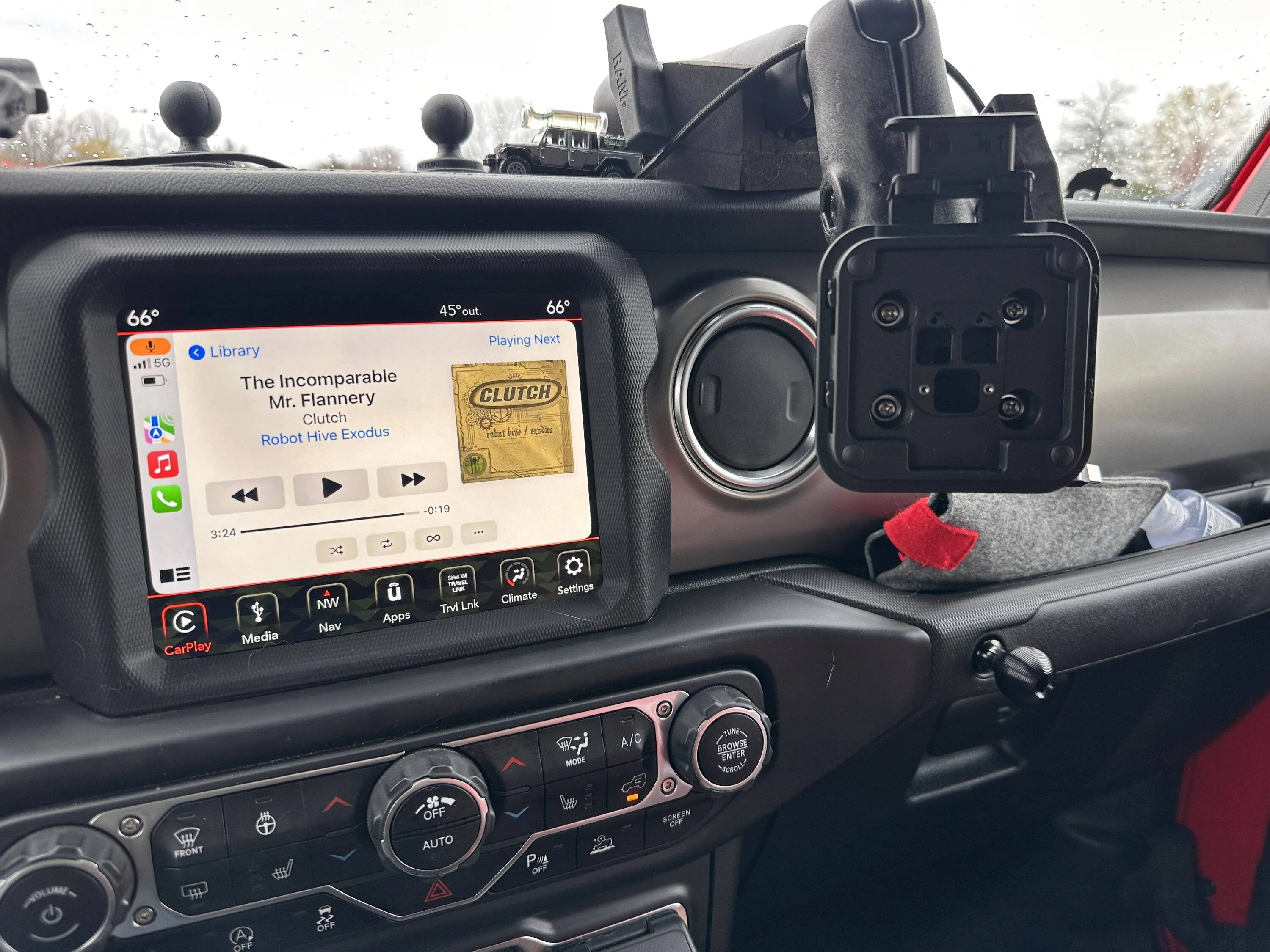
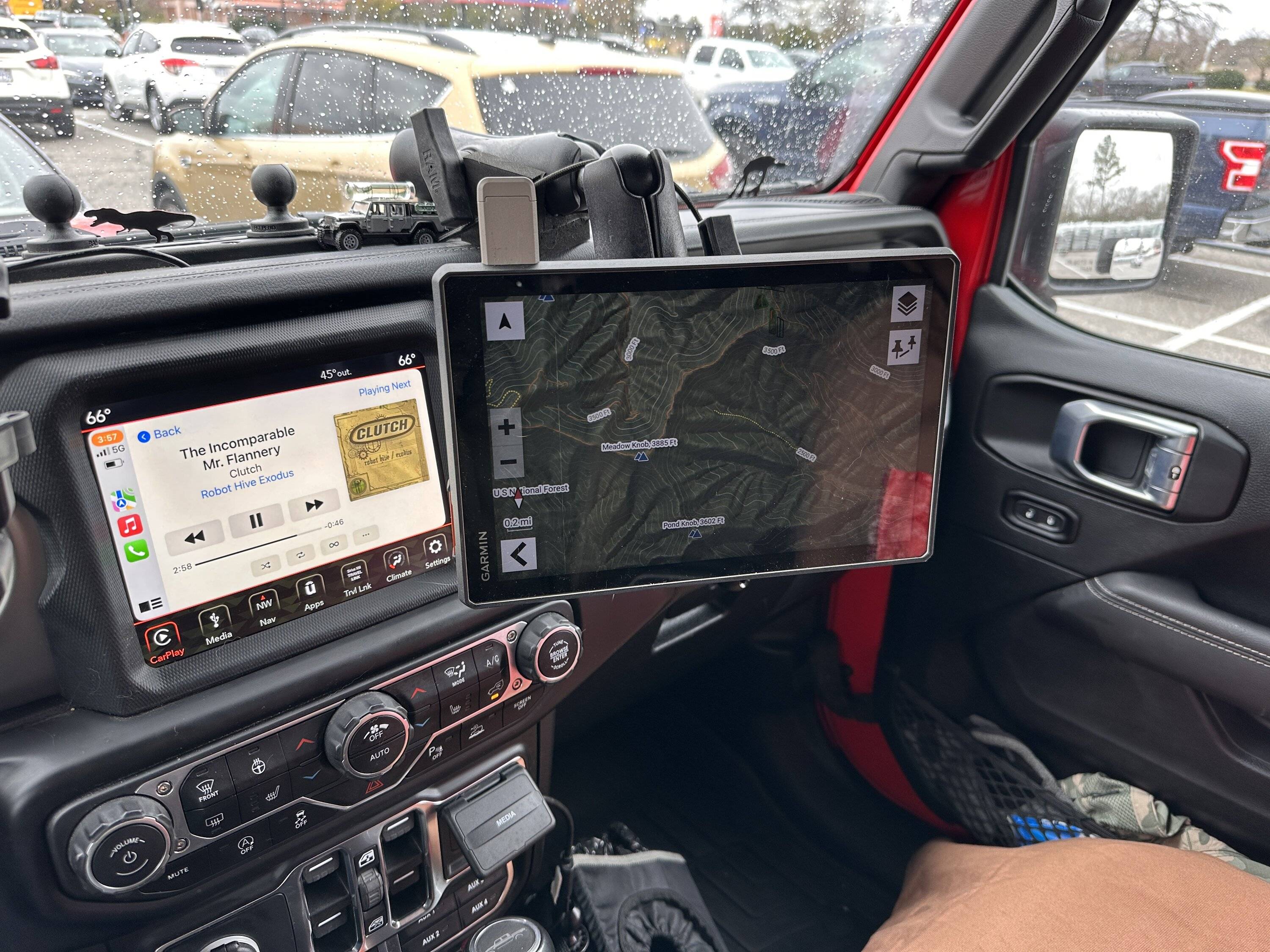
Pics:

Jeep Gladiator Garmin Tread XL Overland Sideloading PSA IMG_0922

Jeep Gladiator Garmin Tread XL Overland Sideloading PSA IMG_0920

Mine’s mounted to a Ram Mounts Tough Track using the “C” size 1 1/2 ball with 2 double socket arms and a double ball adapter. I did it this way so the unit won’t obscure the view out of the windshield. The mount is moved as far to the drivers side as possible without starting to cover up the Uconnect. It’s over far enough that if the passenger airbag should deploy at most it will gently push the Garmin to the side where it will blow a rectangular hole through my torso. There’s a piece of high density foam under the horizontal socket arm to reduce bouncing. It works pretty well but I find all the Ram stuff to be bouncy. I’m not sure if it’s more so than other manufacturers. But my OCD demands close to zero shaking.
 
Last edited:

Sponsored

HooliganActual

Well-Known Member
First Name
Robert
Joined
Jun 27, 2020
Threads
9
Messages
1,410
Reaction score
3,601
Location
10 miles from the Sun
Vehicle(s)
2020 Gladiator Rubicon
Occupation
Retired
One question I have is now are you mounting it in your Gladiators? Pictures would be great.
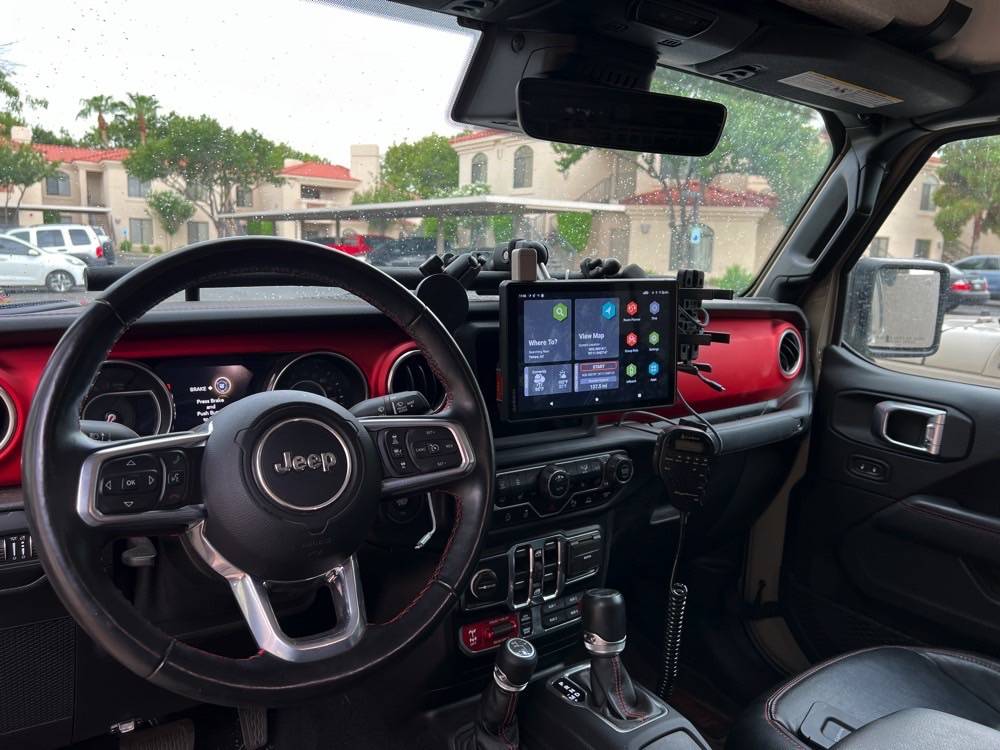
I have a Vector dock mounted on my dash for all my mounting needs. The Tread comes with a mount/power adapter base that has the larger RAM ball on it (B I think). I bought a RAM arm and U-clamp mount to affix the whole thing to the Vector Dock bar. I also went to the effort to run the power cable through the top of the dash and down through the dash to tie into the switched wire in the Aux Switch bundle in the passenger footwell. This ensures my Tread is powered while in use. Another thing I played around with was getting a RAM arm combination that allows me a lot of freedom to have it hanging where it suits me for the driving condition:
Jeep Gladiator Garmin Tread XL Overland Sideloading PSA 03_DashAccessories_1


In this picture it is in “street position” so that I don’t get hassled by law enforcement with regards to it blocking my field of view. Typically, in this configuration I don’t find that blocking the Uconnect screen is problematic because there’s nothing there that I tend to look at, except maybe the backup camera. When I’m offroad, I can raise it up in order to see the Uconnect screen for Off-road Pages, Trail Cam, etc. It also doesn’t bounce as much in that config either.

If you are interested, I can take other pictures if necessary.
 

bd100

Well-Known Member
Joined
May 31, 2022
Threads
28
Messages
759
Reaction score
744
Location
USA Midwest
Vehicle(s)
JT, WK2, ole' Ram
I have an RV series Garmin with built-in databases for KOA, public campgrounds, ioverlander, plan RV services, foursquare, trip advisor. Very useful, even when without cell signal ( Navaho nation, parts of Pennsylvania, etc. ) Unfortunately doesn't talk to the InReach.

Ours is mounted just barely above the radio display. It does not rise high enough to block my view past the hood. Rail system with the arm resting on the top of the dash so it's quite stable, along with the GMRS microphone, and the InReach when on a big trip.
 

bd100

Well-Known Member
Joined
May 31, 2022
Threads
28
Messages
759
Reaction score
744
Location
USA Midwest
Vehicle(s)
JT, WK2, ole' Ram
By the way one thing about Garmin is their older units use a cable which listens to the traffic info via broadcast radio signals around major cities, but the newer ones require a cell signal and a connection to your phone's app. And my phone doesn't run the app. So I keep the older one.
 
OP
OP
Wolf Island Diver

Wolf Island Diver

Well-Known Member
Joined
Apr 14, 2021
Threads
26
Messages
1,130
Reaction score
2,477
Location
Virginia
Vehicle(s)
2021 JT Rubicon EcoDiesel
Occupation
Software Engineer
I’ve been reluctant to update the Tread assuming that, in typical fashion, the devs would close the APK loophole. Googling for some info on the latest firmware, for which Garmin appears to not put out release notes (never a good sign), I came a across an official Garmin article stating that sideloading was possible but that they don’t offer support for sideloaded apps. This is as close to tacit support for users doing what they want as I could find. So assuming they weren’t patching this capability out of the unit, I pulled the trigger on the update and I’m happy to report it had zero effect on my existing sideloaded apps. This makes sense considering that sideloading isn’t rooting. Garmin’s own software is just Android apps and they apply a semi-custom shell over what’s basically just a tablet.

Even better I was able to get Windy, Marine Traffic and Navionics working. Navionics won’t download maps with only the trial active unlike the phone app, but $50 and it should work. I had asked the Garmin booth guys at both Overland Expo East and the Annapolis Sailboat Show whether the Tread XL supported their chart plotters. None of them had a clue. This will save me about $2000 for a comparably sized Garmin chart plotter for my sailboats. Obviously this doesn’t replace a full multifunction display system with AIS, etc. But for what I do in the Chesapeake Bay, it will be perfect.

This unit is turning into a smarter purchase the longer I have it.
 

smlobx

Well-Known Member
First Name
Eddie
Joined
Jun 28, 2018
Threads
87
Messages
2,657
Reaction score
4,543
Location
Mid Atlantic
Vehicle(s)
JTR, F-350 diesel, Porsche Spyder, Model Y
Occupation
Semi retired consultant
Hi guys!
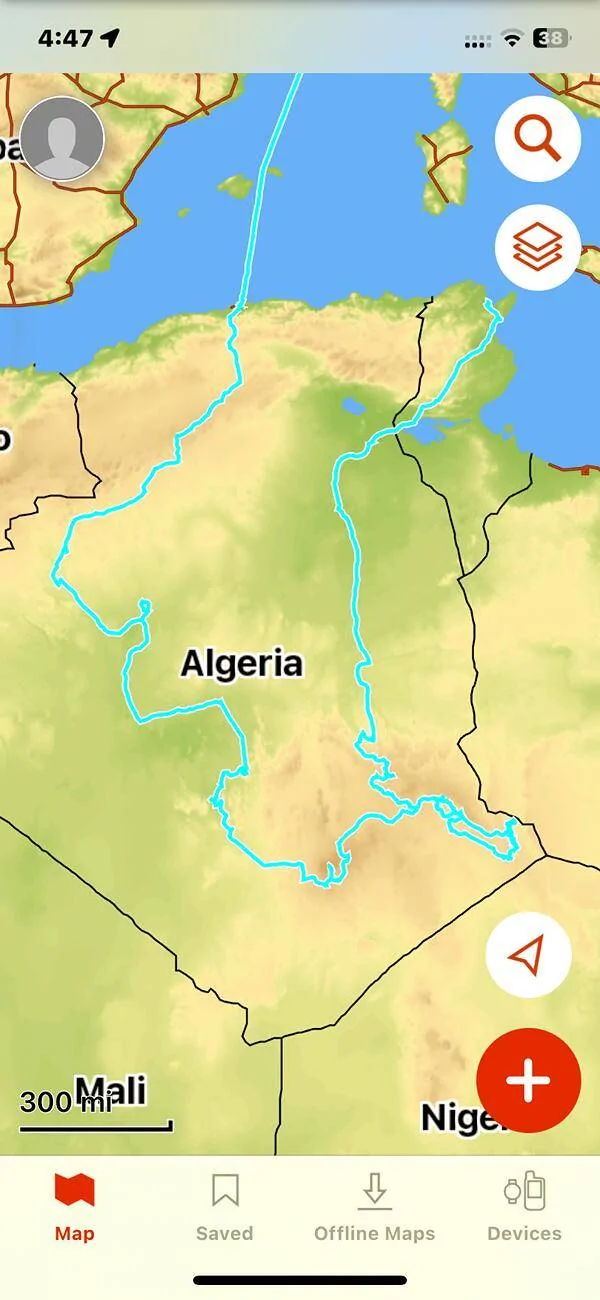
Just an update to this thread. I ended up getting an Overlander and have spent the last year getting used to it in the US as a primer for the big trip I just finished circumnavigating the Sahara Desert!
We had crazy weather with highs over 50 degrees C (over 120F).
Those using iPad devices saw them crash in the heat but the Overlander and inReach Mini never missed a beat!
Here was our track taken over 40 days!
Jeep Gladiator Garmin Tread XL Overland Sideloading PSA IMG_8083
Sponsored


Top