Sponsored

How to connect and use Jscan. And the parts you need to use it.

tysongladiator

Well-Known Member
First Name
Tyson
Joined
Jun 8, 2019
Threads
48
Messages
981
Reaction score
1,288
Location
Florida
Vehicle(s)
Jeep Gladiator, Jeep Wrangler
Occupation
Learner
Vehicle Showcase
1
I made a video almost 2yrs ago on using Jscan. I know there are a lot of videos out there on it but, I still see the questions arising asking about calibrating for tire size changes and regearing. So, I figured it was time for an update. In this video, I showed the parts needed for Jscan, how to connect, and how to use it. It's inexpensive and I use it on three different chrysler vehicles. Definitely worth the money and it doesn't have to stay married to the vehicle. I also have links to the parts.

Sponsored
 

HorsesRear

Well-Known Member
First Name
Vern
Joined
Feb 28, 2024
Threads
4
Messages
460
Reaction score
602
Location
Clever Missouri
Vehicle(s)
2023 Jeep Gladiator Willys
Occupation
Retired
I made a video almost 2yrs ago on using Jscan. I know there are a lot of videos out there on it but, I still see the questions arising asking about calibrating for tire size changes and regearing. So, I figured it was time for an update. In this video, I showed the parts needed for Jscan, how to connect, and how to use it. It's inexpensive and I use it on three different chrysler vehicles. Definitely worth the money and it doesn't have to stay married to the vehicle. I also have links to the parts.

I know that this is a very old posting but I have a question. It is a great informative video and you did an outstanding job. My question is after you connect all the cables up and make your changes on the app what do you do when you are done. Do you just unhook everything and put the cables back to the original connections on the Jeep. That's the only part I do not understand. Once again great video and I have it saved to my favorites.
 

wildtaco

Well-Known Member
First Name
Karol
Joined
Jan 4, 2023
Threads
13
Messages
446
Reaction score
760
Location
CT
Website
www.instagram.com
Vehicle(s)
23’ Diesel Rubicon Sarge Green
Build Thread
Link
Occupation
Engineer
I know that this is a very old posting but I have a question. It is a great informative video and you did an outstanding job. My question is after you connect all the cables up and make your changes on the app what do you do when you are done. Do you just unhook everything and put the cables back to the original connections on the Jeep. That's the only part I do not understand. Once again great video and I have it saved to my favorites.
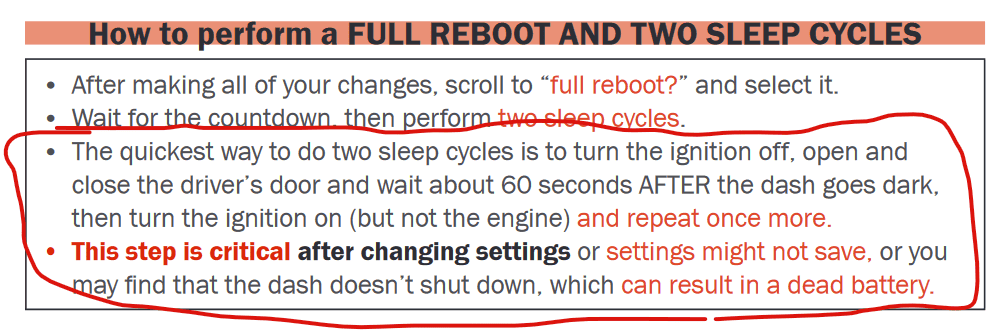
Yes, unhook your adapter cable and reconnect the original cables. Also make sure to do the sleep cycles once you're done! These instructions are from the Tazer, but the sleep cycles are still applicable.

Jeep Gladiator How to connect and use Jscan. And the parts you need to use it. 1724332679910-fo
 

HorsesRear

Well-Known Member
First Name
Vern
Joined
Feb 28, 2024
Threads
4
Messages
460
Reaction score
602
Location
Clever Missouri
Vehicle(s)
2023 Jeep Gladiator Willys
Occupation
Retired
Yes, unhook your adapter cable and reconnect the original cables. Also make sure to do the sleep cycles once you're done! These instructions are from the Tazer, but the sleep cycles are still applicable.

1724332679910-fo.png
Thank you very much.
 
OP
OP
tysongladiator

tysongladiator

Well-Known Member
First Name
Tyson
Joined
Jun 8, 2019
Threads
48
Messages
981
Reaction score
1,288
Location
Florida
Vehicle(s)
Jeep Gladiator, Jeep Wrangler
Occupation
Learner
Vehicle Showcase
1
Thank you very much.
@wildtaco gave you the correct answer. But.... keep in mind that when you use jscan, because some of the changes are different, the way you close out the session may be different. For some of the changes, it will tell you what to do. And if it says you are done, that's usually all that's required.

And once it tells you done or the sleep cycles if that's what's required for the particular change, you can just exit the app. It will ask you if you want to disconnect. Click yes and after the app exits, you can disconnect everything.

One more thing about jscan. Once you open the app and select your vehicle, it will go to the screen where you connect to your adapter. At the top of the screen is a demo. You can actually go there and get into a few things without having to have it connected to your vehicle.
Sponsored


Top