PyrPatriot
Well-Known Member
- Joined
- Oct 27, 2019
- Threads
- 193
- Messages
- 2,668
- Reaction score
- 1,875
- Location
- Kentucky, USA
- Vehicle(s)
- JT Sport S Max Tow; Honda Element
- Thread starter
- #1
I am a huge fan of OEM specifications and instructions. I got interested in mechanics and actually working with my hands in my late 20s (early 30s now). So I went to look for the Factory Service Manual (FSM) from FCA. Everything is digital now, and that's fine. However, I much prefer paper backups. After buying the JL FSM a few months back, the JT finally came out and I decided to print it. I have not gone through all of it, and you'll see why. Hell, I haven't even finished printing all of it, and you'll see why.
First, I love the FSM. It has given me almost every bit of information I have needed in my endeavors to learn about my JT. What it leaves out is parts numbers, which I have made a collection of numbers/descriptions/pictures as well. Is it the ideal combination of going to an instruction on how to replace something with hover-over to parts numbers/descriptions? No. The FSM does a little of that, but mostly with special tools needed.
What I don't like:
The FSM deliveres 4 types of information:
The information is of 3 types:
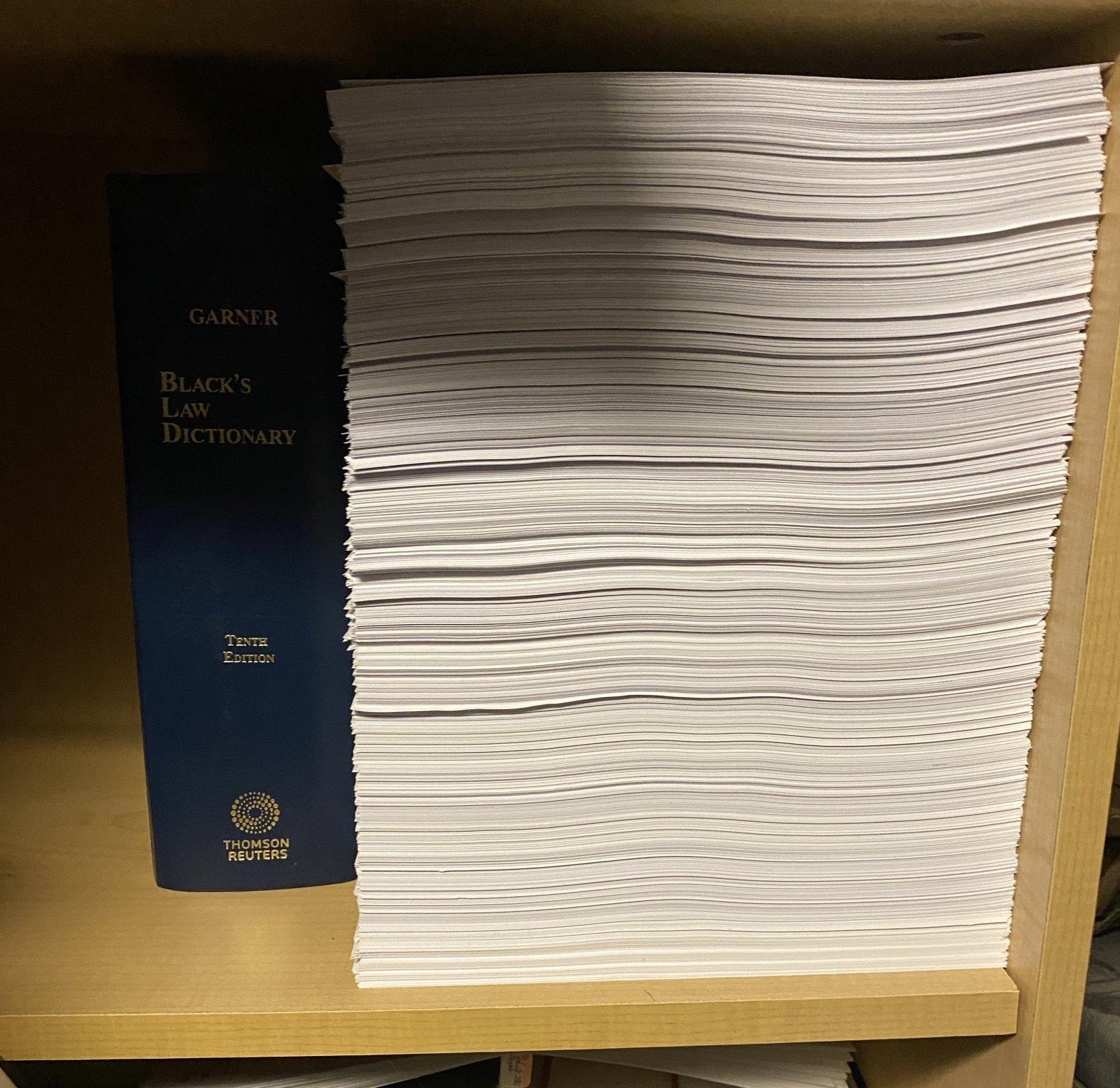
The picture below is everything less the DTC-Based Diagnostics and Non-DTC Based Diagnostics. The shelf is tall enough to fit a 3" binder upright.
I estimated the number of pages left with the Diagnostics sections from my experience of how much scroll-bar space equated to how many pages, counted up the sections, and I stopped at 1200 sections/codes. They were mostly 10-page sections, so at least 12000 pages. I only got through half the DTC-Based Diagnostics chapters and would estimate I had another 500 sections, so the total remaining pages to print after the above is about 15,000. Now, don't get me wrong. The instructions/information for those codes is VERY thorough. 10-pages per code in finding what the problem is, the wiring, etc., is very useful information. But at $90/5000 pages in ink, and $8/800 sheets of quality paper, I'm looking at another $300 in ink at least and $150 in paper. Total for buying the USB drive and printing all the pages would be about $700
I still might print the DCT-Based Diagnostics sections. That's really where you start with problems.
Find the product here: https://www.techauthority.com/en-us/products/81-370-20083-SUSB
It is time-sensitive. That is, they continuously come out with different versions that have more and more info. Mine had an option to see stuff for the Diesel engine, but most of the interesting stuff, like the actual engine section, was missing. Selecting to see everything still had whole chapters missing, the count would go from 24 to 27 and the like. So as more info is deemed worthy of putting into the manual, different versions will be released. I suspect they make a limited number at a time. I bought a JL a while back, then the supply ran out and the website I got them from could not longer get them. I couldn't find them on TechAuthority's website either (went 3rd party to save on shipping - TA charges $15) but came across the JL manual a few weeks later tucked into the Cherokee section. The JT came out a couple weeks ago. Mine has a late-January date on it. So if you don't need to, or would rather use the subscription service, you can get more information as it becomes available later.

First, I love the FSM. It has given me almost every bit of information I have needed in my endeavors to learn about my JT. What it leaves out is parts numbers, which I have made a collection of numbers/descriptions/pictures as well. Is it the ideal combination of going to an instruction on how to replace something with hover-over to parts numbers/descriptions? No. The FSM does a little of that, but mostly with special tools needed.
What I don't like:
- You cannot access the files without the USB drive physically in the computer. You can copy/paste as many times as you want, but nothing opens without inserting the drive.
- You have to use Internet Explorer and Adobe Flash Player, and there is some initial difficulty in getting it to work on Windows 10. The software uses programs that Adobe stopped supporting in 2009.
- You cannot use any search feature
- You cannot copy anything
- Space is used very inefficiently. Often a photo will be on one side, accompanied by a little bit of text to the left of it. Vast swaths of white space in between photos/text and paragraphs is common.
The FSM deliveres 4 types of information:
- Technical Specifications - fluids, temperatures, pressures, voltages, and torque specs for EVERY single cable, nut, bolt, wire, and fluid container. In the form of tables in the accompanying section/part of pertinence. Bolt torque specs alone make the purchase worth it.
- Photos/Digital-drawings of parts or x-rays of the entire truck. There is not a photo/picture of everything, but there are a lot. X-ray diagrams showing you where stuff is, like the GPS transponder and the WiFi antenna alone make this purchase worth it. I am surprised where some things are located, some where you expect, and others actually being multi-part modules throughout the truck.
- Video instruction on general matters like how to splice wires, voltage test, etc.
- DTC codes - the error codes. Their own section.
The information is of 3 types:
- diagnosis
- removal, and
- installation.
The picture below is everything less the DTC-Based Diagnostics and Non-DTC Based Diagnostics. The shelf is tall enough to fit a 3" binder upright.
I estimated the number of pages left with the Diagnostics sections from my experience of how much scroll-bar space equated to how many pages, counted up the sections, and I stopped at 1200 sections/codes. They were mostly 10-page sections, so at least 12000 pages. I only got through half the DTC-Based Diagnostics chapters and would estimate I had another 500 sections, so the total remaining pages to print after the above is about 15,000. Now, don't get me wrong. The instructions/information for those codes is VERY thorough. 10-pages per code in finding what the problem is, the wiring, etc., is very useful information. But at $90/5000 pages in ink, and $8/800 sheets of quality paper, I'm looking at another $300 in ink at least and $150 in paper. Total for buying the USB drive and printing all the pages would be about $700
I still might print the DCT-Based Diagnostics sections. That's really where you start with problems.
Find the product here: https://www.techauthority.com/en-us/products/81-370-20083-SUSB
It is time-sensitive. That is, they continuously come out with different versions that have more and more info. Mine had an option to see stuff for the Diesel engine, but most of the interesting stuff, like the actual engine section, was missing. Selecting to see everything still had whole chapters missing, the count would go from 24 to 27 and the like. So as more info is deemed worthy of putting into the manual, different versions will be released. I suspect they make a limited number at a time. I bought a JL a while back, then the supply ran out and the website I got them from could not longer get them. I couldn't find them on TechAuthority's website either (went 3rd party to save on shipping - TA charges $15) but came across the JL manual a few weeks later tucked into the Cherokee section. The JT came out a couple weeks ago. Mine has a late-January date on it. So if you don't need to, or would rather use the subscription service, you can get more information as it becomes available later.
Sponsored