Sponsored

CarPlay Dead?

Wolf Island Diver

Well-Known Member
Joined
Apr 14, 2021
Threads
26
Messages
1,119
Reaction score
2,461
Location
Virginia
Vehicle(s)
2021 JT Rubicon EcoDiesel
Occupation
Software Engineer
Today my CarPlay died. At least I think it did. I’m curious if anyone’s seen this issue. It’s been working fine. I stopped to get gas and when I started the truck back up, it wouldn’t work.

I have a wireless Carplay2Air dongle that’s worked more or less flawlessly for 2 years. When upon starting, it didn’t come up, of course I assumed that it was dead. So I tried unplugging it, restarting the truck, letting the system reboot, etc. Assuming it truly had died, I went directly into the Uconnect via usb with my iPhone 14 Pro Max pos. No dice. I tried multiple cables, multiple ports. Nothing. Both devices, the phone itself and the dongle appear as CarPlay devices to the Uconnect so essentially it’s not recognizing USB CarPlay devices at all. Because the dongle isn’t tied to iOS versions and it doesn’t work, I don’t think this is an iOS 17 issue. Also the updated CarPlay has worked really well until today and it looks a lot better than before.

I tried doing a factory reset on the radio. Interestingly enough, this doesn’t actually do anything at all. When you click the final “OK” on the reset it either closes the screen or nothing. It’s hard to explain, but it’s as if the modal closes without the reset starting. Like the button is unresponsive. It does sometimes pop up a modal indicating the radio was reset. But it’s not. Nothing has changed.

I’ve also noticed that the off road pages mostly don’t load lately and just crash or the menu button for them disappears. This has happened a few times lately. I’ve always had issues with the menu button placement resetting for Uconnect and other UI bugs over the last 2 years.

The projection manager in Uconnect also doesn’t seem to work right. I can actually see my phone appear in its menu and it goes from greyed out to active when I plug in my phone as if it does recognize the CarPlay device but CarPlay doesn’t work and the menu entry for the phone in projection managdoesn’t seem to work.

I unplugged the phone and tried using the built in navigation. Interestingly when trying to start my route I get another modal popup that asks me if I want to cancel my current CarPlay navigation despite nothing being connected.

All of this happened while really needing my navigation with traffic updates due to the delightful combo of Friday Hampton Roads rush hour traffic crossing bridge tunnels during a tropical storm.

So I took it to the dealership explained everything and one of their managers was able to reproduce the inability to factory reset the unit. I’m taking it back on Wednesday as my B-to-B warranty is about 1500 miles from expiration. They told me that UConnect isn’t really even Stellantis. The dealerships have to deal with the vender directly. They’ll likely just replace the head unit although it will most likely be a refurbished one. They recommended I do it since the warranty is almost up and then the $1500 or whatever it is to replace the junk is on me.

Anyone else have CarPlay just seem to go away like this?
Sponsored
 

Dm55555

Member
First Name
David
Joined
Sep 5, 2023
Threads
2
Messages
8
Reaction score
7
Location
Northwest NJ
Vehicle(s)
2023 Jeep Gladiator, 2021 Jeep Grand Cherokee L
This has not happened on my gladiator yet, but happens all the time on my Grand Cherokee L - like every other day. Stupid question, have you tried restarting your iPhone? I have not had any issues either updating iOS 17.0 and have been using it on CarPlay throughout the beta versions as well.

restarting my iPhone on my GCL is the only thing that fixes it on that one.
 

RubiNewbCB

Well-Known Member
First Name
Chris
Joined
Jun 1, 2022
Threads
19
Messages
1,041
Reaction score
1,344
Location
757, Coastal VA from the 810 Thumb of the Big Ol'
Vehicle(s)
22 JTRD, 21JGCL, 07 Mustang GT, 05 Chebby Hoe, 90 Fox body stroked and poked393W
Occupation
USN NSW Seabee (1994-2021Ret.) / Current status DoD PMC
My wife's 2021 GCL Limited had the whole unit BRICK at less than 12k miles. Your Unit is probably about to brick.
 
OP
OP
Wolf Island Diver

Wolf Island Diver

Well-Known Member
Joined
Apr 14, 2021
Threads
26
Messages
1,119
Reaction score
2,461
Location
Virginia
Vehicle(s)
2021 JT Rubicon EcoDiesel
Occupation
Software Engineer
This has not happened on my gladiator yet, but happens all the time on my Grand Cherokee L - like every other day. Stupid question, have you tried restarting your iPhone? I have not had any issues either updating iOS 17.0 and have been using it on CarPlay throughout the beta versions as well.

restarting my iPhone on my GCL is the only thing that fixes it on that one.
Short answer is yes, I did a hard reset. I usually assume iOS is the issue. Also I’ve had almost every model iPhone since the 3g with maybe the exception of the 8 or whatever came out with the X. I got the X. Anyway, the 14 is the worst phone yet. A total pos. Nothing but issues. So I’m always ready to assume it’s the issue.

iOS 16.x had tons of CarPlay issues. I’ve had the weird bug where the phone would prompt me to “Finish setting up CarPlay.” One of the later updates killed CarPlay completely and a subsequent update brought it back. Also WiFi now seems to interfere with wireless CarPlay at times.

Here’s the thing. The wireless dongle will connect and be recognized by Uconnect without an iPhone. You pair the dongle with Uconnect. Then you pair the phone with the dongle. Uconnect doesn’t recognize the dongle or the iPhone. Well, that’s not totally true. Projection manager recognizes both. The CarPlay itself (the screen, or the menu item) never come up with either the dongle or the phone on any USB port even though they show up in projection manager. I even deleted and readded them to PM and no dice.

So iOS is always a good assumption as the culprit but I think in this case I can’t blame the rotten fruit people.
 

OffAxis2021

Well-Known Member
Joined
Dec 31, 2021
Threads
3
Messages
330
Reaction score
768
Location
S.E. Michigan USA
Vehicle(s)
2022 Jeep Gladiator Mojave. First Jeep.
A “hard reset” is taking a phone back to its original form, as in when purchased new.

A “soft rest” is the quick press of the volume up/down buttons and then immediately push/hold power button until the apple appears on screen.

You actually did a “hard reset?”

I just got a brand new CarlinKit 5.0 2 air today and I posted a pairing question just a little while ago in another thread.

https://www.jeepgladiatorforum.com/forum/threads/wireless-carplay-adapter.72764/post-1193412
 

Sponsored

OP
OP
Wolf Island Diver

Wolf Island Diver

Well-Known Member
Joined
Apr 14, 2021
Threads
26
Messages
1,119
Reaction score
2,461
Location
Virginia
Vehicle(s)
2021 JT Rubicon EcoDiesel
Occupation
Software Engineer
A “hard reset” is taking a phone back to its original form, as in when purchased new.

A “soft rest” is the quick press of the volume up/down buttons and then immediately push/hold power button until the apple appears on screen.

You actually did a “hard reset?”

I just got a brand new CarlinKit 5.0 2 air today and I posted a pairing question just a little while ago in another thread.

https://www.jeepgladiatorforum.com/forum/threads/wireless-carplay-adapter.72764/post-1193412
Sorry, not a hard reset. I did what Apple calls a force restart which usually clears issues, the steps of which you describe above. But this is moot anyway as I explained. The Uconnect doesn’t recognize any CarPlay compatible device. It also won’t reset to factory settings which the dealership confirmed means that there’s something wrong with the unit itself.
 

sharpsicle

Well-Known Member
Joined
Apr 29, 2021
Threads
22
Messages
2,765
Reaction score
6,255
Location
Tampa, FL / Milwaukee, WI
Vehicle(s)
2020 Gladiator Overland, 2002 VTX1800
You have two questionable devices in this equation. You need to rule one out. So either use your phone on a UConnect that you know works just fine, or use a different phone that you know works fine on your system. See which does what. That will narrow down where the communication breakdown is.

Although if the dealership is already talking replacement of your radio, it's all really a moot point anyway, isn't it?
 
OP
OP
Wolf Island Diver

Wolf Island Diver

Well-Known Member
Joined
Apr 14, 2021
Threads
26
Messages
1,119
Reaction score
2,461
Location
Virginia
Vehicle(s)
2021 JT Rubicon EcoDiesel
Occupation
Software Engineer
You have two questionable devices in this equation. You need to rule one out. So either use your phone on a UConnect that you know works just fine, or use a different phone that you know works fine on your system. See which does which. That will narrow down where the communication breakdown is.

Although if the dealership is already talking replacement of your radio, it's all a moot point anyway, isn't it?
This is a good point. However, the dongle isn’t questionable per se. It’s worked essentially flawlessly for 2 years. I only questioned it first because it makes sense to assume a device bought off of Amazon was broken or the usb cable connecting it had failed before Uconnect had failed. The quality engineering for Uconnect is unquestionably better than some unofficially supported random thing from China. However, I’ve never seen this specific problem with this dongle or any iPhone on a Uconnect. The iPhone is only questionable in the sense that this phone has had numerous issues unrelated to CarPlay and as an Apple developer myself I’ve witnessed a precipitous drop in their overall software quality. So I don’t put anything past Apple. My gut would always be that this is an iOS 17 issue.

As far as CarPlay issues Ive actually had, none of them have been of this nature. I’ve had the dongle connect to Uconnect and it’s page view come up but the iPhone then not connect to the dongle. I’ve had the iPhone’s CarPlay connect but audio not work. I’ve had the iPhone connect but CarPlay would freeze or have some other issue. I’ve never had the Uconnect simply not bring either the dongle’s or the phone’s CarPlay screen up.

I followed what I thought was a logical process given what I had to work with, to arrive at the Uconnect being the most likely issue. You’re correct that a more definitive test would be bringing in another phone, which I don’t currently have. I could also be wrong in this. It could always be a curious set of coincidences. But this also means that both the iPhone and the dongle failed at the same time since either normally connect to Uconnect and manifest a view on the screen independent of each other. Additionally, the fact that I can’t reset the Uconnect leads me to believe that it’s the issue. Also, some part of the CarPlay system appears to work. Uconnect recognizes CarPlay devices in projection manager. From a software engineering perspective it seems that something in Uconnect is preventing the CarPlay graphical screen/state/mode from starting despite recognizing CarPlay devises. This feels like a problem of the GUI or shell within Uconnect. And hive seen increasing issues with its UI as of late. The fact that built in navigation thinks CarPlay is currently navigating, the state it was in prior to shutting it off for fuel, leads me to believe that Uconnect is in some bad state that it can’t get out of despite restarts. One thing to test in addition to a different phone would be to disconnect the battery.

I don’t necessarily think the unit has a hardware problem. The service writer simply told me that they don’t fix Uconnect systems. They just replace them. She explained that there’s this big disconnect between Stellantis and vender of the units. The vender expects dealerships to perform software diagnostics on these units that dealerships are not able to do in terms of training or equipment. They simply order a new unit and Stellantis gets upset because the units are not being investigated. In this sense it is probably is moot, because they will most likely give me a “new unit”.

I created the thread because it might be nice for people to see this failure mode in case it happens to them, but also because I’m genuinely curious if something similar has happened to others, if it resulted in a new unit, etc. Also it was news to me that when a dealership replaces your Uconnect you don’t actually get a new unit. You get one that was pulled out of another vehicle and “refurbished”. This irks me in the same way Apple sometimes replaces defective iPhones, particularly under AppleCare or AIG with refurbished units.
 

Wildtoad

Well-Known Member
First Name
Thomas
Joined
Jun 26, 2023
Threads
4
Messages
215
Reaction score
262
Location
Blythewood
Vehicle(s)
2021 Gladiator Sport Willys
Occupation
Retired, former mainframe computer bit twiddler
Have you tried connecting your phone via Bluetooth and using maps on the phone with the audio playing through the car unit? Works well with mine.


Does everything work correctly between the iPhone and uconnect going thru Bluetooth? Music, phone, contacts?

My 14 works well and has since I got it. My wife’s 14 Plus crapped out and had to replace it. Thankful is was still under warranty. We bought the insurance just in case.
 
OP
OP
Wolf Island Diver

Wolf Island Diver

Well-Known Member
Joined
Apr 14, 2021
Threads
26
Messages
1,119
Reaction score
2,461
Location
Virginia
Vehicle(s)
2021 JT Rubicon EcoDiesel
Occupation
Software Engineer
Have you tried connecting your phone via Bluetooth and using maps on the phone with the audio playing through the car unit? Works well with mine.


Does everything work correctly between the iPhone and uconnect going thru Bluetooth? Music, phone, contacts?

My 14 works well and has since I got it. My wife’s 14 Plus crapped out and had to replace it. Thankful is was still under warranty. We bought the insurance just in case.
Bluetooth to the Uconnect works fine. CarPlay isn’t working. The Uconnect “projection manager” recognizes both the iPhone and the wireless CarPlay dongle. The Uconnect just won’t bring up the CarPlay display.

Personally I think the Uconnect built in navigation and phone system is awful. I only use the off road pages, cams, some of the climate (thank God it has knobs and buttons for this. Climate controls via touch screen should be illegal). I use CarPlay for everything else: music, navigation, traffic, etc.
 

Sponsored

Wildtoad

Well-Known Member
First Name
Thomas
Joined
Jun 26, 2023
Threads
4
Messages
215
Reaction score
262
Location
Blythewood
Vehicle(s)
2021 Gladiator Sport Willys
Occupation
Retired, former mainframe computer bit twiddler
I use CarPlay mostly but sometimes I have a short ride, phone in pocket, just let it connect by BT. Haven’t bought a BT dongle yet.
 
OP
OP
Wolf Island Diver

Wolf Island Diver

Well-Known Member
Joined
Apr 14, 2021
Threads
26
Messages
1,119
Reaction score
2,461
Location
Virginia
Vehicle(s)
2021 JT Rubicon EcoDiesel
Occupation
Software Engineer
I use CarPlay mostly but sometimes I have a short ride, phone in pocket, just let it connect by BT. Haven’t bought a BT dongle yet.
The nice thing about the wireless CarPlay dongle is that you don’t have to think about it. You just get in and go, your music starts right up. Navigation is there, etc. I have a wireless Qi charger built into the center console arm rest so I’m completely wireless. It’s really how the truck ought to come.
 

Vtur

Well-Known Member
First Name
Le
Joined
Mar 6, 2021
Threads
11
Messages
1,925
Reaction score
2,278
Location
Norcal
Vehicle(s)
JTOD
Occupation
Electrical Foreman
It's most likely the head unit if you had already tried all 3 usb ports via cable
 
OP
OP
Wolf Island Diver

Wolf Island Diver

Well-Known Member
Joined
Apr 14, 2021
Threads
26
Messages
1,119
Reaction score
2,461
Location
Virginia
Vehicle(s)
2021 JT Rubicon EcoDiesel
Occupation
Software Engineer
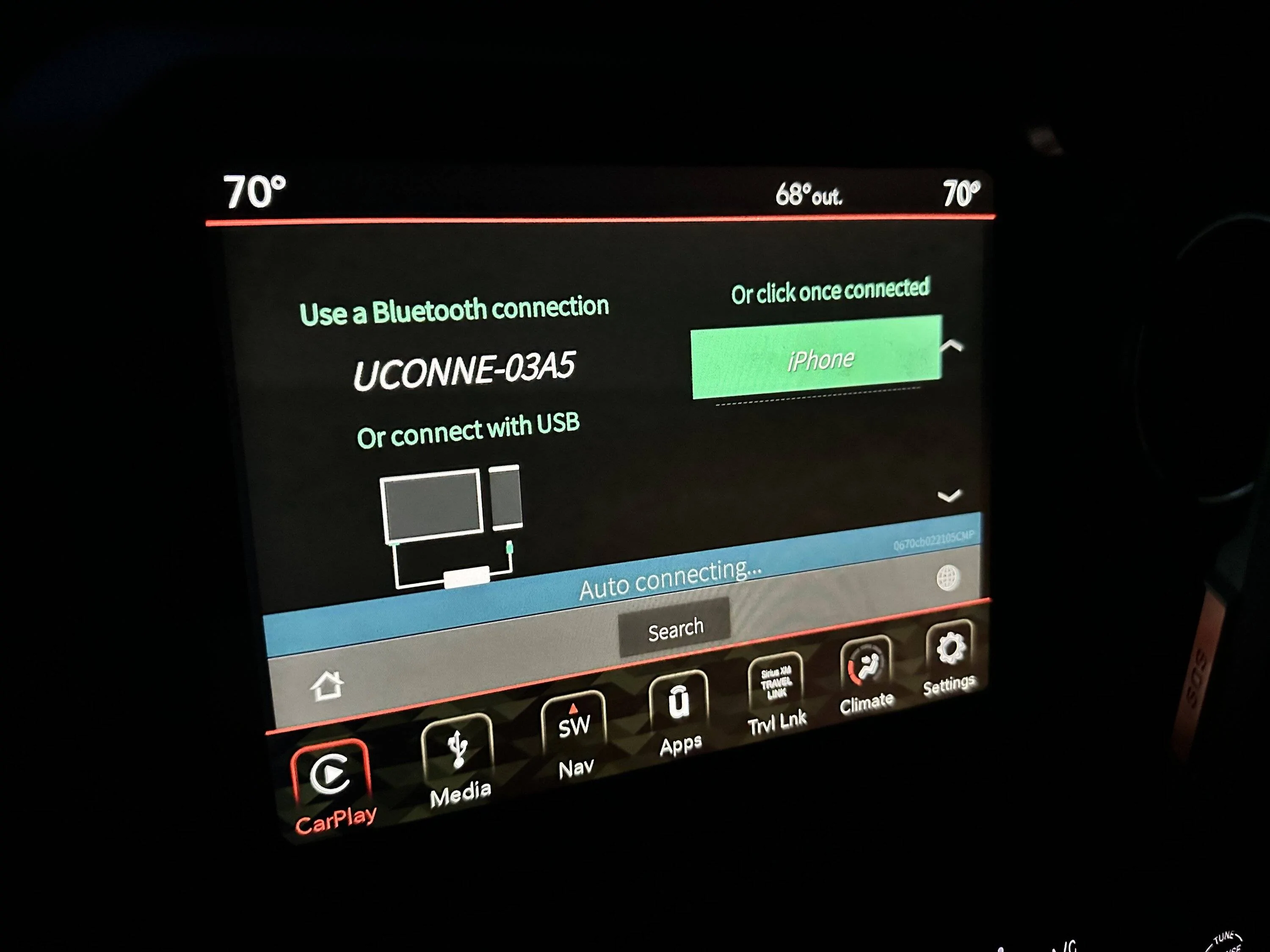
It’s alive!
Jeep Gladiator CarPlay Dead? IMG_2233

This is the screen from the wireless dongle. Started immediately when I started up the Jeep today. The “iPhone” entry on this screen isn’t actually connected because I deleted the CarPlay and Bluetooth instances from the phone while troubleshooting. So this screen comes up regardless of the presence of the phone and this wasn’t coming up before. I readded this dongle to Bluetooth on the phone and UCONNE-03A5 to the CarPlay portion of the phone.

My service writer told me even if this started working to bring it in anyway. They can pull codes from Uconnect and if needs to be replaced to do it now before the warranty is up in a few thousand miles.
 

djthumper

Well-Known Member
First Name
Larry
Joined
Oct 5, 2021
Threads
1
Messages
528
Reaction score
420
Location
North Las Vegas, NV
Vehicle(s)
21 JT Sport S Eco Diesel, 18 JLU Sport S
Occupation
I.T.
I had a similar issue with mine about a week ago and did a hard reset on the head unit by pulling the fuse under the hood. No problems since.
Sponsored


Top