Sponsored

ecidiego

Well-Known Member
First Name
Chris
Joined
Nov 3, 2021
Threads
62
Messages
3,625
Reaction score
5,580
Location
San Diego
Vehicle(s)
2021 Gladiator Mojave
Occupation
IT
I dont actually have a blue screen I cant press the front camera Button it does nothing. In the off road pages when I click on the front camera it makes a sound and does nothing. Amazon just delivered an ECRI security bypass module. Going to try that now and see if it changes anything
I have a video from when mine didn't work ( wrong CVPM installed in this video ):


I recalled incorrectly. I had the blue screen when I was too impatient for the changes to take effect. Watch that and try to activate the trailcam while in reverse. If yours is behaving like mine, you have the wrong CVPM.


Post the part # of the CVPM you ordered. If it's right, it's possible they sent you the wrong one ( 2020 ). They look identical. Hopefully you didn't put the truck back together. I kept my interior out until all tested good.
Sponsored
 

nickd

Well-Known Member
First Name
Nick
Joined
Apr 26, 2022
Threads
4
Messages
124
Reaction score
129
Location
Alpharetta, GA
Vehicle(s)
2022 Rubicon Bright White
So I am an idiot and I didnt realize I had to read the system status each time before viewing the log. It turns out the log I was viewing was from 2 days ago thats why it showed the updates as pending.
It turns out the changes I made with AlfaOBD did get implemented into the BCM see the new log here:
 

nickd

Well-Known Member
First Name
Nick
Joined
Apr 26, 2022
Threads
4
Messages
124
Reaction score
129
Location
Alpharetta, GA
Vehicle(s)
2022 Rubicon Bright White
Watch the video i linked
[/Q
something similar is happening for me. Uploading video now. However the camera doesn't work at all

I double checked the part number it is correct for a 2022

Jeep Gladiator HOW TO: Add Factory Front Trail Camera to Gladiator (DIY Writeup) IMG_1523
 

ecidiego

Well-Known Member
First Name
Chris
Joined
Nov 3, 2021
Threads
62
Messages
3,625
Reaction score
5,580
Location
San Diego
Vehicle(s)
2021 Gladiator Mojave
Occupation
IT
So I am an idiot and I didnt realize I had to read the system status each time before viewing the log. It turns out the log I was viewing was from 2 days ago thats why it showed the updates as pending.
It turns out the changes I made with AlfaOBD did get implemented into the BCM see the new log here:
Jeep Gladiator HOW TO: Add Factory Front Trail Camera to Gladiator (DIY Writeup) 1686681915727


you need to make the file public
 

Sponsored

nickd

Well-Known Member
First Name
Nick
Joined
Apr 26, 2022
Threads
4
Messages
124
Reaction score
129
Location
Alpharetta, GA
Vehicle(s)
2022 Rubicon Bright White
Fixed... made it public. Here is a video of what is happening


ecidiego

Well-Known Member
First Name
Chris
Joined
Nov 3, 2021
Threads
62
Messages
3,625
Reaction score
5,580
Location
San Diego
Vehicle(s)
2021 Gladiator Mojave
Occupation
IT
Fixed... made it public. Here is a video of what is happening

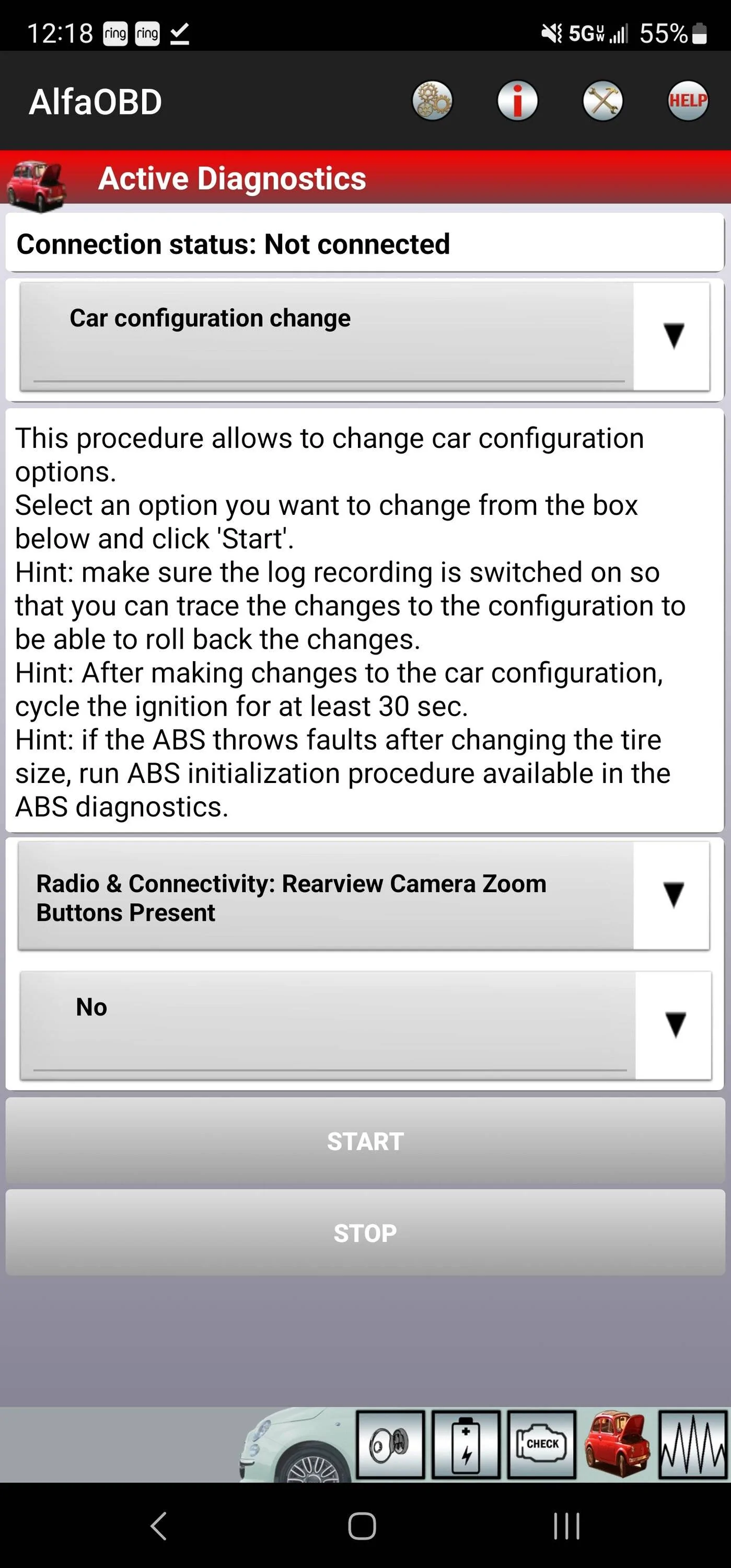
This is your Zoom button problem:

Jeep Gladiator HOW TO: Add Factory Front Trail Camera to Gladiator (DIY Writeup) Screenshot_20230613_121857_AlfaOBD


Set that to no. Your truck came with tow package it looks like. CVPM sends its own Zoom button. You need to turn off the tow package one.
 

nickd

Well-Known Member
First Name
Nick
Joined
Apr 26, 2022
Threads
4
Messages
124
Reaction score
129
Location
Alpharetta, GA
Vehicle(s)
2022 Rubicon Bright White
On the CVPM I am supposed to connect to the Front for the front camera and rear for the backup camera correct?
 

ecidiego

Well-Known Member
First Name
Chris
Joined
Nov 3, 2021
Threads
62
Messages
3,625
Reaction score
5,580
Location
San Diego
Vehicle(s)
2021 Gladiator Mojave
Occupation
IT
On the CVPM I am supposed to connect to the Front for the front camera and rear for the backup camera correct?
Do you have a pic? If you didn't button it up yet, check the part # on it.
 

nickd

Well-Known Member
First Name
Nick
Joined
Apr 26, 2022
Threads
4
Messages
124
Reaction score
129
Location
Alpharetta, GA
Vehicle(s)
2022 Rubicon Bright White
Do you have a pic? If you didn't button it up yet, check the part # on it.
I needed the backseats and I was confident that I wired the CVPM correctly since the backup camera was working. Also I was sure it was an AlfaOBD issue.
So long story short I put everything back together.

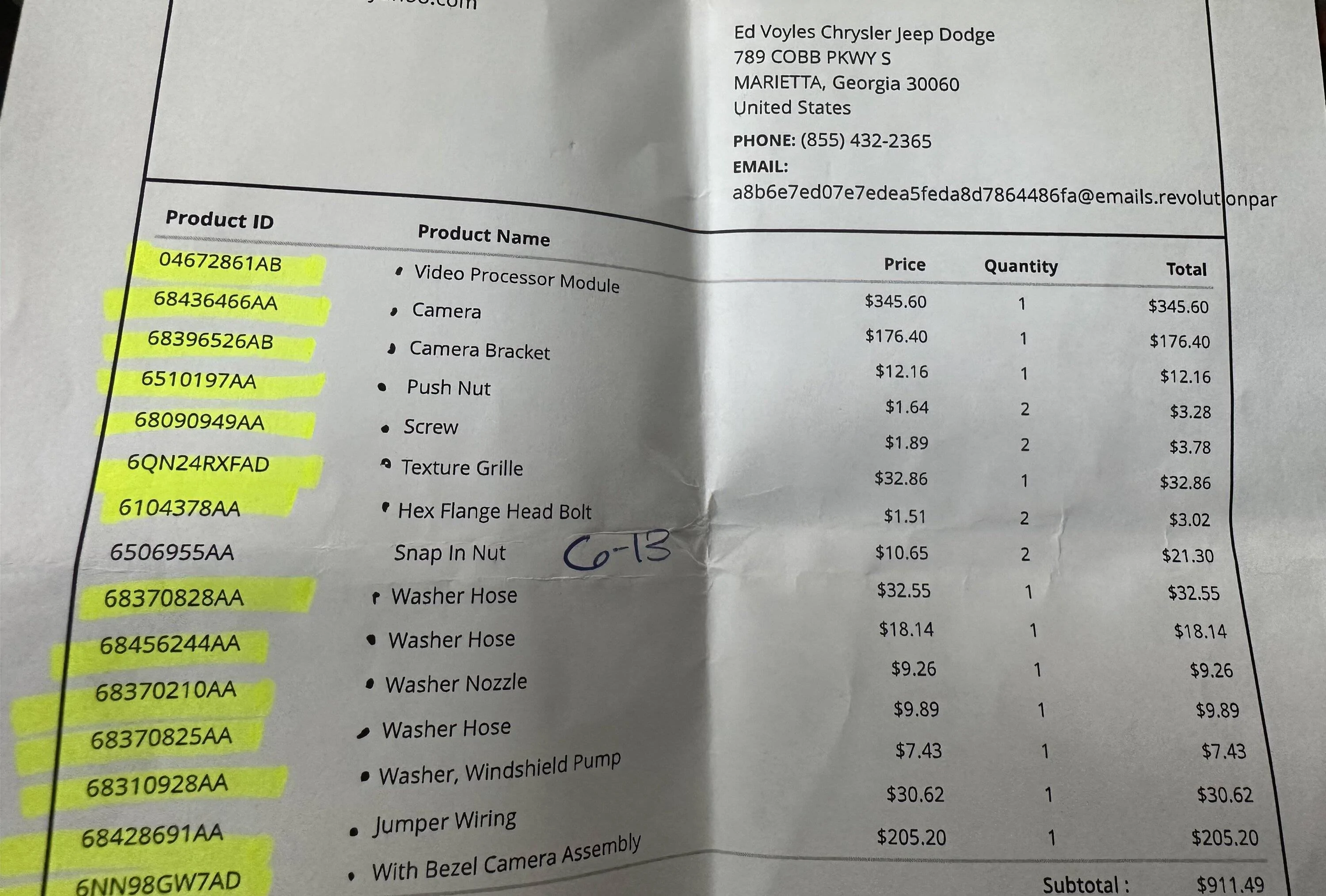
However, that being said the first thing I did when I got to the dealership to pick up the parts was check the part numbers against your list. So I am confident I have the correct part.
 

Sponsored

ecidiego

Well-Known Member
First Name
Chris
Joined
Nov 3, 2021
Threads
62
Messages
3,625
Reaction score
5,580
Location
San Diego
Vehicle(s)
2021 Gladiator Mojave
Occupation
IT
Fixed... made it public. Here is a video of what is happening

@Jimmy07 you got a take on this one? It isn't acting like mine did with the 2020 CVPM... I could at least activate my front camera while in reverse.
 

nickd

Well-Known Member
First Name
Nick
Joined
Apr 26, 2022
Threads
4
Messages
124
Reaction score
129
Location
Alpharetta, GA
Vehicle(s)
2022 Rubicon Bright White
I did some debugging, I swapped the cameras around and I am confident the cameras are working. All indications point towards the CVPM. Is there a different CVPM for 2022?
 

ecidiego

Well-Known Member
First Name
Chris
Joined
Nov 3, 2021
Threads
62
Messages
3,625
Reaction score
5,580
Location
San Diego
Vehicle(s)
2021 Gladiator Mojave
Occupation
IT
I did some debugging, I swapped the cameras around and I am confident the cameras are working. All indications point towards the CVPM. Is there a different CVPM for 2022?
https://www.bamwholesaleparts.com/o...yJnk9MjAyMiZ0PXJ1Ymljb24mZT0zLTZsLXY2LWdhcw==

Every parts house shows 2021/22 as being the same.

Try and get a VIN from someone with a 2022 and factory trailcam. Call a dealer with that VIN and say you need the CVPM, and what is the part #. Or just ask the person to do that for you.
 

nickd

Well-Known Member
First Name
Nick
Joined
Apr 26, 2022
Threads
4
Messages
124
Reaction score
129
Location
Alpharetta, GA
Vehicle(s)
2022 Rubicon Bright White
Also there are 2 can bus connection points on the back panel. I choose to connect to the one on the drivers side. I figured it didn't matter which CAN bus connection point I choose.

I also made my own CAN bus connector using the parts listed in Jimmy's first post.

The CAN bus has to be working correctly otherwise the backup camera wouldnt be working right?


Top