Sponsored
OP
OP
DailyDrivenTJ

DailyDrivenTJ

Well-Known Member
First Name
Michael
Joined
Nov 19, 2023
Threads
22
Messages
319
Reaction score
226
Location
PNW
Vehicle(s)
2023 JTRD, 1999 TJ-6 HEMI, 1998TJ, 2000 XJ 4.6L
’20 Mojave S/W version 22.42.13
You have officially (or unofficially) have beaten oldest known version upgraded. I found v22.46 to be the oldest upgraded with this update without any issues.
 

Gvsukids

Well-Known Member
First Name
Justin
Joined
Mar 7, 2020
Threads
26
Messages
7,263
Reaction score
6,899
Location
Grand Rapids
Website
www.youtube.com
Vehicle(s)
2020 Gladiator Sport S Max Tow
Occupation
Delivery Driver
After installing the update, now when I search for something on the navigation, it tries to search via 4G before telling me I have an error.
 

ScoutVet19D

Well-Known Member
First Name
J
Joined
May 29, 2024
Threads
2
Messages
53
Reaction score
106
Location
Indiana
Vehicle(s)
20 Gladiator Rubicon, 23 Grand Cherokee L
Occupation
Veteran U.S. Army Cav Scout, former Lvl II Structural and Wildland firefighter
V 22.42.11
 

Sponsored

Gvsukids

Well-Known Member
First Name
Justin
Joined
Mar 7, 2020
Threads
26
Messages
7,263
Reaction score
6,899
Location
Grand Rapids
Website
www.youtube.com
Vehicle(s)
2020 Gladiator Sport S Max Tow
Occupation
Delivery Driver
Can I downgrade from this? I have the white line that leads to a dealership that won't disappear.
Also looks like there's a new map update, 2023 (v1 ASO)
 
Last edited:
OP
OP
DailyDrivenTJ

DailyDrivenTJ

Well-Known Member
First Name
Michael
Joined
Nov 19, 2023
Threads
22
Messages
319
Reaction score
226
Location
PNW
Vehicle(s)
2023 JTRD, 1999 TJ-6 HEMI, 1998TJ, 2000 XJ 4.6L
Can I downgrade from this? I have the white line that leads to a dealership that won't disappear.
Also looks like there's a new map update, 2023 (v1 ASO)
Can you post up a photo of what it is doing?

Firmware is not related to map update though. Did you find a map update?
 

Gvsukids

Well-Known Member
First Name
Justin
Joined
Mar 7, 2020
Threads
26
Messages
7,263
Reaction score
6,899
Location
Grand Rapids
Website
www.youtube.com
Vehicle(s)
2020 Gladiator Sport S Max Tow
Occupation
Delivery Driver

PogiPR

Active Member
First Name
Angel
Joined
Jan 20, 2022
Threads
2
Messages
25
Reaction score
9
Location
Chicago
Vehicle(s)
Toyota, BMW, JT MojaveX
Occupation
Retired
*YOU DO THIS UPGRADE AT YOUR OWN RISK. I AM MERELY SHARING MY EXPERIENCE OF SUCCESSFULLY DOING THE UPDATE. YOUR MILEAGE MAY VARY. THERE WILL NOT BE ANY SUPPORT IF THERE ARE ANY ISSUES ARISE FROM FOLLOWING THIS UPDATE PROCEDURE. YOU HAVE BEEN WARNED.*

In the midst of debugging my TrailCam installation for my 2023 JTRD, I stumbled upon updating UConnect Stereo via USB A connection available to the right side of the window controls on JL/JT and other Jeep platforms. However, I found no sepcific guide available for JTs. So here I am, writing it.

From what I read, the Over The Air (OTA) update is no longer pushed out by Uconnect/Chrysler for the newer Jeeps and that the updates are only provided by the dealers. It sorta makes sense as the update is over 1GB and that is a lot of data to push into individual vehicles.

If you have factory warranty, the dealer should provide it for free, otherwise the update is provided for a fee.

This guide is for those like to get stuff done on their own. I am sharing what I did and hope you find it useful.

Indication:

Please see the attached TSB for covered vehicles, issues and repairs that the firmware update is covering.

Customers may experience one or more of the following:
• **Wi-Fi hotspot connection failure.
• Speaker popping, crackle noise during Voice Recognition (VR) response and navigation guidance.
• Mobile Station Integrated Services Digital Network (MSISDN) missing from radio, no connected services working.**
• Intermittent, black radio display screen (Rear View Camera (RVC) not affected).
• Intermittent, radio freezes (RVC not affected).
• Wireless connectivity pairing and/or connection issues. • Lost radio presets. • Radio channels change by itself.
• SXM icon inoperative.
• SXM favorite song not displaying/playing.
• Incorrect navigation address/location/directions.
• Backup camera has black display screen or only displays Check Entire Surroundings with black screen (occurs when vehicle is shifted immediately to reverse upon key-on before RVC signal is received, recoverable with key cycle) .
• High pitch chime noise.
• Contact list not loading.
• Device not supported message.
• Remote app inoperative.
• Travel-Link fuel price incorrect.
• Backup camera gridlines missing.
• Unable to adjust volume.

In addition, the following enhancement are included in this update:
• Enables map updates.
• Heavy Duty (HD) Truck USB HUB improvements.
• HDTruck heated steering wheel improvemens.


Version:

Firmware update v 40.1 (Over 1GB).


Warning:

***You can brick your headunit if you don't do it properly.**

From what I have learned is that when you try to update old unit with old firmware tends to not finish the update and falls into infinite loop. The work around is to do incremental upgrades to a safe/known version then apply the latest upgrade. I do not know of the "old but yet" safe version.

I have read that someone had successful update going from as old as v22.64 to v40.1.

*V22.42.11 REPORTEDLY has been successfully updated.
*V22.42.13 has been successfully updated.

How to figure out what version you have:


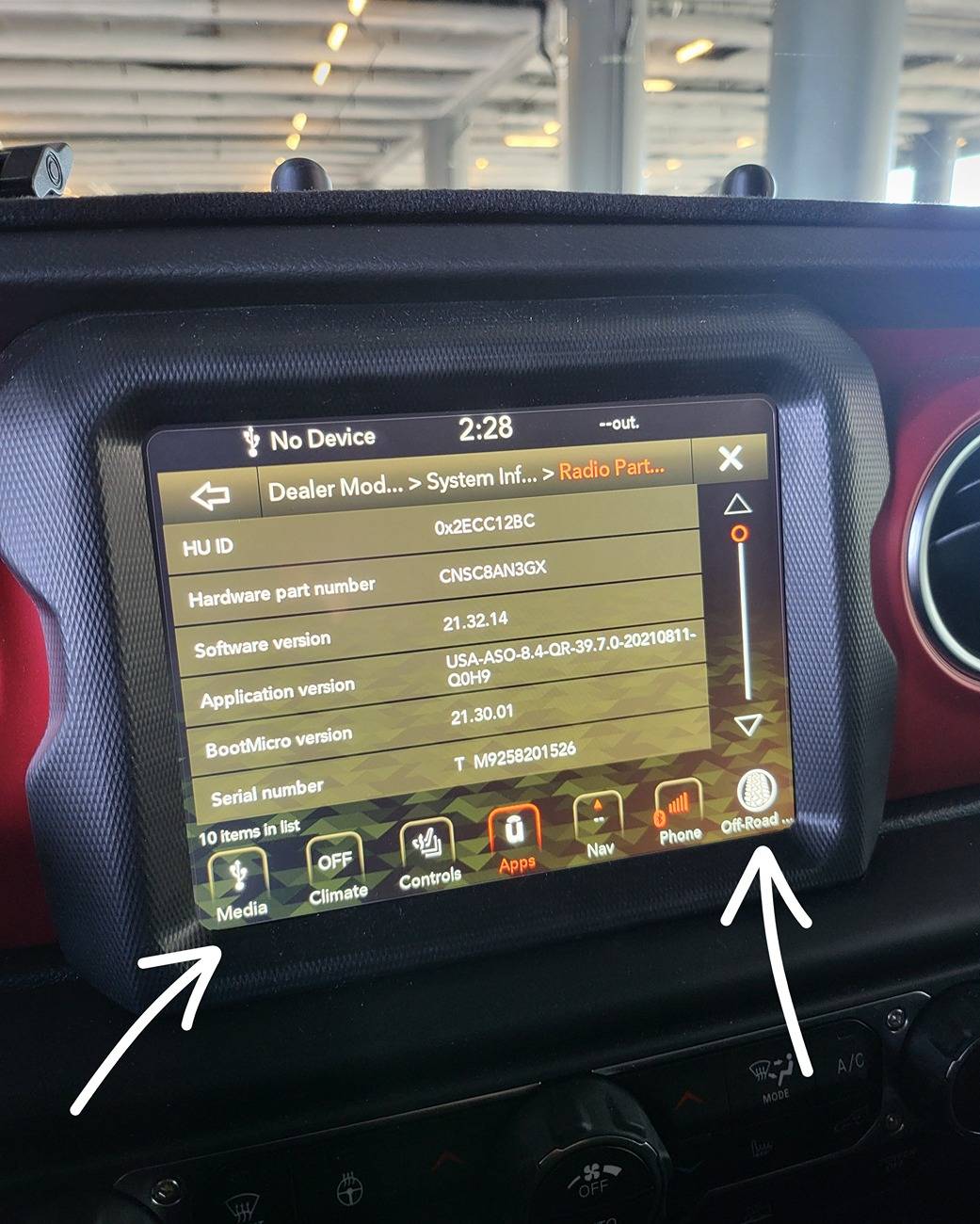
Hold the short cuts on the bottom left and right. As seen below until screen changes and you will get into "Dealer Mode".

In this mode, you want to get into the Radio Information.

You will see a very similar screen below.

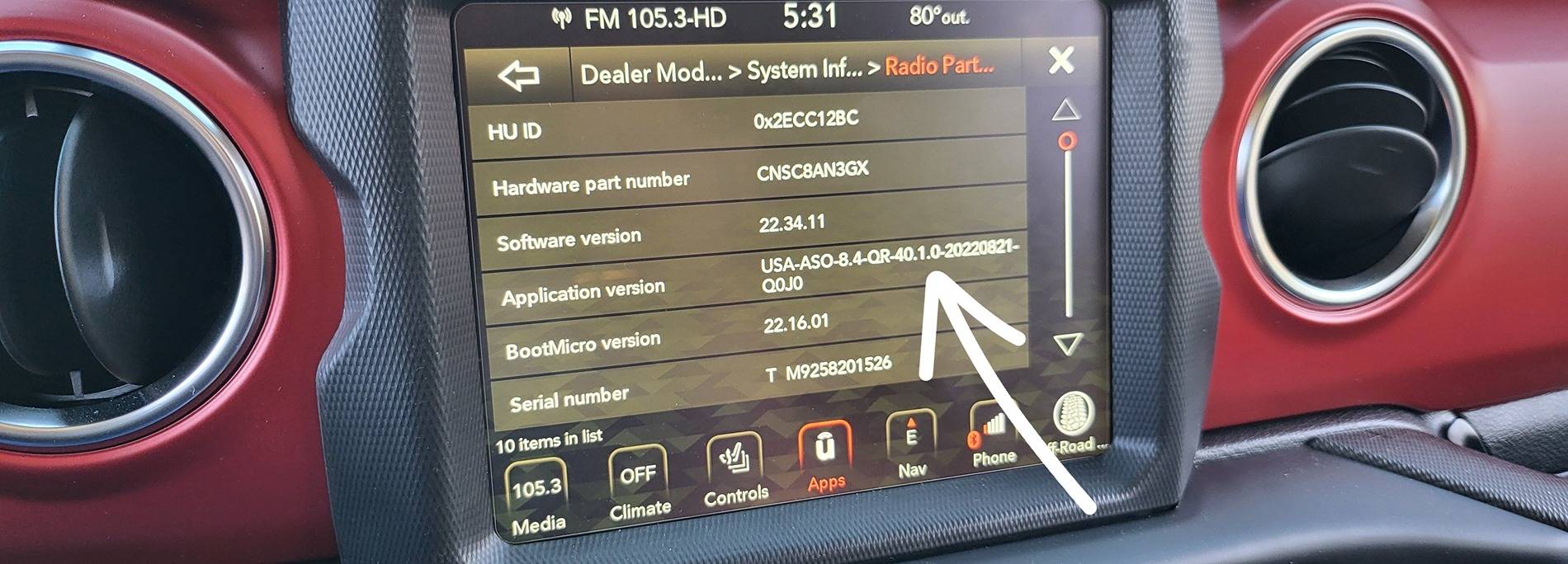
In the "Application Version", you see USA-.......39.7.0-......

That "39.7" is the Application version.


Mine is relatively new, but not the latest.

1000011480.jpg


Where to get the software:

Link to the Firmware Version 40.1

https://www.mediafire.com/file/guzmk27vexkr33x/UCONNECT_UAQ_8.4_QR40.1_MY18-21.zip/file

Approximately 1.1GB. as of 7/11/2024, the file is still downloadable.

What to do next:

Take screen shots of all the important information on Uconnect. IE: SXM account number....

Download the file above.

Unzip the files while preserving the directory structure:

You will get a directory named: "\VP4R_Update\" with bunch of files inside.

Format a good functioning USB drive with enough space to Fat32.

*This is done by right clicking on the USB drive then selecting "Format". If you don't know how to do this. Then you should look it up on Google How to format USB drive to Fat32. MAKE SURE YOU DON'T FORMAT YOUR HARD DRIVE.

I personally used Sandisk 16gb USB 3.0 capable drive.
https://a.co/d/bsWqDfp

Move "\VP4R_Update\" and all of its contents into root of the USB drive.

Plug the USB drive into the dash USB A port.

I started my vehicle and kept it running as I wanted to have stable battery voltage during the entire update process.

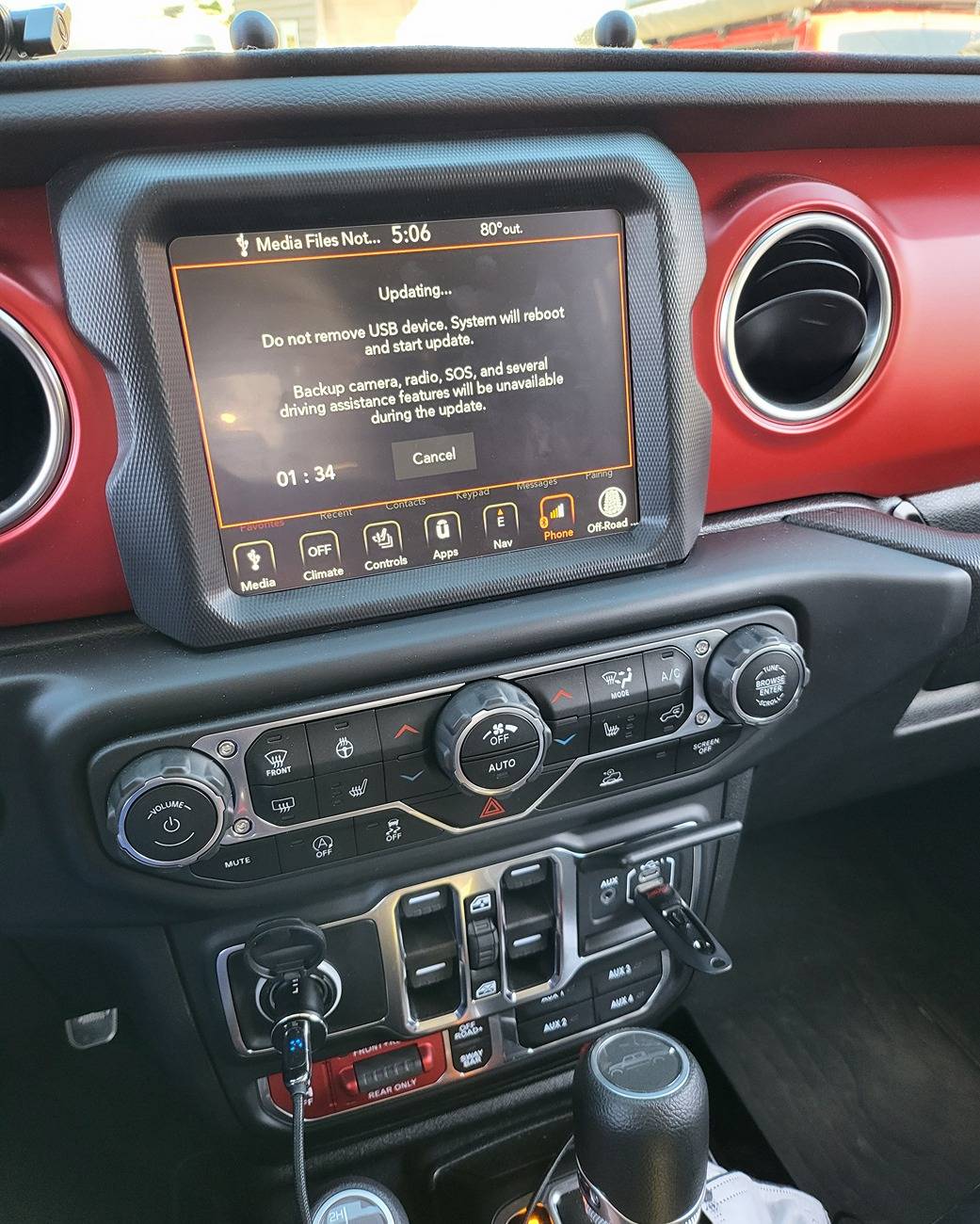
And you will get a prompt asking if you want to upgrade. Proceed through that prompt and you will get the following timer. Let the timer expire. You can see where I plugged in the USB drive.

1000011421.jpg


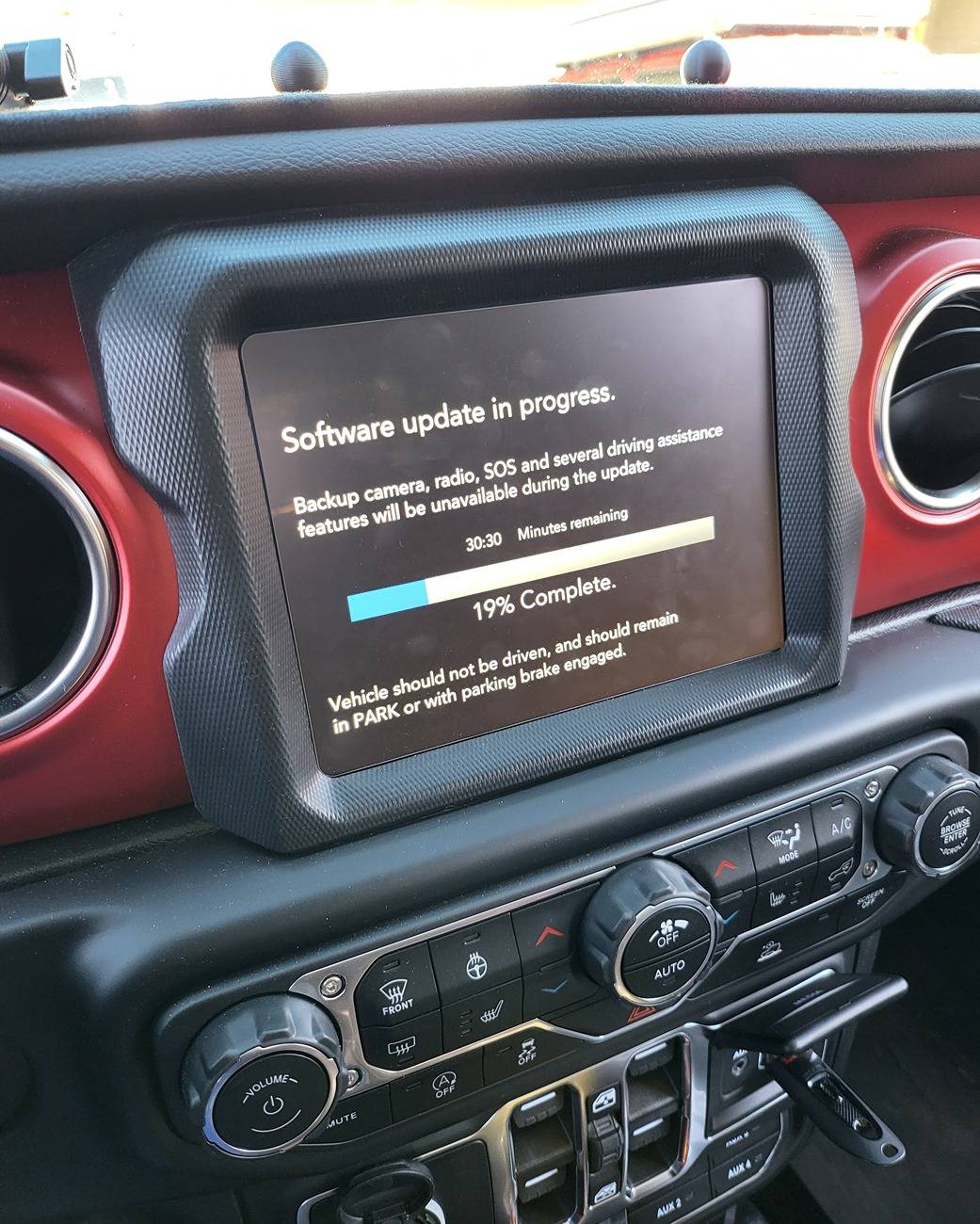
Once timer runs out, you will get the following screen.

1000011430.jpg


While the count down stated 30 plus minutes, mine took about 25min.

And the unit will reset on its own and the first screen will tell you that the update present in the USB drive is the same as the current one. This means you successfully upgraded your HU.

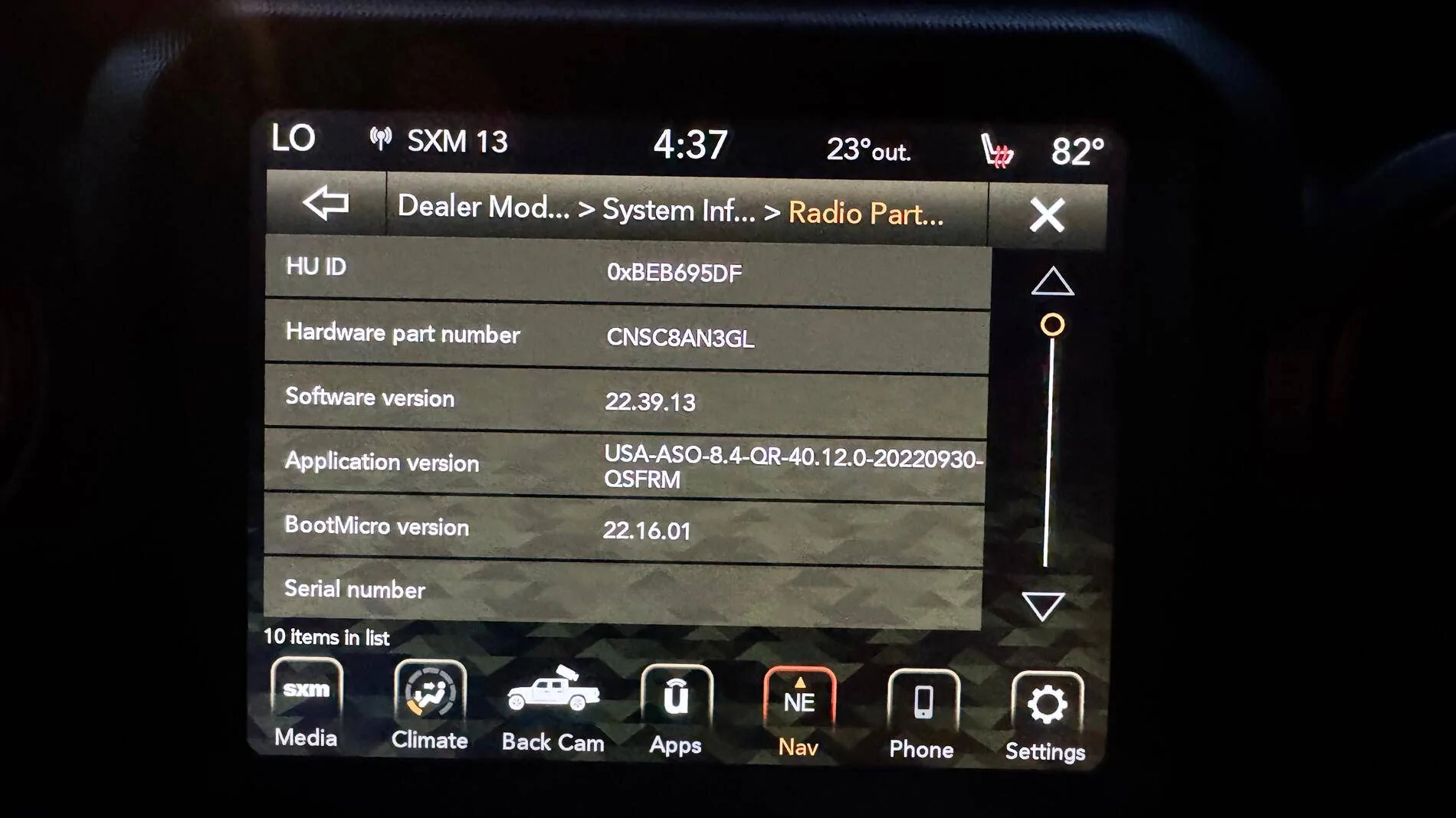
You can reaccess the dealer mode and check "Radio" information and you shall see the following screen. You can see the Application Version is now 40.1.

*IT IS POSSIBLE THAT YOU MAY NOT SEE ALL YOUR APPS RIGHT WAY. I READ PEOPLE REPORTING THEIR APPS BACK ALMOST 24 HOURS LATER and also having to reset all their settings again. Having said that, all the apps were present immediately for me.

1000011481.jpg


Impression:

I started researching into this upgrade because my parking guideline and TrailCam were functioning intermittently. The issue turned out to be because I did not seat CVPM CAN IHS connector all the way down.

Nonetheless, the upgrade made the entire interface feel more fluent and faster. Navigation loads within a few of seconds and offroad page loads faster too. Definitely an upgrade.

GOOD LUCK!

*YOU DO THIS UPGRADE AT YOUR OWN RISK. I AM MERELY SHARING MY EXPERIENCE. YOUR MILEAGE MAY VARY.

Reference:
https://www.jlwranglerforums.com/forum/threads/new-update-for-8-4-uconnect-radio.107222/

I need to reflash/install uconnect software in my unit. My battery died and replaced both batteries and noticed my GPS is not working properly and showing somewhere else instead of where I'm at and my wifi is not working even though I have service. Radio Software:
Application Verison: USA-ASO-8.4-QR-40.12.0-20220930-QSFRM

Can't take it to the Dealership cause it's out of warranty.

Is it possible to reflash without taking it to the dealership or download and then hopefully it'll update on its own OTA?
Jeep Gladiator How to: Update UConnect 8.4" via USB drive. tempImageOF3QUj
 

Sponsored

Hootbro

Well-Known Member
First Name
Don
Joined
Apr 13, 2019
Threads
57
Messages
10,176
Reaction score
19,942
Location
Delaware
Vehicle(s)
2025 Gladiator Sport
I need to reflash/install uconnect software in my unit. My battery died and replaced both batteries and noticed my GPS is not working properly and showing somewhere else instead of where I'm at and my wifi is not working even though I have service. Radio Software:
Application Verison: USA-ASO-8.4-QR-40.12.0-20220930-QSFRM

Can't take it to the Dealership cause it's out of warranty.

Is it possible to reflash without taking it to the dealership or download and then hopefully it'll update on its own OTA?
tempImageOF3QUj.webp
When power is removed from the infotainment headsets, they usually go back to default state and features get lost or removed and have to do a cold reboot to reconfigure. That means exit vehicle, doors locked and left for a few hours (preferably overnight). In rare instances, have to do a cold reboot 2X.
 
Last edited:
OP
OP
DailyDrivenTJ

DailyDrivenTJ

Well-Known Member
First Name
Michael
Joined
Nov 19, 2023
Threads
22
Messages
319
Reaction score
226
Location
PNW
Vehicle(s)
2023 JTRD, 1999 TJ-6 HEMI, 1998TJ, 2000 XJ 4.6L
I would give a few days and see if it is still weird.
I remember when I did the adaptive cruise control install. Automatic High Beam feature took literally like a 3 days to become active.

Also is your vehicle inside the garage? Have you tried driving it around?

When did you replace the battery?
 

PogiPR

Active Member
First Name
Angel
Joined
Jan 20, 2022
Threads
2
Messages
25
Reaction score
9
Location
Chicago
Vehicle(s)
Toyota, BMW, JT MojaveX
Occupation
Retired
I would give a few days and see if it is still weird.
I remember when I did the adaptive cruise control install. Automatic High Beam feature took literally like a 3 days to become active.

Also is your vehicle inside the garage? Have you tried driving it around?

When did you replace the battery?
The battery was replaced 3-4 days before my original post here. The Jeep is parked outside in plain sight of the sky with no interference.
 
OP
OP
DailyDrivenTJ

DailyDrivenTJ

Well-Known Member
First Name
Michael
Joined
Nov 19, 2023
Threads
22
Messages
319
Reaction score
226
Location
PNW
Vehicle(s)
2023 JTRD, 1999 TJ-6 HEMI, 1998TJ, 2000 XJ 4.6L
The battery was replaced 3-4 days before my original post here. The Jeep is parked outside in plain sight of the sky with no interference.
So, do you still have the same issue?
 

PogiPR

Active Member
First Name
Angel
Joined
Jan 20, 2022
Threads
2
Messages
25
Reaction score
9
Location
Chicago
Vehicle(s)
Toyota, BMW, JT MojaveX
Occupation
Retired
Yes, still same issue
Sponsored


Top