Sponsored

ecidiego

Well-Known Member
First Name
Chris
Joined
Nov 3, 2021
Threads
62
Messages
3,625
Reaction score
5,580
Location
San Diego
Vehicle(s)
2021 Gladiator Mojave
Occupation
IT
ECUConfig 3:
Rear Camera Present: No

You need to set that to no. That option is only Yes for trucks without front trailcam.

Did you get this one which relates to the washer?

Connector A Pin 14: Washer Motor Control Right Rear Output Present/Front Camera Washer: Yes
Sponsored
 

nickd

Well-Known Member
First Name
Nick
Joined
Apr 26, 2022
Threads
4
Messages
124
Reaction score
129
Location
Alpharetta, GA
Vehicle(s)
2022 Rubicon Bright White
My front camera is still not working. Good news is the radio is now working without issues.

Honestly I completely regret this mod, way too much work and are completely reliant on Alfaobd software working on your particular model of gladiator.
 

vishnu

Member
First Name
Vishnu
Joined
May 15, 2023
Threads
0
Messages
22
Reaction score
4
Vehicle(s)
2021 Jeep Gladiator Rubicon
Occupation
Infrastructure Engineer
ECUConfig 3:
Rear Camera Present: No

You need to set that to no. That option is only Yes for trucks without front trailcam.

Did you get this one which relates to the washer?

Connector A Pin 14: Washer Motor Control Right Rear Output Present/Front Camera Washer: Yes
Assuming that there weren't additional AlfaOBD changes needed other than the ones that Jimmy07 originally posted, I should have gotten those. But, I'll double-check.

Th original ones he posted were:

VehConfig 1 rear view camera- NO​
VehConfig 2 off road capable- YES​
VehConfig 8 off road camera present- YES​
ECUConfig 3 rear camera present- NO​
CBC Features reversible washer pump enabled- YES​
CBC Config I/O connector A pin 14- YES​
CustSetMenu 1 Rear View Camera Gridlines CSM Present- NO​
CustSetMenu 1 Rear Camera CSM Present- NO​
CustSetMenu 3 Auto Launch Forward Facing Camera Off Road Plus CSM Present- NO​
CustSetMenu 3 Auto Launch Off Road Plus CSM Present- YES​
CustSetMenu 3 Forward Facing Camera Gridlines CSM Present- YES​
CustSetMenu 3 Rear CVPM Camera Dynamic Gridlines CSM Present- YES​
CustSetMenu 3 Rear CVPM Camera Static Gridlines CSM Present- YES​
Cabin Net CVPM central vision processing- YES​

I feel like this writeup needs to be re-posted with all of the updated info, gotchas, and additional pictures and videos. This is a long thread at this point and there's some important info buried in various pages, communications, etc.. I would be glad to help with providing some of my additional comments, photos, videos, etc. if there was interest in updating the write-up....
 

vishnu

Member
First Name
Vishnu
Joined
May 15, 2023
Threads
0
Messages
22
Reaction score
4
Vehicle(s)
2021 Jeep Gladiator Rubicon
Occupation
Infrastructure Engineer
My front camera is still not working. Good news is the radio is now working without issues.

Honestly I completely regret this mod, way too much work and are completely reliant on Alfaobd software working on your particular model of gladiator.
When did you do the mod and more specifically the Alfaobd changes? I made my Alfaobd changes yesterday afternoon and things just started working this morning.... Does your rear camera work? Mine did before the front camera worked. I could be wrong here, but my assumption was that since we had to change out the rear camera due to its compatibility with the CVPM that it was a good sign (like the CVPM was operational) that the rear camera was working...
 

nickd

Well-Known Member
First Name
Nick
Joined
Apr 26, 2022
Threads
4
Messages
124
Reaction score
129
Location
Alpharetta, GA
Vehicle(s)
2022 Rubicon Bright White
Well I'm admitting defeat. The front camera does not work and the washer stalk sprays the front camera. The rear camera is working through the CVPM and the CAN bus so I assume I wired everything correctly. I read the log through AlphaOBD and see the changes are appended to the bottom of the log but aren't implemented. Its been over 24hrs and I assume this is a AlfaOBD bug for 2022 or newer JTs (maybe it will start working tomorrow? Who knows). What a huge waste of time and money!!!!!

OP should probably put a note that 2022 or newer should not attempt this install until AlfaOBD updates their software.

Jeep Gladiator HOW TO: Add Factory Front Trail Camera to Gladiator (DIY Writeup) IMG_1521
 

Sponsored

vishnu

Member
First Name
Vishnu
Joined
May 15, 2023
Threads
0
Messages
22
Reaction score
4
Vehicle(s)
2021 Jeep Gladiator Rubicon
Occupation
Infrastructure Engineer
Well I'm admitting defeat. The front camera does not work and the washer stalk sprays the front camera. The rear camera is working through the CVPM and the CAN bus so I assume I wired everything correctly. I read the log through AlphaOBD and see the changes are appended to the bottom of the log but aren't implemented. Its been over 24hrs and I assume this is a AlfaOBD bug for 2022 or newer JTs (maybe it will start working tomorrow? Who knows). What a huge waste of time and money!!!!!

OP should probably put a note that 2022 or newer should not attempt this install until AlfaOBD updates their software.

IMG_1521.jpeg
@nickd I feel your frustration, as I just went through the process and it is a lot of work with frustration. It's also a fairly big spend. I do see something that might be worth checking though.

There are two settings that should have been set, that I don't see in your logs :
  • VehConfig 2 off road capable- YES
  • CustSetMenu 1 Rear Camera CSM Present- NO

Your log also shows two settings that appear to have been set incorrectly, but then later in the log they appear to be set to the correct/needed value. Maybe still worth double-checking those:

  • CustSetMenu 3 Auto Launch Forward Facing Camera Off Road Plus CSM Present
  • CustSetMenu 3 Auto Launch Off Road Plus CSM Present

I'm not sure if those just don't show in your log or if they didn't get set. There is a way in AlfaOBD to read the current config and save it to a log file. I would recommend reading your current config and double-check the current config, comparing to what was supposed to be set to support the front trailcam:
  • Windows version:
    • Click on "Status/Faults" tab.
    • Click on "Read System ID" button.
      • It'll read in all of the current settings.
    • Then you can click on View Log and it will open it in Notepad. From there you can search for items or save it somewhere
  • Android version:
    • I don't have the Android version, but Jimmy mentioned clicking on a battery icon

Needed settings for front trailcam:
VehConfig 1 rear view camera- NO​
VehConfig 2 off road capable- YES​
VehConfig 8 off road camera present- YES​
ECUConfig 3 rear camera present- NO​
CBC Features reversible washer pump enabled- YES​
CBC Config I/O connector A pin 14- YES​
CustSetMenu 1 Rear View Camera Gridlines CSM Present- NOT PRESENT​
CustSetMenu 1 Rear Camera CSM Present- NO​
CustSetMenu 3 Auto Launch Forward Facing Camera Off Road Plus CSM Present- NO​
CustSetMenu 3 Auto Launch Off Road Plus CSM Present- YES​
CustSetMenu 3 Forward Facing Camera Gridlines CSM Present- YES​
CustSetMenu 3 Rear CVPM Camera Dynamic Gridlines CSM Present- YES​
CustSetMenu 3 Rear CVPM Camera Static Gridlines CSM Present- YES​
Cabin Net CVPM central vision processing- ENABLED​
Note my rear and front cameras are working as they should. The only issue that I still have is related to the trailcam clean cam washer function. My windshield washer on the steering column sprays the windshield and the front camera. There is a "clean camera" button on the front camera screen (which you haven't seen yet). When I push that button, it just sprays the windshield. I still need to double-check my washer related settings via AlfaODB, which I plan to do today...
 

nickd

Well-Known Member
First Name
Nick
Joined
Apr 26, 2022
Threads
4
Messages
124
Reaction score
129
Location
Alpharetta, GA
Vehicle(s)
2022 Rubicon Bright White
I'm not sure if those just don't show in your log or if they didn't get set. There is a way in AlfaOBD to read the current config and save it to a log file. I would recommend reading your current config and double-check the current config, comparing to what was supposed to be set to support the front trailcam:
My experience with AlfaOBD has been different than everyone else on these threads. The software did not connect at first of me, I kept getting BUS init errors. I started messing around with manual connection tab and somehow I got it to connect to the BCM. But I dont think the changes that I made are getting implemented.

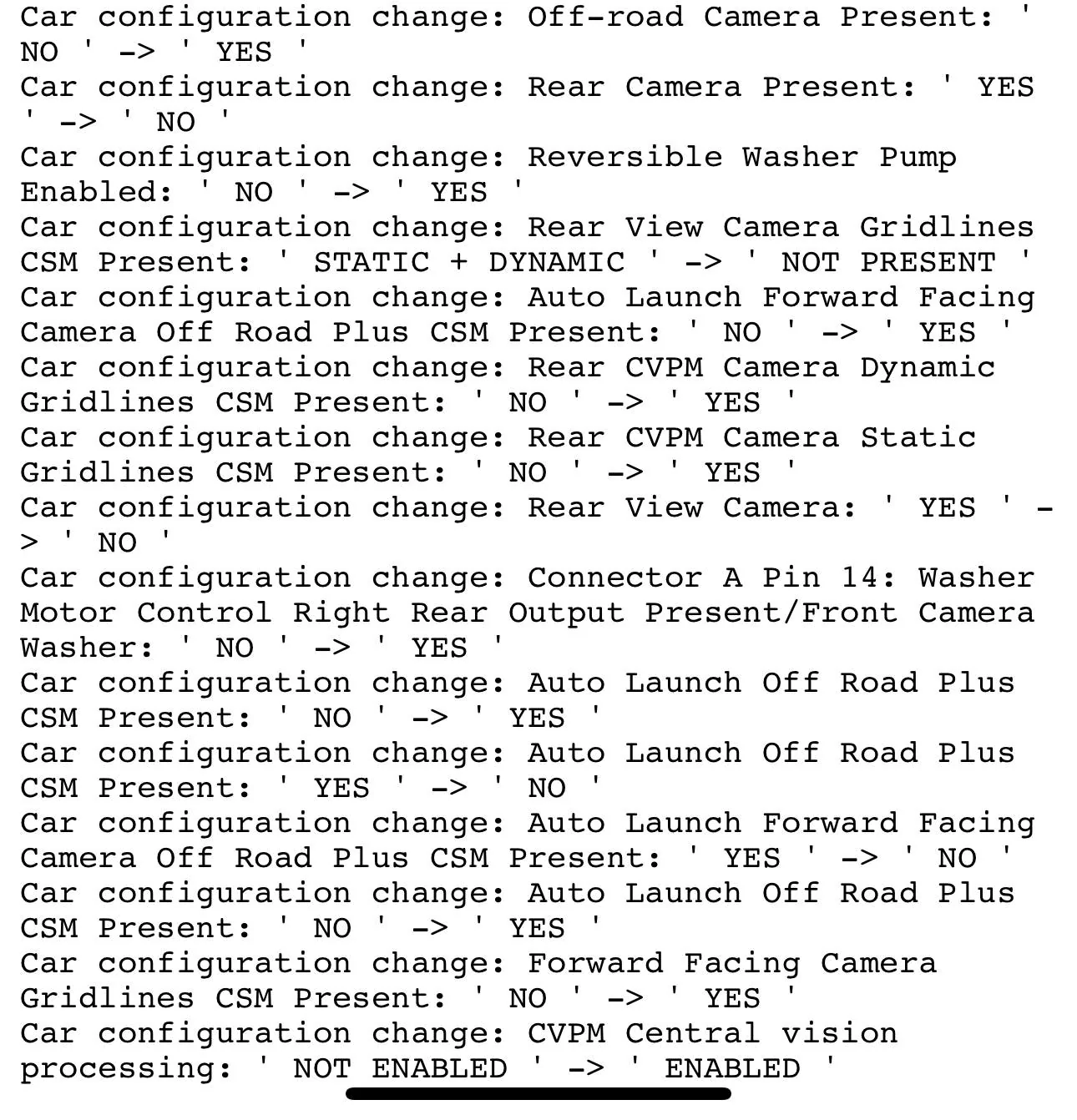
When I do a diff of the initial log that I saved before I changed anything and the log in the BCM now, the only difference is the screen shot I just posted. It is appended to the bottom and listed as a "Car Configuration Change", which likely means its pending. Where the change is getting stuck I dont know, either in the AlfaOBD software or the BCM? It has been about 48 hours and nothing has changed so I dont think its a question of waiting for the ECU to cycle.

I was using a cheaper security bypass module I got off of amazon rather than the ones recommended by AlfaOBD. There is a small possibility this is causing the issue, so again I have spent more money in hopes that the other money I spent wasnt wasted.

Donut media said it best...."Cars are PAIN!"
 

ecidiego

Well-Known Member
First Name
Chris
Joined
Nov 3, 2021
Threads
62
Messages
3,625
Reaction score
5,580
Location
San Diego
Vehicle(s)
2021 Gladiator Mojave
Occupation
IT
Note my rear and front cameras are working as they should. The only issue that I still have is related to the trailcam clean cam washer function. My windshield washer on the steering column sprays the windshield and the front camera. There is a "clean camera" button on the front camera screen (which you haven't seen yet). When I push that button, it just sprays the windshield. I still need to double-check my washer related settings via AlfaODB, which I plan to do today...
Post your AlfaOBD backup and I'll compare it to mine....
 

nickd

Well-Known Member
First Name
Nick
Joined
Apr 26, 2022
Threads
4
Messages
124
Reaction score
129
Location
Alpharetta, GA
Vehicle(s)
2022 Rubicon Bright White
What EXACT OBDII Bluetooth receiver are using, and are you using Windows or Android? The latest ( March 31 ) version of Alfa states:


AlfaOBD for PC

March 31st 2023: Version 2.3.8.0

More support for 2020-2023 models. Various fixes and improvements..​
OBDLink Mx+

I dont think its the OBD bluetooth adapter. I can read the log on the car just fine. Also DashCommand and the OBDLink apps all work flawlessly.
 

Sponsored

ecidiego

Well-Known Member
First Name
Chris
Joined
Nov 3, 2021
Threads
62
Messages
3,625
Reaction score
5,580
Location
San Diego
Vehicle(s)
2021 Gladiator Mojave
Occupation
IT
OBDLink Mx+

I dont think its the OBD bluetooth adapter. I can read the log on the car just fine. Also DashCommand and the OBDLink apps all work flawlessly.
Post the backup log after running a backup.. You can tell Alfa to upload it to Google Drive. It will be named BODY_CHRYSLER_Info.log. Check your version of Alfa as well.

If you have the blue screen when hitting the front trailcam button it's 1 of 4 things:

1. BCM settings not correct
2. Camera defective ( easy to test, just remove it and plug it into the rear camera cable and see if it comes on when you go into reverse ). You can also, at the same time, plug the rear camera into the front camera cable and see if you have a picture . This will narrow it down fast.

* note * - I am not sure IF the front camera speaks the same "language" as the rear, so this test might not work but worth trying *

3. CVPM bad or wrong part
4. Cabling bad

Swapping the 2 cameras should make quick work in diagnosing.

When I originally did the mod, I bought the 2020 CVPM off of Jimmy's post in this thread. My rear camera worked but the front camera was a blue screen. I learned that the 2021+ CVPM is different. I returned the CVPM and ordered the correct 2021+ part and my front camera worked.
 

nickd

Well-Known Member
First Name
Nick
Joined
Apr 26, 2022
Threads
4
Messages
124
Reaction score
129
Location
Alpharetta, GA
Vehicle(s)
2022 Rubicon Bright White
using AlphaOBD windows version 2.3.8.0

Current log scroll to the bottom to see the configuration changes:
 

ecidiego

Well-Known Member
First Name
Chris
Joined
Nov 3, 2021
Threads
62
Messages
3,625
Reaction score
5,580
Location
San Diego
Vehicle(s)
2021 Gladiator Mojave
Occupation
IT
Checking reports online, the Mar 31 Alfa OBD update fixed all issues with 2022s:

Jeep Gladiator HOW TO: Add Factory Front Trail Camera to Gladiator (DIY Writeup) 1686676342764
 

nickd

Well-Known Member
First Name
Nick
Joined
Apr 26, 2022
Threads
4
Messages
124
Reaction score
129
Location
Alpharetta, GA
Vehicle(s)
2022 Rubicon Bright White
Post the backup log after running a backup.. You can tell Alfa to upload it to Google Drive. It will be named BODY_CHRYSLER_Info.log. Check your version of Alfa as well.

If you have the blue screen when hitting the front trailcam button it's 1 of 4 things:

1. BCM settings not correct
2. Camera defective ( easy to test, just remove it and plug it into the rear camera cable and see if it comes on when you go into reverse ). You can also, at the same time, plug the rear camera into the front camera cable and see if you have a picture . This will narrow it down fast.

* note * - I am not sure IF the front camera speaks the same "language" as the rear, so this test might not work but worth trying *

3. CVPM bad or wrong part
4. Cabling bad

Swapping the 2 cameras should make quick work in diagnosing.

When I originally did the mod, I bought the 2020 CVPM off of Jimmy's post in this thread. My rear camera worked but the front camera was a blue screen. I learned that the 2021+ CVPM is different. I returned the CVPM and ordered the correct 2021+ part and my front camera worked.
I dont actually have a blue screen I cant press the front camera Button it does nothing. In the off road pages when I click on the front camera it makes a sound and does nothing. Amazon just delivered an ECRI security bypass module. Going to try that now and see if it changes anything
 

ecidiego

Well-Known Member
First Name
Chris
Joined
Nov 3, 2021
Threads
62
Messages
3,625
Reaction score
5,580
Location
San Diego
Vehicle(s)
2021 Gladiator Mojave
Occupation
IT
@vishnu's issue should hopefully be easy to track down.

Factory trailcam trucks have a reversed harness and then the 2 related settings:

Reversible Washer Pump Enabled: Yes
Connector A Pin 14: Washer Motor Control Right Rear Output Present/Front Camera Washer: Yes

Make damn sure you got that reversed harness ( easy to compare, get the one you replaced out and compare wire colors on the fender side connector ) and that you enabled that Pin change.
Sponsored


Top