Sponsored

Locker Position Sensor Trouble

Figmo

Well-Known Member
First Name
Figmo
Joined
Jun 28, 2021
Threads
6
Messages
285
Reaction score
618
Location
Missoula, MT
Vehicle(s)
22 Gladiator Rubicon, 23 Bronco, Samurai
Occupation
Renaissance Man
So I started getting the service axle locker soon error on the dash. Didn't know if it was front or rear causing it so I bought two of those bypass cables. Installed on both axles. The service locker message is now gone from the dash but when I try to engage the lockers I just get a flashing locker icon indefinitely.

Has anybody else run into this? Seems like the bypass cable is the accepted solution for everyone else.
Sponsored
 

RubiDukkie

Well-Known Member
First Name
David
Joined
Feb 8, 2023
Threads
22
Messages
142
Reaction score
320
Location
Virginia
Vehicle(s)
2021 Jeep Gladiator Rubicon
Occupation
Database Administrator
When I installed my Z Locker OEM bypass, it eliminated the "service axle locker”; however, the locker engage/disengage light kept blinking after turning the locker off and even when back in 2WD. I contacted Z Automotive support and they said,

"remove the Z-Locker oem and check for dirt or a bent pin and reconnect. Make sure it fully snaps in to the connector too. If the issue continues, try swapping it to the other axle and if the other locker position sensor is the cause this should remedy the issue. But if not read the codes and see what they show. This would help determine the problem.

These are the codes the Z-Locker oem is designed to remedy and if the code is showing for the opposite axle then switch the axle to it. If the code appears for the previous axle it was on then you may need two, one for each axle. If the code is showing different then the ones below it could be something else the z-locker isn't designed to remedy but let me know what you see.

Z-Locker OEM
Front C144d-11, C144d-15 C144D-64 or rear codes C1451d-11, C1451-15 or C1451-64"


I removed the Z-Locker OEM and the diff housing bulkhead connector (68400411AA), then sprayed everything down with electrical contact cleaner, let it dry, put it all back and the locker in-progress light stopped blinking. Problem solved. Just need to get around to replacing the locker position sensor in the spring.

BTW, if you bent one of the pins in the bulkhead connector, here is the part number and description:

Mopar 68400411AA Connector - Accuator (Bulkhead Pass Through)
 
OP
OP
Figmo

Figmo

Well-Known Member
First Name
Figmo
Joined
Jun 28, 2021
Threads
6
Messages
285
Reaction score
618
Location
Missoula, MT
Vehicle(s)
22 Gladiator Rubicon, 23 Bronco, Samurai
Occupation
Renaissance Man
When I installed my Z Locker OEM bypass, it eliminated the "service axle locker”; however, the locker engage/disengage light kept blinking after turning the locker off and even when back in 2WD. I contacted Z Automotive support and they said,

"remove the Z-Locker oem and check for dirt or a bent pin and reconnect. Make sure it fully snaps in to the connector too. If the issue continues, try swapping it to the other axle and if the other locker position sensor is the cause this should remedy the issue. But if not read the codes and see what they show. This would help determine the problem.

These are the codes the Z-Locker oem is designed to remedy and if the code is showing for the opposite axle then switch the axle to it. If the code appears for the previous axle it was on then you may need two, one for each axle. If the code is showing different then the ones below it could be something else the z-locker isn't designed to remedy but let me know what you see.

Z-Locker OEM
Front C144d-11, C144d-15 C144D-64 or rear codes C1451d-11, C1451-15 or C1451-64"


I removed the Z-Locker OEM and the diff housing bulkhead connector (68400411AA), then sprayed everything down with electrical contact cleaner, let it dry, put it all back and the locker in-progress light stopped blinking. Problem solved. Just need to get around to replacing the locker position sensor in the spring.

BTW, if you bent one of the pins in the bulkhead connector, here is the part number and description:

Mopar 68400411AA Connector - Accuator (Bulkhead Pass Through)
Good info! I’m traveling for the holiday at the moment but when I get home, I’ll check this out.
 
OP
OP
Figmo

Figmo

Well-Known Member
First Name
Figmo
Joined
Jun 28, 2021
Threads
6
Messages
285
Reaction score
618
Location
Missoula, MT
Vehicle(s)
22 Gladiator Rubicon, 23 Bronco, Samurai
Occupation
Renaissance Man
When I installed my Z Locker OEM bypass, it eliminated the "service axle locker”; however, the locker engage/disengage light kept blinking after turning the locker off and even when back in 2WD. I contacted Z Automotive support and they said,

"remove the Z-Locker oem and check for dirt or a bent pin and reconnect. Make sure it fully snaps in to the connector too. If the issue continues, try swapping it to the other axle and if the other locker position sensor is the cause this should remedy the issue. But if not read the codes and see what they show. This would help determine the problem.

These are the codes the Z-Locker oem is designed to remedy and if the code is showing for the opposite axle then switch the axle to it. If the code appears for the previous axle it was on then you may need two, one for each axle. If the code is showing different then the ones below it could be something else the z-locker isn't designed to remedy but let me know what you see.

Z-Locker OEM
Front C144d-11, C144d-15 C144D-64 or rear codes C1451d-11, C1451-15 or C1451-64"


I removed the Z-Locker OEM and the diff housing bulkhead connector (68400411AA), then sprayed everything down with electrical contact cleaner, let it dry, put it all back and the locker in-progress light stopped blinking. Problem solved. Just need to get around to replacing the locker position sensor in the spring.

BTW, if you bent one of the pins in the bulkhead connector, here is the part number and description:

Mopar 68400411AA Connector - Accuator (Bulkhead Pass Through)

Took the advice you got from z-locker.

Started at the front. Removed the Z-Locker, inspected the pins. And just left it off and plugged the stock wire harness back in.

Tested lockers - failed for both rear only and rear+front (same perpetual flashing icon)

Moved to rear next. Removed Z-Locker, inspected the pins. On this axle I did not just remove z-locker and reconnect stock harness as I knew that would just bring me back to the original problem so, instead, I plugged the removed front Z-Locker into the rear axle.

Tested lockers - success. Both rear only and rear+front engage normally.

So, at this point, I'm thinking it was my rear factory sensor that went sour originally and of the two Z-Lockers I purchased one of them was defective (the one I first installed in the rear). As moving the front z-locker to the rear axle fixed the problem.

I bought them several months ago so I guess I'm just stuck with a dead one. Not happy about that. But I am happy that I have my lockers working again.

Thank you for the tip - it solved my problem. And to future searchers who may find this thread: the z-locker works but don't trust that you got a good one.
 

Maximus Gladius

Well-Known Member
First Name
Kevin
Joined
Jan 30, 2021
Threads
74
Messages
2,905
Reaction score
3,696
Location
Calgary, AB, Canada
Vehicle(s)
2021 JTR, 2023 JTR
So I started getting the service axle locker soon error on the dash. Didn't know if it was front or rear causing it so I bought two of those bypass cables. Installed on both axles. The service locker message is now gone from the dash but when I try to engage the lockers I just get a flashing locker icon indefinitely.

Has anybody else run into this? Seems like the bypass cable is the accepted solution for everyone else.
What model/year and odometer reading? Have you had your diff covers off yet to do a good cleaning?
 

Sponsored

OP
OP
Figmo

Figmo

Well-Known Member
First Name
Figmo
Joined
Jun 28, 2021
Threads
6
Messages
285
Reaction score
618
Location
Missoula, MT
Vehicle(s)
22 Gladiator Rubicon, 23 Bronco, Samurai
Occupation
Renaissance Man
What model/year and odometer reading? Have you had your diff covers off yet to do a good cleaning?
2022 at round 20k miles. No warranty, though. Or I would have let Jeep fix this mess.

Haven't been in the diffs yet. Figured I go there in the next month or two.
 

Maximus Gladius

Well-Known Member
First Name
Kevin
Joined
Jan 30, 2021
Threads
74
Messages
2,905
Reaction score
3,696
Location
Calgary, AB, Canada
Vehicle(s)
2021 JTR, 2023 JTR
2022 at round 20k miles. No warranty, though. Or I would have let Jeep fix this mess.

Haven't been in the diffs yet. Figured I go there in the next month or two.
I just got my 23 JTR with 25k kms/15k miles, no drain plug and my first order of maintenance was to change all fluids and run a sample of each to the lab.

The previous owner only changed the engine oils 3 times in the 25k km run and no other oils. The lab highlighted 3 problem areas, the iron levels were very high in both diffs (710ppm rear, 416ppm front) and the silicon levels high in the transfer case (179ppm), (caused foaming).

I don’t have the magnetic drain plugs but when I pulled the fill plug, those were magnetic but…they’re up high so not as useful as the low ones. I also had a magnetic drain plug made for the transfer case and put that in.

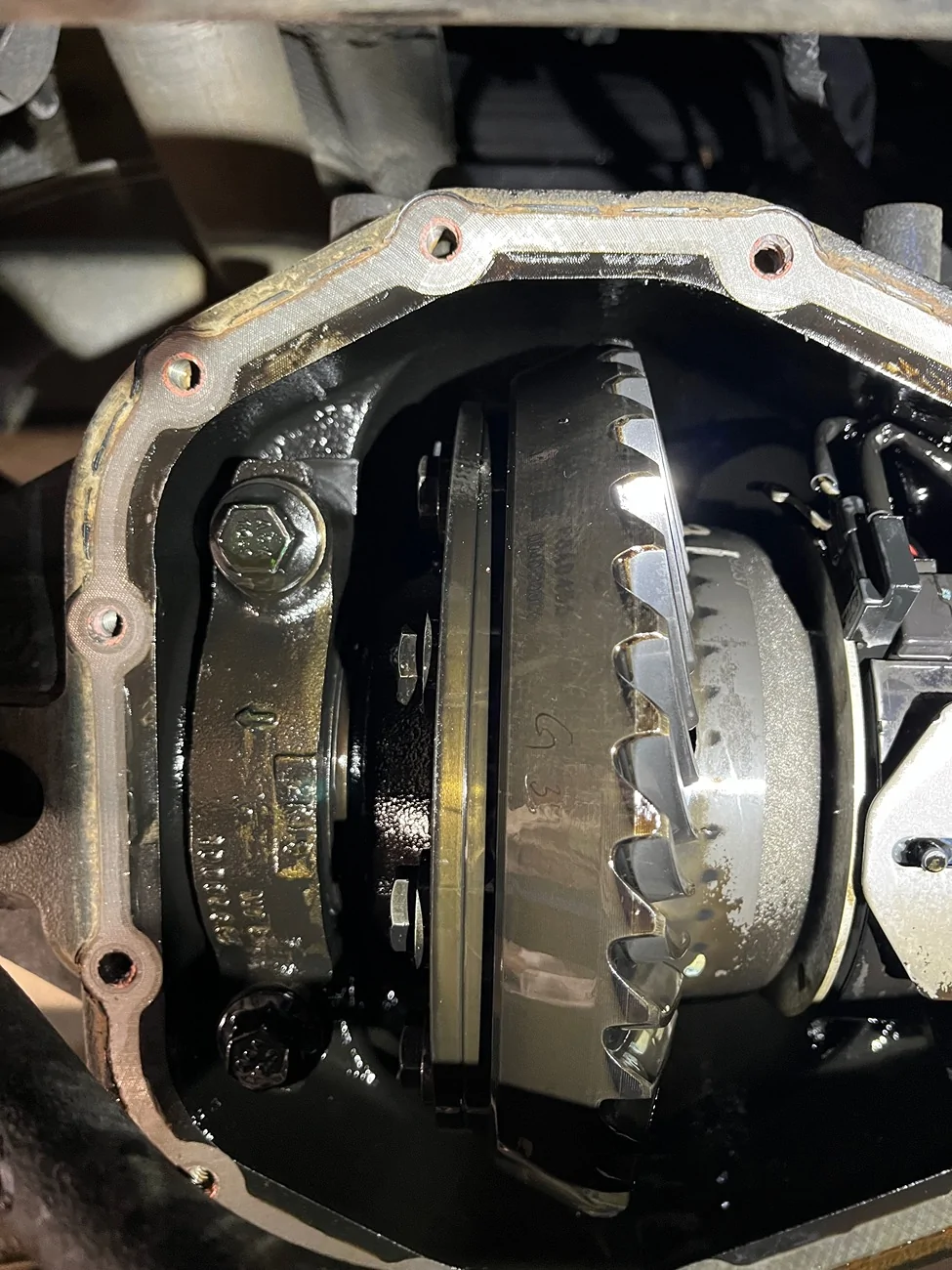
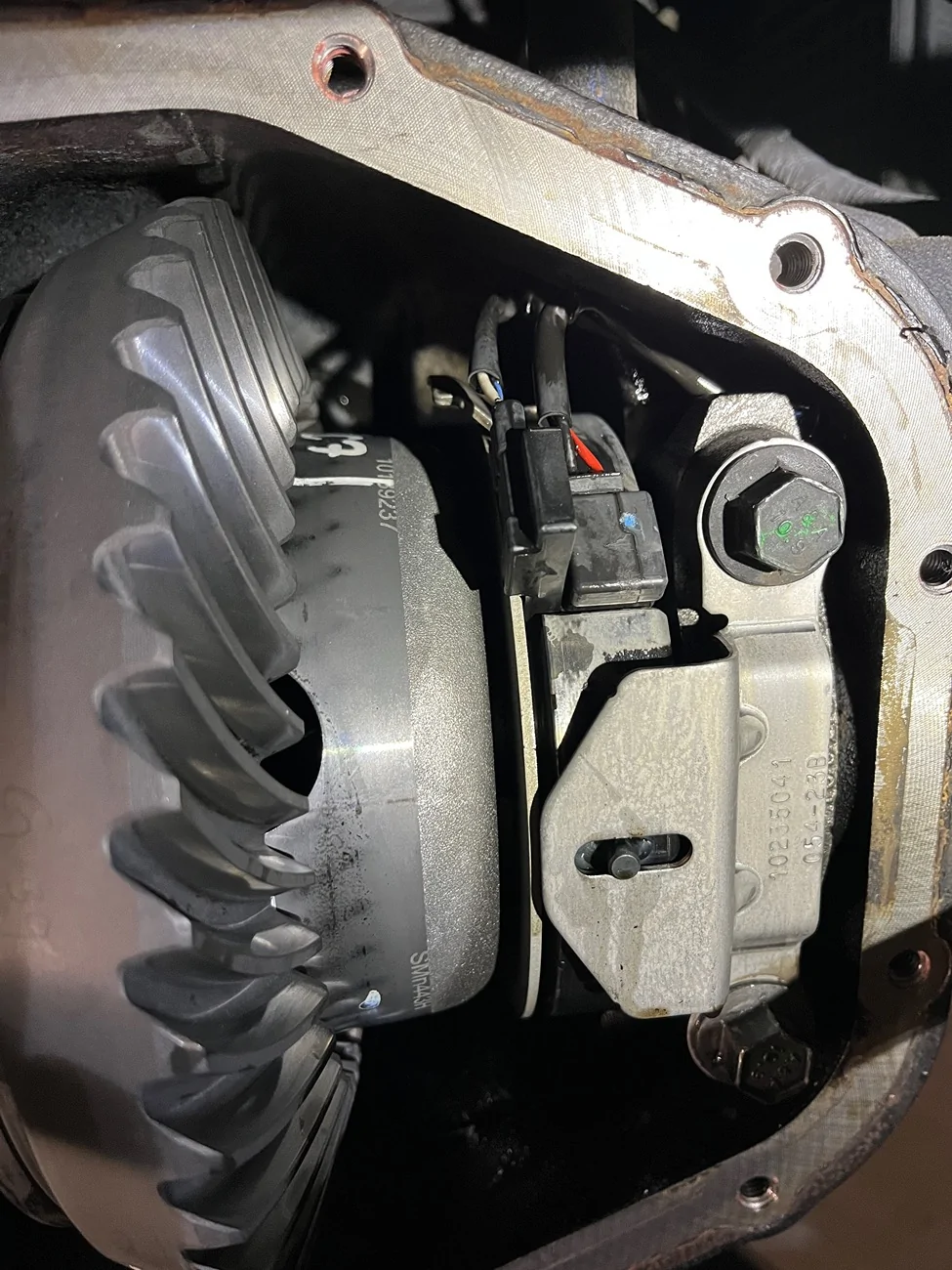
I pulled both diff covers and oil was dark brown/black, didn’t smell burnt and all the surfaces of everything inside had this dark coating that brake cleaner made short work on to strip off and wash out. (See pics)

If I had this from new, the oil would have been dropped a hell of a lot sooner and the lab wouldn’t have highlighted anything.

Diff covers went back on and slapped on earth magnets to the bottom of the covers. Going to order a couple strong pull fishing magnets to replace the earth magnets.

Jeep Gladiator Locker Position Sensor Trouble IMG_5565


Jeep Gladiator Locker Position Sensor Trouble IMG_5566
 
OP
OP
Figmo

Figmo

Well-Known Member
First Name
Figmo
Joined
Jun 28, 2021
Threads
6
Messages
285
Reaction score
618
Location
Missoula, MT
Vehicle(s)
22 Gladiator Rubicon, 23 Bronco, Samurai
Occupation
Renaissance Man
Drain plug or no drain plug?
🤷‍♂️ dunno - haven't been there yet. I've got it on the schedule for January.

The magnet idea is a great suggestion
Sponsored


Top