Sponsored

Questions for the gurus

ShadowsPapa

Well-Known Member
First Name
Bill
Joined
Oct 12, 2019
Threads
247
Messages
40,442
Reaction score
53,860
Location
Runnells, Iowa
Vehicle(s)
'25 JTMX, '23 JLU 4xe, '82 SX4, '73 Javelin
Occupation
Retired auto mechanic, frmr gov't ntwrk security admin
Vehicle Showcase
3
Wave shows the turn right in front of my face too. You can SEE it. It's visual on the screen. And much closer to my safe field of view.

You realize that the phone navs have oral command options, just like anything else? "Turn right in 250 feet."

I turn it off because I don't like it, especially when I'm on the phone, and the turn "right in front of my face" display means I don't need it, but it's there for those who want it.
Of course, I realize it has audio as well. We used it all over Korea (things move FAST there you have to be very alert)
My safe field of view is straight ahead, slightly down as needed to see the cluster, but I can be aware of things ahead of me while seeing the cluster, too, instead of turning my head to see.
You use what you like - please don't knock what others need and use, please. Some of us have no vision in their right eye and thus must actually turn their head to see anything in the middle of the vehicle.
Too often people seem to tear down some options as "junk, don't need them, I hate them, xxx is far better" as if everyone should use it.
That's how the nav system is always talked about - and yet a lot of us out here use it, like it, rely on it but feel like second class people when it comes up "gee, you use that lame system? Why?"
Make sense?
Sponsored

 

MarineHawk

Well-Known Member
Joined
Oct 24, 2019
Threads
13
Messages
525
Reaction score
636
Location
Virginia
Vehicle(s)
2020 Jeep Gladiator Rubicon
Vehicle Showcase
1
Of course, I realize it has audio as well. We used it all over Korea (things move FAST there you have to be very alert)
My safe field of view is straight ahead, slightly down as needed to see the cluster, but I can be aware of things ahead of me while seeing the cluster, too, instead of turning my head to see.
You use what you like - please don't knock what others need and use, please. Some of us have no vision in their right eye and thus must actually turn their head to see anything in the middle of the vehicle.
Too often people seem to tear down some options as "junk, don't need them, I hate them, xxx is far better" as if everyone should use it.
That's how the nav system is always talked about - and yet a lot of us out here use it, like it, rely on it but feel like second class people when it comes up "gee, you use that lame system? Why?"
Make sense?
No, my vision, close-up has degraded over the years. And it’s easier to be safe to look a few degrees to the right, than 30 degrees down and to the right. I’m not bagging on anything. I have failing eyes, and I had hade nav on my previous three vehicles. I never used it because having the phone on a mount really near my view of the road was much safer and better. If I could have achieved any benefit from the stock Jeep nav system, I would have used it. I had it. I almost never used it. It told me that a grocery store was 5 miles from a campsite. It wasn’t there. It had been demolished a year earlier. Waze never does that. Also, the Waze system is FAR more accurate than the Jeep nav on dealing with changing circumstances, especially traffic due to a catastrophic event.
 

ShadowsPapa

Well-Known Member
First Name
Bill
Joined
Oct 12, 2019
Threads
247
Messages
40,442
Reaction score
53,860
Location
Runnells, Iowa
Vehicle(s)
'25 JTMX, '23 JLU 4xe, '82 SX4, '73 Javelin
Occupation
Retired auto mechanic, frmr gov't ntwrk security admin
Vehicle Showcase
3
No, my vision, close-up has degraded over the years. And it’s easier to be safe to look a few degrees to the right, than 30 degrees down and to the right. I’m not bagging on anything. I have failing eyes, and I had hade nav on my previous three vehicles. I never used it because having the phone on a mount really near my view of the road was much safer and better. If I could have achieved any benefit from the stock Jeep nav system, I would have used it. I had it. I almost never used it. It told me that a grocery store was 5 miles from a campsite. It wasn’t there. It had been demolished a year earlier. Wave never does that. Also, the Waze system is FAR more accurate than the Jeep nav on dealing with changing circumstances, especially traffic due to a catastrophic event.
Maybe I didn't say things right - happens to me a lot. I see the "turn coming up" alerts in the cluster - straight ahead - between the tach and speedometer, so there's no turning my head at all - .

I do not doubt the benefits you state of the phone - even the DEALER said it would be more current especially after a while.
My thing is if my phone was mounted on the dash or the windshield, I'd not be able to see the screen well enough and would be so distracted trying to view what was on the phone, THAT would be dangerous. I have to have my phone about 18" from me tops, even closer at times and of course if the sun is ahead of me - can't see the phone screen at all. That's another issue - the phone screens just stink in certain light conditions. It's like trying to watch TV that's in front of the east window as the sun comes up............. can't do it.

I can say so far with my wife's GC, the nav has never failed or been wrong - however, Google maps - suck. I don't rely on Google after it had me go to an abandoned rail crossing when I was looking for one of our state offices in Sioux City, and another time it sent me miles east on a highway in Indiana when my friend's house was a quarter mile WEST from the intersection and another time it had me go clear into central IL then back west again to a place I was heading in southern IL - I could have cut through IA and MO to get there - my NAV cut an HOUR off the trip coming back - Google was so wrong is was laughable.
That's one thing I will NOT rely on for getting anywhere safely. At least three real examples of that system being totally nuts.

PS - no argument here - just stating why I like and use what I use at THIS point, in the here and now, why and how. I know you know your stuff. Who knows what I find most handy in the future. My wife loves her nav system, get in and go, it's there, phone stays in her pocket and it's never failed, and I leave my phone in my holster - there if I need it, no cable to hook up, get in, buckle up, go. I know my phone is with ME when I get out of the vehicle, she knows her phone is with her, not in the vehicle. That's our system - both of us are, well, we misplace things, forget things, where's my phone, etc. crap, it's out in the Jeep, have to go get it....... that sort of thing.
 

MarineHawk

Well-Known Member
Joined
Oct 24, 2019
Threads
13
Messages
525
Reaction score
636
Location
Virginia
Vehicle(s)
2020 Jeep Gladiator Rubicon
Vehicle Showcase
1
Maybe I didn't say things right - happens to me a lot. I see the "turn coming up" alerts in the cluster - straight ahead - between the tach and speedometer, so there's no turning my head at all - .

I do not doubt the benefits you state of the phone - even the DEALER said it would be more current especially after a while.
My thing is if my phone was mounted on the dash or the windshield, I'd not be able to see the screen well enough and would be so distracted trying to view what was on the phone, THAT would be dangerous. I have to have my phone about 18" from me tops, even closer at times and of course if the sun is ahead of me - can't see the phone screen at all. That's another issue - the phone screens just stink in certain light conditions. It's like trying to watch TV that's in front of the east window as the sun comes up............. can't do it.

I can say so far with my wife's GC, the nav has never failed or been wrong - however, Google maps - suck. I don't rely on Google after it had me go to an abandoned rail crossing when I was looking for one of our state offices in Sioux City, and another time it sent me miles east on a highway in Indiana when my friend's house was a quarter mile WEST from the intersection and another time it had me go clear into central IL then back west again to a place I was heading in southern IL - I could have cut through IA and MO to get there - my NAV cut an HOUR off the trip coming back - Google was so wrong is was laughable.
That's one thing I will NOT rely on for getting anywhere safely. At least three real examples of that system being totally nuts.
I just use $10 Walmart reading glasses. The phone is no further away than the Jeep display.

Waze is more sophisticated than Google map, even though they are owned by the same people.

Also, when sitting inside my departure dwelling, I can dial up my destination and see how long it will take based on various routes. Jeep nav isn’t accurate on that. Waze is. I have gone as far as 1,100 miles and arrived as close as within 1 minute of what Waze predicted. No way close with the Jeep nav. It assumes you’re going the speed limit, which is a fantasy.

Basically, I can set up my navigation, including different routes, while eating dinner on a long route when I don’t have a lot of extra time to go out and sit in my vehicle to re-plan it out.

I’ve owned and used both systems. Have you used Waze?
 
Last edited:

ShadowsPapa

Well-Known Member
First Name
Bill
Joined
Oct 12, 2019
Threads
247
Messages
40,442
Reaction score
53,860
Location
Runnells, Iowa
Vehicle(s)
'25 JTMX, '23 JLU 4xe, '82 SX4, '73 Javelin
Occupation
Retired auto mechanic, frmr gov't ntwrk security admin
Vehicle Showcase
3
I just use $10 Walmart reading glasses. The phone is no further away than the Jeep display.

Wze is more sophisticates than Google map, even though they are owned by the same people.


Also, when sitting inside my departure dwelling, I can dial up my destination and see how long it will take based on various routes. Jeep nav isn’t accurate on that. Waze is. I have gone as far as 1,100 miles and arrived as close as within 1 minute of what Waze predicted. No way close with the Jeep nav. It assumes you’re going the speed limit, which is a fantasy.


Basically, I can set up my navigation, including different route, while eating dinner on a long route when I don’t have a lot of extra time to go out and sit in my vehicle to re-plan it out.

I’ve owned and used both systems. Have you used Waze?
Nope - educate me.

I understand the phone isn't all that far away, but for me, the contrast of the screen, the size, just can't read it. If I put the phone on the cluster between the tach and speedometer, I'd have trouble reading what it says. Seriously. I've not seen a phone yet that will display the large picture and contrast of the bright display in the Jeep - so unless a phone can look as bright and show the route as large...... it will be very hard to see. I wear bifocals, blind in right eye.
If there was a phone call coming in and the number displayed on my phone's screen, I'd not be able to read the number if it was on my dash.
 

Sponsored

MarineHawk

Well-Known Member
Joined
Oct 24, 2019
Threads
13
Messages
525
Reaction score
636
Location
Virginia
Vehicle(s)
2020 Jeep Gladiator Rubicon
Vehicle Showcase
1
Nope - educate me.

I understand the phone isn't all that far away, but for me, the contrast of the screen, the size, just can't read it. If I put the phone on the cluster between the tach and speedometer, I'd have trouble reading what it says. Seriously. I've not seen a phone yet that will display the large picture and contrast of the bright display in the Jeep - so unless a phone can look as bright and show the route as large...... it will be very hard to see. I wear bifocals, blind in right eye.
If there was a phone call coming in and the number displayed on my phone's screen, I'd not be able to read the number if it was on my dash.
Okay, if you’re blind (my apologies), but yet you can read Jeep screen, fine, you have a better solution.

But that is rare, even if that is your case.

“If I put the phone on the cluster between the tach and speedometer, …”

No, I put mine on a fancy $5 Walmart suction-cup holder on the windshield right in front of my face. So, that, for people, who can see a phone screen. it’s both closer than the 8.4” screen, but also far closer to the field of view while looking at the road ahead.

I regret that you dismiss this as a tear down. I have used both systems, and never used the factory nav over my phone. And I have poor close vision. I’m jut saying what’s more valuable to me having access to both.
 

ShadowsPapa

Well-Known Member
First Name
Bill
Joined
Oct 12, 2019
Threads
247
Messages
40,442
Reaction score
53,860
Location
Runnells, Iowa
Vehicle(s)
'25 JTMX, '23 JLU 4xe, '82 SX4, '73 Javelin
Occupation
Retired auto mechanic, frmr gov't ntwrk security admin
Vehicle Showcase
3
Okay, if you’re blind (my apologies), but yet you can read Jeep screen, fine, you have a better solution.

But that is rare, even if that is your case.

“If I put the phone on the cluster between the tach and speedometer, …”

No, I put mine on a fancy $5 Walmart suction-cup holder on the windshield right in front of my face. So, that, for people, who can see a phone screen. it’s both closer than the 8.4” screen, but also far closer to the field of view while looking at the road ahead.

I regret that you dismiss this as a tear down. I have used both systems, and never used the factory nav over my phone. And I have poor close vision. I’m jut saying what’s more valuable to me having access to both.
Sorry, I was just saying if the phone WAS there, just for example, it wouldn't be nearly as easy to read as the cluster display is. I wouldn't put it there in the cluster as that would block the normal info (not sure it would fit in there well anyway)
Part of that is the limitation of phone screens. The contrast just isn't there yet. Phone technology limitations compared to the bright white of the cluster
I agree that straight ahead, right above the center of the Jeep display it would be better than looking away, definitely, and far far better than looking to the side for sure. Even a split second looking over to center can be risky. You'd see the nav while still looking at the road. Yes, that makes sense.
Do you cable your phone to the JT while doing this?
I could experiment, compare, see what works best, do a side-by-side. (well, sort of side-by-side, one above the other, perhaps?)
Blind in right eye - otherwise wear bifocals. Far-sighted, have to use magnifying glass even with my glasses to read the coins for my collection. My wife keeps holding up her phone to me and says "look at this pic, isn't that cute" and she's like 2 feet away - I have to take the phone and look.

What was the name of the system you use? WZE or WAZE ........ google will tell me maybe.
 

Sponsored

ShadowsPapa

Well-Known Member
First Name
Bill
Joined
Oct 12, 2019
Threads
247
Messages
40,442
Reaction score
53,860
Location
Runnells, Iowa
Vehicle(s)
'25 JTMX, '23 JLU 4xe, '82 SX4, '73 Javelin
Occupation
Retired auto mechanic, frmr gov't ntwrk security admin
Vehicle Showcase
3
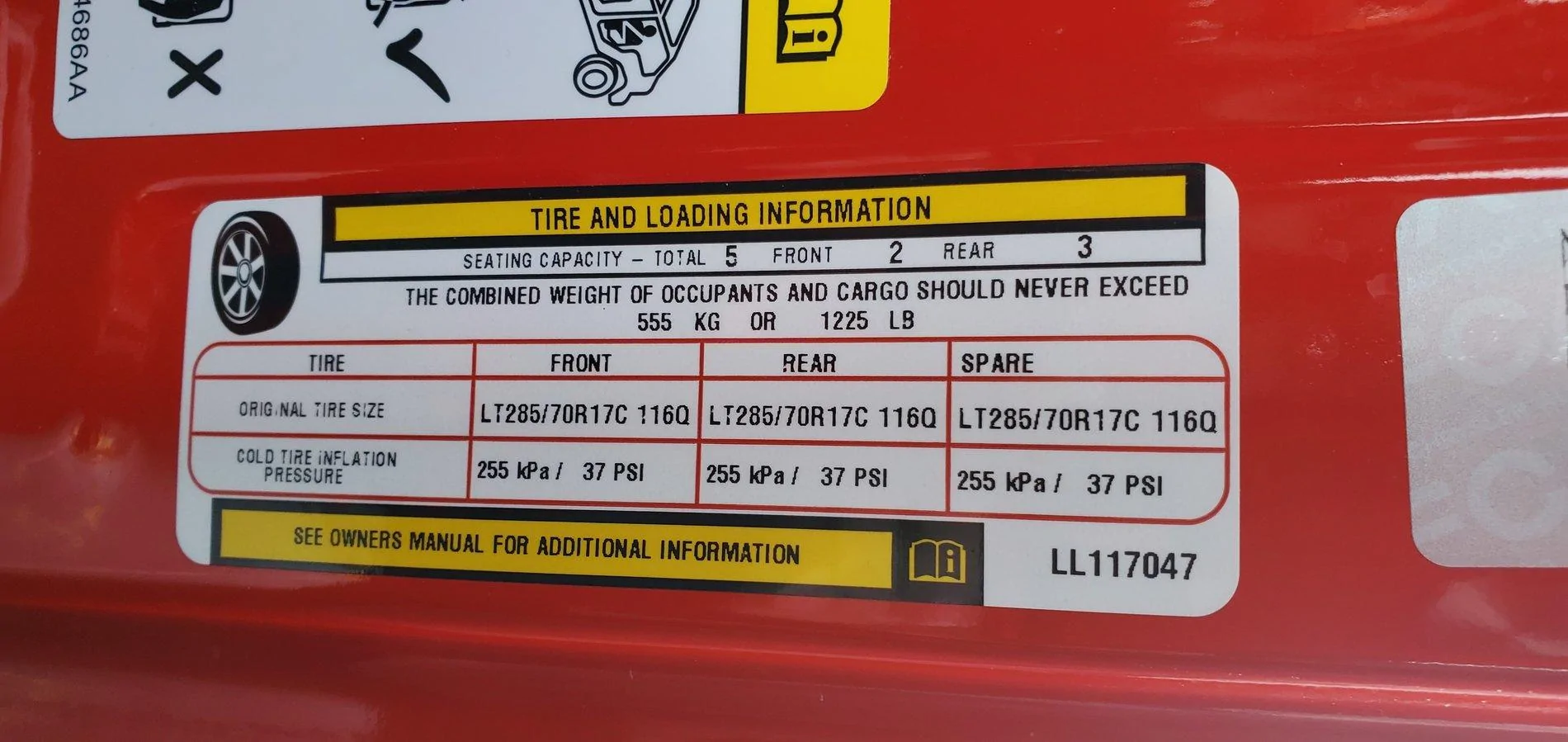
@88mmm now will you agree that you were completely WRONG?
I still have my Jeep charts handy........... lol
I don't mind a good debate, but prefer when the other team at least gives source information or something to back it up instead of "because I said so".
That's why I tried to politely ask - your source please? Cite your sources?

You did - your door jamb sticker. And as WXman and others have said - nothing else matters, that's the law.
I award 2 points for the sticker pics hahaha
 

sad85XD

Well-Known Member
First Name
Evan
Joined
May 23, 2019
Threads
5
Messages
123
Reaction score
139
Location
WI
Vehicle(s)
Firecracker Red 2020 Jeep Gladiator Rubicon "Azazel"
Occupation
Auditor
Sorry, I was just saying if the phone WAS there, just for example, it wouldn't be nearly as easy to read as the cluster display is. I wouldn't put it there in the cluster as that would block the normal info (not sure it would fit in there well anyway)
Part of that is the limitation of phone screens. The contrast just isn't there yet. Phone technology limitations compared to the bright white of the cluster
I agree that straight ahead, right above the center of the Jeep display it would be better than looking away, definitely, and far far better than looking to the side for sure. Even a split second looking over to center can be risky. You'd see the nav while still looking at the road. Yes, that makes sense.
Do you cable your phone to the JT while doing this?
I could experiment, compare, see what works best, do a side-by-side. (well, sort of side-by-side, one above the other, perhaps?)
Blind in right eye - otherwise wear bifocals. Far-sighted, have to use magnifying glass even with my glasses to read the coins for my collection. My wife keeps holding up her phone to me and says "look at this pic, isn't that cute" and she's like 2 feet away - I have to take the phone and look.

What was the name of the system you use? WZE or WAZE ........ google will tell me maybe.

I will say WAZE is a great program. But every day I remember that they took away the option of Terry Crews to yell directions at you.

I like Google/WAZE on the Phone for short stuff with more short turns. Mostly because its easy to manipulate and see whats coming up ahead.

But for long trips or on more highway type driving I like using the internal NAV. Mostly because you can touch the icons on the right side and see exactly whats at each exit and you can call places directly too.


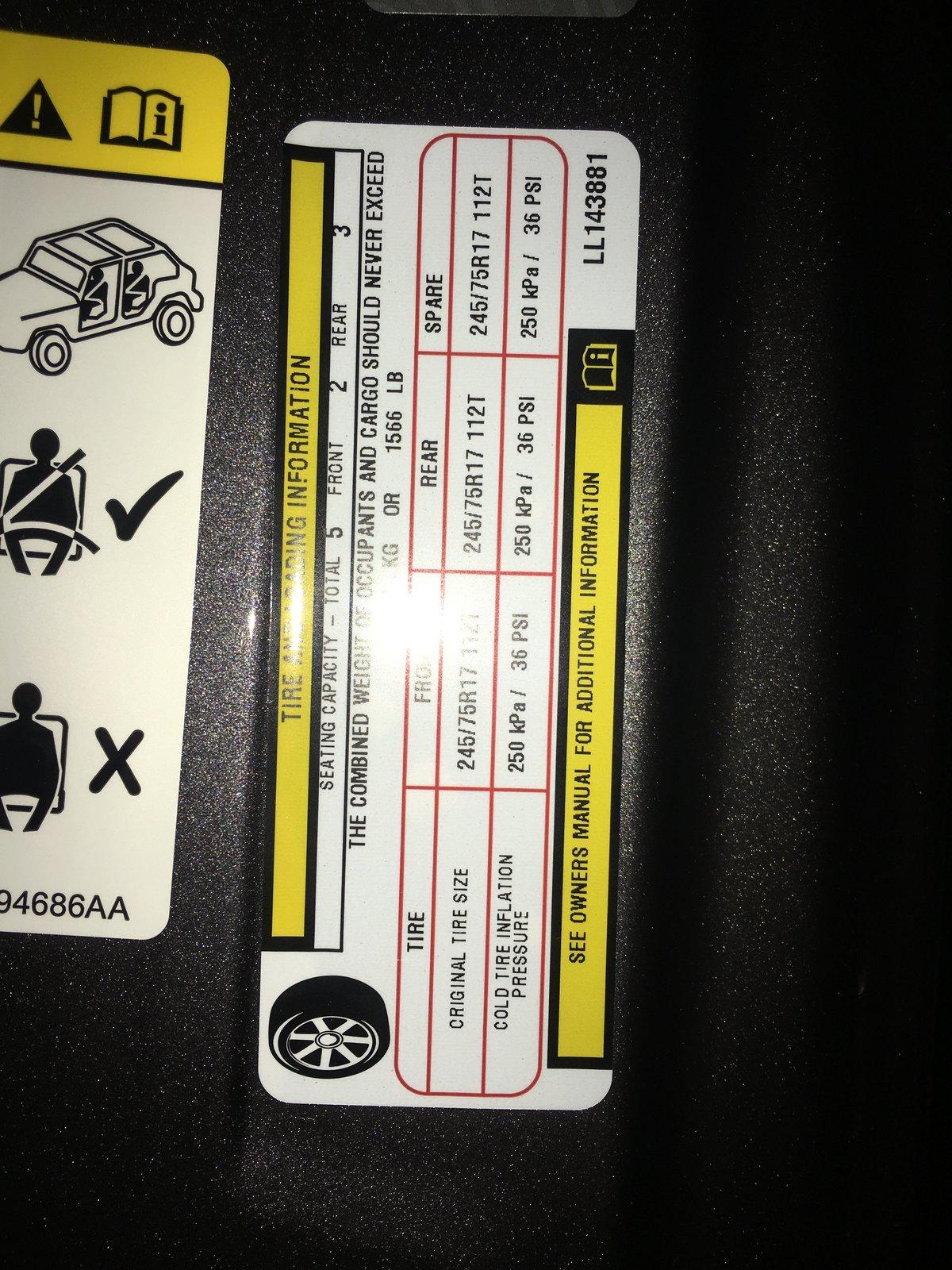
Also, here's my Rubi Max Tow sticker

Jeep Gladiator Questions for the gurus 20191220_102854
 

ShadowsPapa

Well-Known Member
First Name
Bill
Joined
Oct 12, 2019
Threads
247
Messages
40,442
Reaction score
53,860
Location
Runnells, Iowa
Vehicle(s)
'25 JTMX, '23 JLU 4xe, '82 SX4, '73 Javelin
Occupation
Retired auto mechanic, frmr gov't ntwrk security admin
Vehicle Showcase
3
I will say WAZE is a great program. But every day I remember that they took away the option of Terry Crews to yell directions at you.

I like Google/WAZE on the Phone for short stuff with more short turns. Mostly because its easy to manipulate and see whats coming up ahead.

But for long trips or on more highway type driving I like using the internal NAV. Mostly because you can touch the icons on the right side and see exactly whats at each exit and you can call places directly too.


Also, here's my Rubi Max Tow sticker

20191220_102854.webp
Great explanation - thanks.
I was impressed with the internal NAV in that at least in what _I_ was looking for, it showed on the cluster the exit with the signs and as I looked at the cluster screen then up at the signs and the exit, it was as if they photographed that exact same place and exit. It was such a match it was unreal.
I also understand on the manipulate, scale and so on - can't always with the built-in.
 

sad85XD

Well-Known Member
First Name
Evan
Joined
May 23, 2019
Threads
5
Messages
123
Reaction score
139
Location
WI
Vehicle(s)
Firecracker Red 2020 Jeep Gladiator Rubicon "Azazel"
Occupation
Auditor
No such thing as a Rubicon MAX tow. Rubicons have a trailer tow package.
NUHUH! The dealer said its a "MAX TOW!" sticker that adds a 5 whole extra pounds. So there. :muscle:
Sponsored


Top