Sponsored

AlfaOBD talk

gpwrang33

Well-Known Member
Joined
Aug 2, 2020
Threads
7
Messages
101
Reaction score
83
Location
Albany, N.Y.
Vehicle(s)
2000 TJ 2021 Hydro Blue JTSS MAX TOW
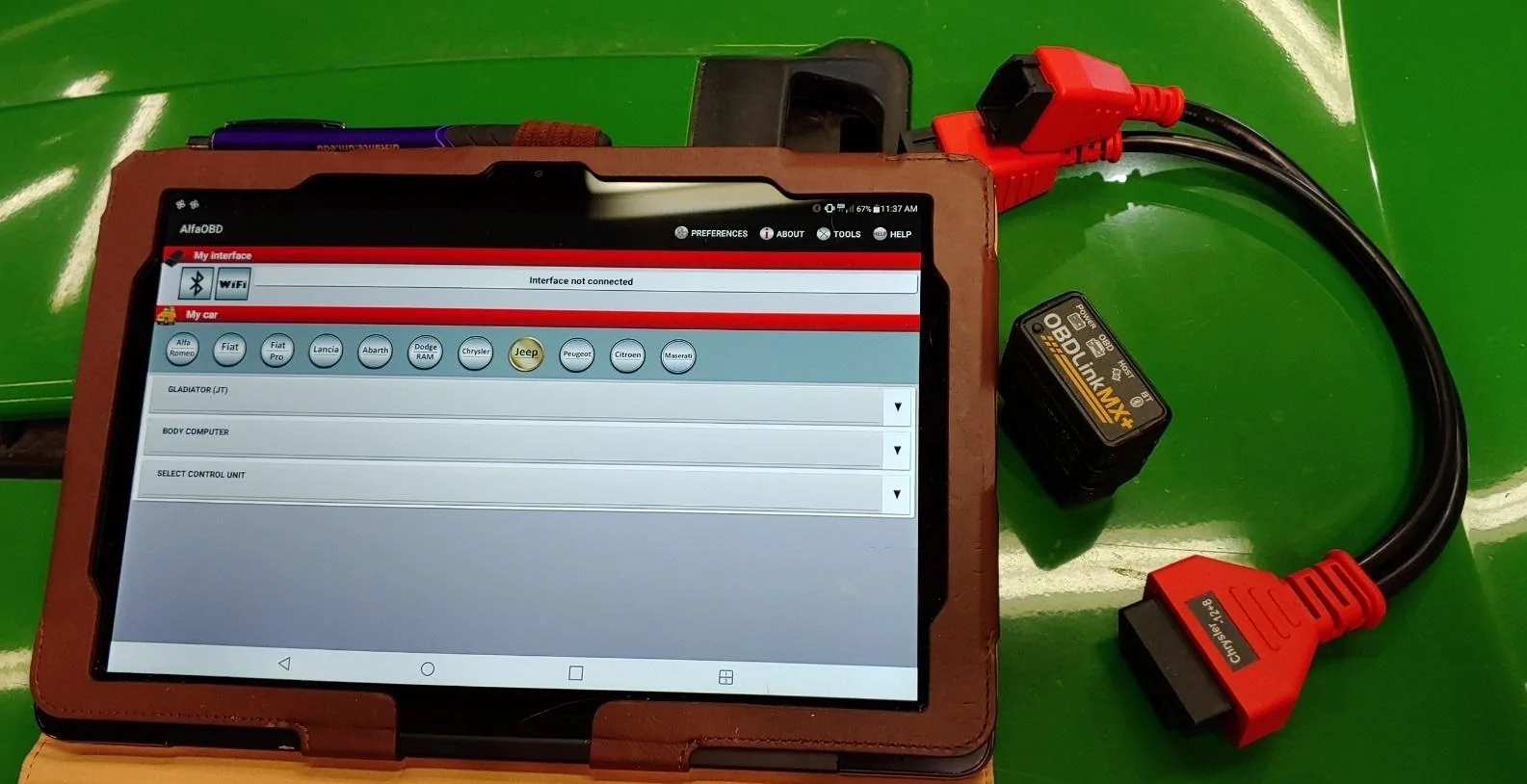
So I received my bypass cables and OBDlink mx+ the other day. I was going to use the Jscan app but someone on another thread brought up the AlfaOBD android mobile app so I figured I'd try it out.

WARNING if you do plan on using AlfaOBD please remember you can really mess up your truck if you try to change something that doesn't work with the JT!

I've tried a couple settings and it seems like a pretty robust app, confusing at first with all the different settings but once I figured things out it seems pretty easy and a little too easy to screw things up. I just wanted to start this thread to see what others have tried with this app and what has worked out. I plan on using it to change my tire size and add proximity locks when I get them installed. Can someone provide the different settings they used for the proximity?
Sponsored
 
OP
OP
gpwrang33

gpwrang33

Well-Known Member
Joined
Aug 2, 2020
Threads
7
Messages
101
Reaction score
83
Location
Albany, N.Y.
Vehicle(s)
2000 TJ 2021 Hydro Blue JTSS MAX TOW
So a couple things I've tried so far:

all window one touch - didn't work

tried a couple stop/start settings but they didn't work either

special package to the Rubicon package and you can really feel how the truck drives differently - I didn't like how it drove, it seemed rougher IMO

so not sure if its a placebo effect or not but I like to run high octane in my vehicles here in the north east for a couple reason which I'm sure others would disagree with so I'll leave it at that but there is a setting to tell the truck high octane is present and it really seemed like I had more get up and go after that setting change. It made my truck that much more fun.
 
Last edited:

1BadCtdBrute

Well-Known Member
Joined
Apr 7, 2021
Threads
1
Messages
62
Reaction score
25
Location
New Mexico
Vehicle(s)
‘99 XJ, ‘09 JKUR, ‘21 MOJAVE
Occupation
Professional killer
I’ve changed my tire size, removed tpms altogether, changed speed limit, changed drl location to turn signals, killed seatbelt reminder, and that’s all I believe would work through AlfaOBD.

I killed the ESS, and turned off AutoPark with JSCAN.
If anyone has suggestions or known working changes please post em up. I’ve done everything I can do with Alfaobd and JSCAN on my Ram 2500 CTD and I’m anxious to do more with the JTM!!

Jeep Gladiator AlfaOBD talk 1F0DEACF-E316-4B60-B42D-3CDE853ABA32
 

jsalbre

Well-Known Member
First Name
Jeremy
Joined
Mar 17, 2021
Threads
10
Messages
676
Reaction score
812
Location
Idaho
Vehicle(s)
‘21 Sarge Mojave, ‘21 VW Tiguan SEL-P RLine
Build Thread
Link
Occupation
Security Engineer, First Sergeant
I’ve changed my tire size, removed tpms altogether, changed speed limit, changed drl location to turn signals, killed seatbelt reminder, and that’s all I believe would work through AlfaOBD.

I killed the ESS, and turned off AutoPark with JSCAN.
If anyone has suggestions or known working changes please post em up. I’ve done everything I can do with Alfaobd and JSCAN on my Ram 2500 CTD and I’m anxious to do more with the JTM!!
How did you change the speed limiter with AlfaOBD and did you verify that it works?

Also, how did you disable Auto Park with JScan?
 

1BadCtdBrute

Well-Known Member
Joined
Apr 7, 2021
Threads
1
Messages
62
Reaction score
25
Location
New Mexico
Vehicle(s)
‘99 XJ, ‘09 JKUR, ‘21 MOJAVE
Occupation
Professional killer
For the speed limiter I changed the max speed setting to 120mph. I’m not near the Jeep now but I can get the steps for you. For the auto park it’s in the JSCAN programming. I dug around forever looking for a good way to disable the ESS but everything I have done always defeats the remote start as well. So I’ve been just pushing the button to disable it.
 

Sponsored

kooltoys

Well-Known Member
First Name
Tony
Joined
Dec 19, 2020
Threads
18
Messages
432
Reaction score
288
Location
Central Florida
Vehicle(s)
21 JTD, 90 300zx TT, 07 Nightrain, MB 3.0L Diesel
Occupation
AV Design/Programming
So I received my bypass cables and OBDlink mx+ the other day. I was going to use the Jscan app but someone on another thread brought up the AlfaOBD android mobile app so I figured I'd try it out.

WARNING if you do plan on using AlfaOBD please remember you can really mess up your truck if you try to change something that doesn't work with the JT!

I've tried a couple settings and it seems like a pretty robust app, confusing at first with all the different settings but once I figured things out it seems pretty easy and a little too easy to screw things up. I just wanted to start this thread to see what others have tried with this app and what has worked out. I plan on using it to change my tire size and add proximity locks when I get them installed. Can someone provide the different settings they used for the proximity?
I need to enable heated/ventilated seats.. still need a few xtra parts to get electrical side of seat working. I bought Alpha on my phone, I think I like the pc app better.. (I old school and hate looking at my phone)
 
OP
OP
gpwrang33

gpwrang33

Well-Known Member
Joined
Aug 2, 2020
Threads
7
Messages
101
Reaction score
83
Location
Albany, N.Y.
Vehicle(s)
2000 TJ 2021 Hydro Blue JTSS MAX TOW
I need to enable heated/ventilated seats.. still need a few xtra parts to get electrical side of seat working. I bought Alpha on my phone, I think I like the pc app better.. (I old school and hate looking at my phone)
I haven't used the pc app before so I'm not sure the difference but I get what your saying. It is a little difficult to find things while scrolling through the phone app. I just wish there was a way to find out what certain things are suppose to do and if the JT can actually do it. There's no definition page.
 

TimJohanson

Member
First Name
Tim
Joined
Jun 1, 2021
Threads
0
Messages
22
Reaction score
92
Location
USA
Vehicle(s)
2020 Gladiator sport
Vehicle Showcase
1
I’ve changed my tire size, removed tpms altogether, changed speed limit, changed drl location to turn signals, killed seatbelt reminder, and that’s all I believe would work through AlfaOBD.

I killed the ESS, and turned off AutoPark with JSCAN.
If anyone has suggestions or known working changes please post em up. I’ve done everything I can do with Alfaobd and JSCAN on my Ram 2500 CTD and I’m anxious to do more with the JTM!!

1F0DEACF-E316-4B60-B42D-3CDE853ABA32.jpeg
I just used alpha obd+ to tell the computer I installed led turnsignal and driving light bulbs.
 

1BadCtdBrute

Well-Known Member
Joined
Apr 7, 2021
Threads
1
Messages
62
Reaction score
25
Location
New Mexico
Vehicle(s)
‘99 XJ, ‘09 JKUR, ‘21 MOJAVE
Occupation
Professional killer
Lighting upgrades are just the top of the iceberg for AlfaOBD. Just be careful of the changes made. Some cause chaos. But if you know what was changed it’s easy to revert it back.
 

Sponsored

ShadowsPapa

Well-Known Member
First Name
Bill
Joined
Oct 12, 2019
Threads
247
Messages
40,440
Reaction score
53,853
Location
Runnells, Iowa
Vehicle(s)
'25 JTMX, '23 JLU 4xe, '82 SX4, '73 Javelin
Occupation
Retired auto mechanic, frmr gov't ntwrk security admin
Vehicle Showcase
3
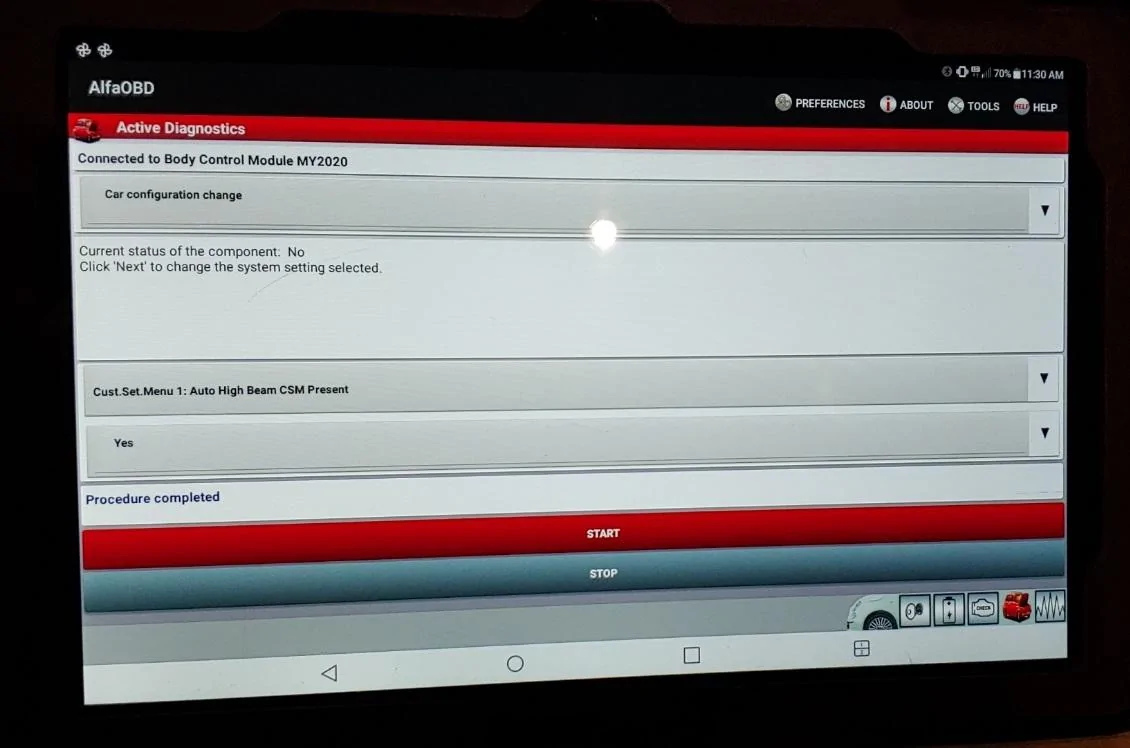
the passive entry changes are in that thread. I posted what I did as far as passive entry and auto high beam headlights.

But - instead of my linking to those settings in that 3,000,000 page thread, here it is -

AP1 Left front > smart switch

AP2 right front > smart switch

Passive entry present > yes/ active

Passive entry CSM > yes/ active
(CSM is the CustSetMenu and makes the option show up in the settings menu in the radio)

Are you SURE you turned off auto-park in the truck? Some have said it's not possible. Park sense isn't the same thing. Try leaving the door open a tad and putting it in reverse and trying to back up......
JSCAN isn't nearly as powerful as AlfaOBD so if the latter can't do it, I strongly doubt jscan could. And like I said - others here have said "not possible" since it's a safety feature they have locked down. Interesting to see if you've actually tried to back up with the door open. (seat belt both on and off)

ESS also has to be disabled by a live device since it's locked down and not selectable. The system has to be told each restart as it resets to active at each restart so you can't "program" that. Tazer works because each restart it tells the ECU that the button is pushed again. There's not a check box for that that can be changed so software can't do it.

Sorry, folks - some things just aren't ever going to be possible via software.

I use AlfaOBD on my tablet - a heck of a lot easier to maneuver and use and READ the screen.
I also used it to log the misfires on my wife's Jeep, printed the log and gave to the dealer to show what was going on.
Nice thing is - once you own it, you own it. It's not locked in to a single VIN. Ram truck owners seem to love it. I've used it several times on both Jeeps.

Jeep Gladiator AlfaOBD talk 20210110_113706


Jeep Gladiator AlfaOBD talk 20210110_113058
 

Zlewis

Member
First Name
Zach
Joined
Dec 19, 2021
Threads
3
Messages
9
Reaction score
1
Location
Colorado
Vehicle(s)
Gladiator Rubicon Ecodiesel
I’ve changed my tire size, removed tpms altogether, changed speed limit, changed drl location to turn signals, killed seatbelt reminder, and that’s all I believe would work through AlfaOBD.

I killed the ESS, and turned off AutoPark with JSCAN.
If anyone has suggestions or known working changes please post em up. I’ve done everything I can do with Alfaobd and JSCAN on my Ram 2500 CTD and I’m anxious to do more with the JTM!!

1F0DEACF-E316-4B60-B42D-3CDE853ABA32.jpeg
What Security Bypass Module and OBD dongle are you using?
 

1BadCtdBrute

Well-Known Member
Joined
Apr 7, 2021
Threads
1
Messages
62
Reaction score
25
Location
New Mexico
Vehicle(s)
‘99 XJ, ‘09 JKUR, ‘21 MOJAVE
Occupation
Professional killer
I had the cheapest Amazon bypass I found for the application and I already had the dongle, which is the “OBDLINK MX+”. I don’t use the bypass for this Jeep anymore since I have the HPTuners bypass that has the dual OBD ports. I still believe the Alfaobd is hands down the best choice for any Mopar. I use it on all my Mopars from my 09 JKUR, 13 CTD, 21 JTM, and my new ‘22 TRX.
 

ShadowsPapa

Well-Known Member
First Name
Bill
Joined
Oct 12, 2019
Threads
247
Messages
40,440
Reaction score
53,853
Location
Runnells, Iowa
Vehicle(s)
'25 JTMX, '23 JLU 4xe, '82 SX4, '73 Javelin
Occupation
Retired auto mechanic, frmr gov't ntwrk security admin
Vehicle Showcase
3
I had the cheapest Amazon bypass I found for the application and I already had the dongle, which is the “OBDLINK MX+”. I don’t use the bypass for this Jeep anymore since I have the HPTuners bypass that has the dual OBD ports. I still believe the Alfaobd is hands down the best choice for any Mopar. I use it on all my Mopars from my 09 JKUR, 13 CTD, 21 JTM, and my new ‘22 TRX.
AlfaOBD doesn't recognize 2022 jeeps yet though. They are stuck at 2021. I asked and there isn't 2022 support for wrangler and jt modules yet.
 

Idlethunder

Well-Known Member
First Name
David
Joined
Mar 22, 2022
Threads
13
Messages
741
Reaction score
921
Location
Oklahoma
Vehicle(s)
2022 JTR, 23 JTRD
Occupation
Manufacturing
I email Alexey every month or so to ask when the 22 JTs will be added so he will know people want it. The last reply I got was 2 days ago and said, “Hope to add more support in the next update, but I’m not sure when I will release it yet…”
Sponsored


Top