Sponsored

ecidiego

Well-Known Member
First Name
Chris
Joined
Nov 3, 2021
Threads
62
Messages
3,625
Reaction score
5,580
Location
San Diego
Vehicle(s)
2021 Gladiator Mojave
Occupation
IT
Yeah, that’s what I’m afraid of… getting to that thing is a b!%6h!
It doesn't even need to be there....if you do indeed have to swap it....you should move it under the seat or something. Just extend the CAN connector. All of the coax are already so long you can put it anywhere else in the cab. Maybe you can even use the CAN connector behind the glove box.
 

ecidiego

Well-Known Member
First Name
Chris
Joined
Nov 3, 2021
Threads
62
Messages
3,625
Reaction score
5,580
Location
San Diego
Vehicle(s)
2021 Gladiator Mojave
Occupation
IT
So I've started having intermittent blue and green screens in both front/rear cam. When it happens, it happens to both. Sometimes the picture skips and freezes up. Since it's consistently across both cams when it happens, I'm inclined to think it's a cable to the control module or the module itself. Also, I can be sitting and it'll stop working, start working... so thinking it's not a connector as I can bounce the truck around and doesn't seem to affect it. Curious if anyone else has experienced this that added the trail cam themselves.

Edit: Could moisture in the connectors cause this? Wondering I some dielectric grease in the cam connectors might help.
Pretty sure you can scan codes from CVPM. Check that first....then I'd check the connector in the passenger kick panel that connects the 8.4 to the cvpm. Knock out easy stuff before you take the damn back panel off again.
 

atxatxatx

Well-Known Member
Joined
Aug 13, 2020
Threads
4
Messages
380
Reaction score
535
Location
Washington
Vehicle(s)
WK2Grand Cherokee,Gladiator Mojave
So I've started having intermittent blue and green screens in both front/rear cam. When it happens, it happens to both. Sometimes the picture skips and freezes up. Since it's consistently across both cams when it happens, I'm inclined to think it's a cable to the control module or the module itself. Also, I can be sitting and it'll stop working, start working... so thinking it's not a connector as I can bounce the truck around and doesn't seem to affect it. Curious if anyone else has experienced this that added the trail cam themselves.

Edit: Could moisture in the connectors cause this? Wondering I some dielectric grease in the cam connectors might help.
do you have a Tazer installed ? While rare it can cause this issue also. just something else to consider before you get too deep on troubleshooting, unpair the Tazer and see how it is.

I've seen the blue screen also
 

Sponsored

ecidiego

Well-Known Member
First Name
Chris
Joined
Nov 3, 2021
Threads
62
Messages
3,625
Reaction score
5,580
Location
San Diego
Vehicle(s)
2021 Gladiator Mojave
Occupation
IT
do you have a Tazer installed ? While rare it can cause this issue also. just something else to consider before you get too deep on troubleshooting, unpair the Tazer and see how it is.

I've seen the blue screen also
Looks like he does...
 

WK2JT

Well-Known Member
First Name
Darren
Joined
Mar 11, 2020
Threads
18
Messages
806
Reaction score
832
Location
Highlands Ranch, CO
Vehicle(s)
JTC
Vehicle Showcase
1
Looks like he does...
Yeah, haven’t even considered the tazer. If I was to do this install again, I’d definitely put it behind the glovebox. There’s plenty of room back there. That back panel just isn’t worth it.

Thanks for all the suggestions. Took the cam connections apart and blew them out. Kick panel was next in line. Then thinking about checking my 12v connection. I have it behind the HVAC controls tapped into the 12V port.
 

ecidiego

Well-Known Member
First Name
Chris
Joined
Nov 3, 2021
Threads
62
Messages
3,625
Reaction score
5,580
Location
San Diego
Vehicle(s)
2021 Gladiator Mojave
Occupation
IT
For future installers - we vets have 2 suggestions:

1. Don't install the CVPM behind the rear cab trim - insane labor and insane clip breakage. While it's "OEM" to put it there - there is really no need. A future guy or gal doing this should place it somewhere more convenient, and document the needed cable lengths to do so. @Jimmy07 - can they just plug into the glove box CAN bus? Not sure which bus that is.

2. At the grille - don't run the CVPM to front camera coax as ONE cable. Stop it right at the radiator support, and add a second cable going to the camera. Now you can remove the front grille without having to cut all of the cable routing ties in the grille for the camera cable.
 

WK2JT

Well-Known Member
First Name
Darren
Joined
Mar 11, 2020
Threads
18
Messages
806
Reaction score
832
Location
Highlands Ranch, CO
Vehicle(s)
JTC
Vehicle Showcase
1
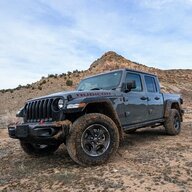
Me waiting for @WK2JT to fix his camera subsystem:

cnF6bi5qcGc.webp
So it’s been a minute and I got locked out of my account with a password update, so wanted to give an update. So far all I’ve done is disconnect the rear cam, blow out the connectors, and reconnect. I recall reading somewhere the rear cam giving someone else issues. I’m very skeptical this was the issue, but it hasn’t had an episode since. It was happening every time I drove, but my logic was a single camera wouldn’t cause both to exhibit issues. ?‍♂ I’ll update if it returns or this was the fix.
 

Sponsored

WK2JT

Well-Known Member
First Name
Darren
Joined
Mar 11, 2020
Threads
18
Messages
806
Reaction score
832
Location
Highlands Ranch, CO
Vehicle(s)
JTC
Vehicle Showcase
1
So it’s been a minute and I got locked out of my account with a password update, so wanted to give an update. So far all I’ve done is disconnect the rear cam, blow out the connectors, and reconnect. I recall reading somewhere the rear cam giving someone else issues. I’m very skeptical this was the issue, but it hasn’t had an episode since. It was happening every time I drove, but my logic was a single camera wouldn’t cause both to exhibit issues. ?‍♂ I’ll update if it returns or this was the fix.
So I was lurking on the JL forum and someone mentioned the last UConnect, update about a month ago, caused some “flakiness” with his cam. Then about a week ago, a second update came out. It’s very unusually for UConnect updates to come so close together. Usually a year or more apart.

So this got me thinking… I did not pay attention to when my issue started and when that initial update pushed out. It never dawned on me that might have been a contributing factor.

Again, not paying attention, but I do know the cam issue went away soonish to the latest update last week or so. Sooo… I’m thinking there might not have been an issue with my install after all and perhaps it was that initial UConnect update. So damn glad I didn’t rip the back bulkhead out again. Whew!
 

Alc

Well-Known Member
First Name
Doug
Joined
Apr 30, 2023
Threads
7
Messages
173
Reaction score
144
Location
USA
Vehicle(s)
Jeep Gladiator
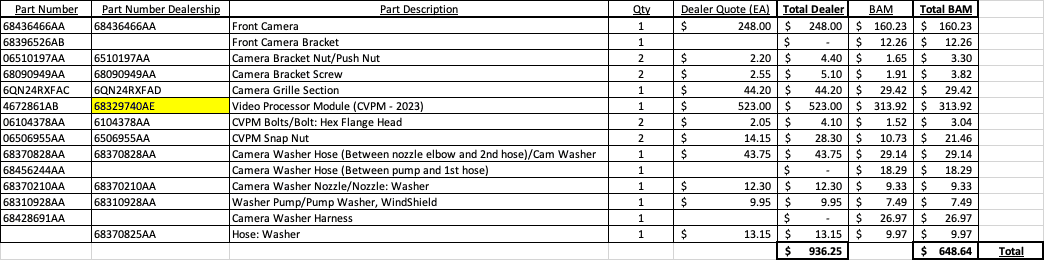
Newb here. Just picked up my 2023 Gladiator Rubicon that was almost fully loaded…almost. You guessed it, it’s missing the trail cam. Using this thread I had the dealership thinking they could do the install then they backed out quoting me 25 hours of labor and then “it’s impossible”. I was able to secure the dealership purchasing all the parts except the Farka wires and custom CAN wires that Jimmy can make. The dealership (and I) can't figure out the correct CVPM part number. They only have the one for 2020 and I saw there is a 2021-22 version. Anyone know if there is a different 2023 version of the CVPM and its associated part number? Here's what I have so far for parts:
Jeep Gladiator HOW TO: Add Factory Front Trail Camera to Gladiator (DIY Writeup) 1683815336725


Questions:
1. Anyone know the part number of the 2023 Gladiator CVPM?

2. What am I missing other than the Farkas and custom CAN wire?

3. After completing this install is the rear camera going to be as clear as it is now? It's a clear digital picture but I assume the CVPM lowers the quality.

4. Can the CVPM just plug into the glove box CAN bus as referenced above? This would greatly reduce labor and might make it possible for more owners to complete this mod.

5. Just to be clear, why do I need another rearview camera? Is it because the CVPM cannot convert the digital signal or is there something else I do not yet understand?

Thank for all the help, definitely looks like a huge project and hopefully I can install the CVPM in a different location since it sounds like its a bit over the top behind the rear seat.
 

vishnu

Member
First Name
Vishnu
Joined
May 15, 2023
Threads
0
Messages
22
Reaction score
4
Vehicle(s)
2021 Jeep Gladiator Rubicon
Occupation
Infrastructure Engineer
Finally, you need to enable the system in the BCM to get it working. You’re going to have to use AlfaOBD to do this, as the sales code for the integrated trail cam system won’t be available for your VIN. Yes, I realize @bryanklay was able to get it added to his, but he got extremely lucky that they allowed it, and don’t expect this to be the case for everyone. In order to attempt to get a sales code added to your VIN build that is unavailable, you have to convince the dealer service advisor to contact the area FCA rep. HE has to convince the area rep to call FCA and in turn convince engineering to make the sales code available to add for your VIN, and they could easily say “NO, end of discussion”. EVEN AFTER they allowed it for Bryan, when they added the sales code and restored his vehicle configuration, it still didn’t work. It didn’t enable all the necessary BCM settings. So, rather than roll the dice with the dealer, and potentially wasting hourly rate money, just use AlfaOBD to get it done right the first time. Inevitably, people are going to wonder about their warranty with using AlfaOBD. First off, you’re already installing hardware onto your vehicle that isn’t going to be covered anyway if something goes wrong with that hardware. Second, AlfaOBD is changing the exact same bits in the BCM configuration that adding the sales code does, so technically speaking, it’s enabled the exact same way as factory. And last, the dealer can’t read the BCM configuration to see what changes have been made.

Software: AlfaOBD- Android app from google play store, or windows version download from http://www.alfaobd.com/download.html
Android will work, but windows is more powerful/preferred.
OBD interface so AlfaOBD can interface with vehicle modules- OBD Link MX+ is preferred, and will without a doubt make any change possible with no issue. People have had success using BAFX OBD Bluetooth, but it may come across some settings changes it’s not fast enough to make.
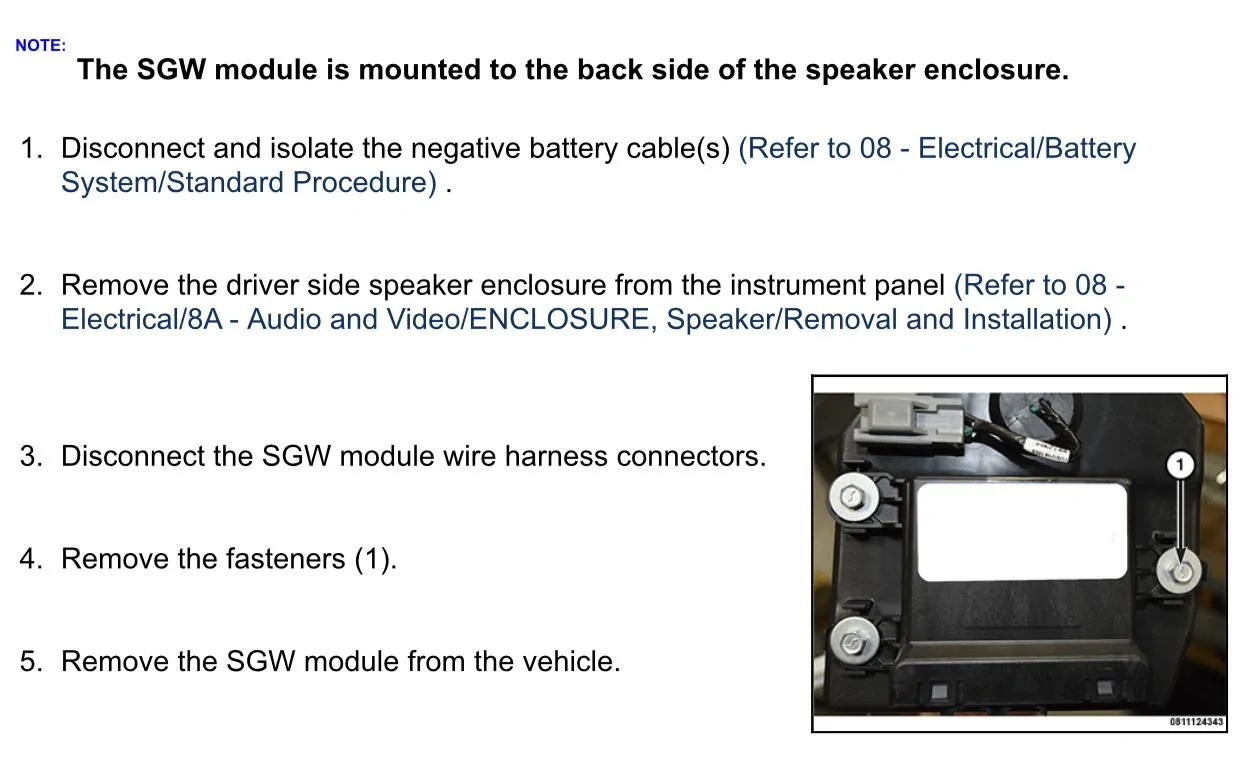
Security gateway module bypass (to allow the BCM settings changes to be made)- https://www.infotainment.com/products/fca-security-gateway-module-bypass?variant=8775773945892
To get started, unplug the security gateway module under the steering column, and plug in the bypass-
5HmAFpR.jpg

Plug the interface into the OBD port, and pair it to your Android device or windows computer. Open up AlfaOBD. For the Android version, connect to the interface. Choose your vehicle brand and model. Select body computer in the drop down, then select MY2020-2021 in the next drop down. Select connect, and once connected, *the first thing you want to do is save your current configuration so you have something to go by if you enable/disable some wrong settings by accident*. Select the faults and status tab. For Android, select the battery icon on the bottom right. Select read system ID, and let it fully populate. For windows, select view log, then “save as” anything or anywhere you want. For Android, once the system ID is read, it is automatically saved into a file in AlfaOBD. Once that’s done, click the active diagnostics tab. For the Android version, this is the little car in the bottom right. Drop down the menu and choose car configuration change towards the bottom. On the next drop down, find all the settings listed below and set each one how to what I have listed. For each setting, you will choose yes/no, or enable/disable. You’ll hit start, then next, then wait for procedure complete. Hit start one more time, and it will confirm the change by saying nothing else needs to be done. Move right on the the next setting change. No need to power off or wait between changes. These are all the settings changes that need to be made/confirmed:
VehConfig 1 rear view camera- NO
VehConfig 2 off road capable- YES
VehConfig 8 off road camera present- YES
ECUConfig 3 rear camera present- NO
CBC Features reversible washer pump enabled- YES
CBC Config I/O connector A pin 14- YES
CustSetMenu 1 Rear View Camera Gridlines CSM Present- NO
CustSetMenu 1 Rear Camera CSM Present- NO
CustSetMenu 3 Auto Launch Forward Facing Camera Off Road Plus CSM Present- NO
CustSetMenu 3 Auto Launch Off Road Plus CSM Present- YES
CustSetMenu 3 Forward Facing Camera Gridlines CSM Present- YES
CustSetMenu 3 Rear CVPM Camera Dynamic Gridlines CSM Present- YES
CustSetMenu 3 Rear CVPM Camera Static Gridlines CSM Present- YES
Cabin Net CVPM central vision processing- YES
Once these are changed, close the software. It will take several drive cycles and some time for all the settings changes to take effect. After that, you’re done, and will have the fully functioning integrated trail cam system.
Special thanks to @bryanklay. It’s been a pleasure helping him get this up and running. Very knowledgeable, and immediately picked up on, and understood everything I explained to him, and made remote troubleshooting and brainstorming a breeze! He’s going to get the new rear camera installed later this weekend, and we’re confident that will wrap up his full installation.
@Jimmy07 Thanks for the excellent write up (and the CVPM harness). I just finished my install and programmed via AlfaODB. I'm wondering if you can explain "takes several drive cycles and some time for all the settings changes to take effect"? I would think setting changes would be immediate, so this boggles my mind. And what's the definition of a drive cycle? Is there any way to accelerate this, as I want instant gratification for my weekend of work. ?

Thanks again,

Vishnu
 

ecidiego

Well-Known Member
First Name
Chris
Joined
Nov 3, 2021
Threads
62
Messages
3,625
Reaction score
5,580
Location
San Diego
Vehicle(s)
2021 Gladiator Mojave
Occupation
IT
@Jimmy07 Thanks for the excellent write up (and the CVPM harness). I just finished my install and programmed via AlfaODB. I'm wondering if you can explain "takes several drive cycles and some time for all the settings changes to take effect"? I would think setting changes would be immediate, so this boggles my mind. And what's the definition of a drive cycle? Is there any way to accelerate this, as I want instant gratification for my weekend of work. ?

Thanks again,

Vishnu
You can do battery disconnect cycles and other stuff to make it faster.

My advice...go to bed and wait 24 hrs. If you did everything correctly ( and got the correct CVPM ), it will be there in the morning..
 

vishnu

Member
First Name
Vishnu
Joined
May 15, 2023
Threads
0
Messages
22
Reaction score
4
Vehicle(s)
2021 Jeep Gladiator Rubicon
Occupation
Infrastructure Engineer
You can do battery disconnect cycles and other stuff to make it faster.

My advice...go to bed and wait 24 hrs. If you did everything correctly ( and got the correct CVPM ), it will be there in the morning..
You're right, patience is a virtue. I'm an IT engineer, so I really do want to know the technical side of why you have to wait. That would satisfy my curiosity, if anyone knows...

I've got the front camera this morning, but checking through things I do still have a little weirdness. So, maybe not completely updated yet?

For example, my clean camera button actually cleans my windshield (and not the camera). Windshield wash on the steering column cleans the windshield AND the camera. I did swap the washer harness...

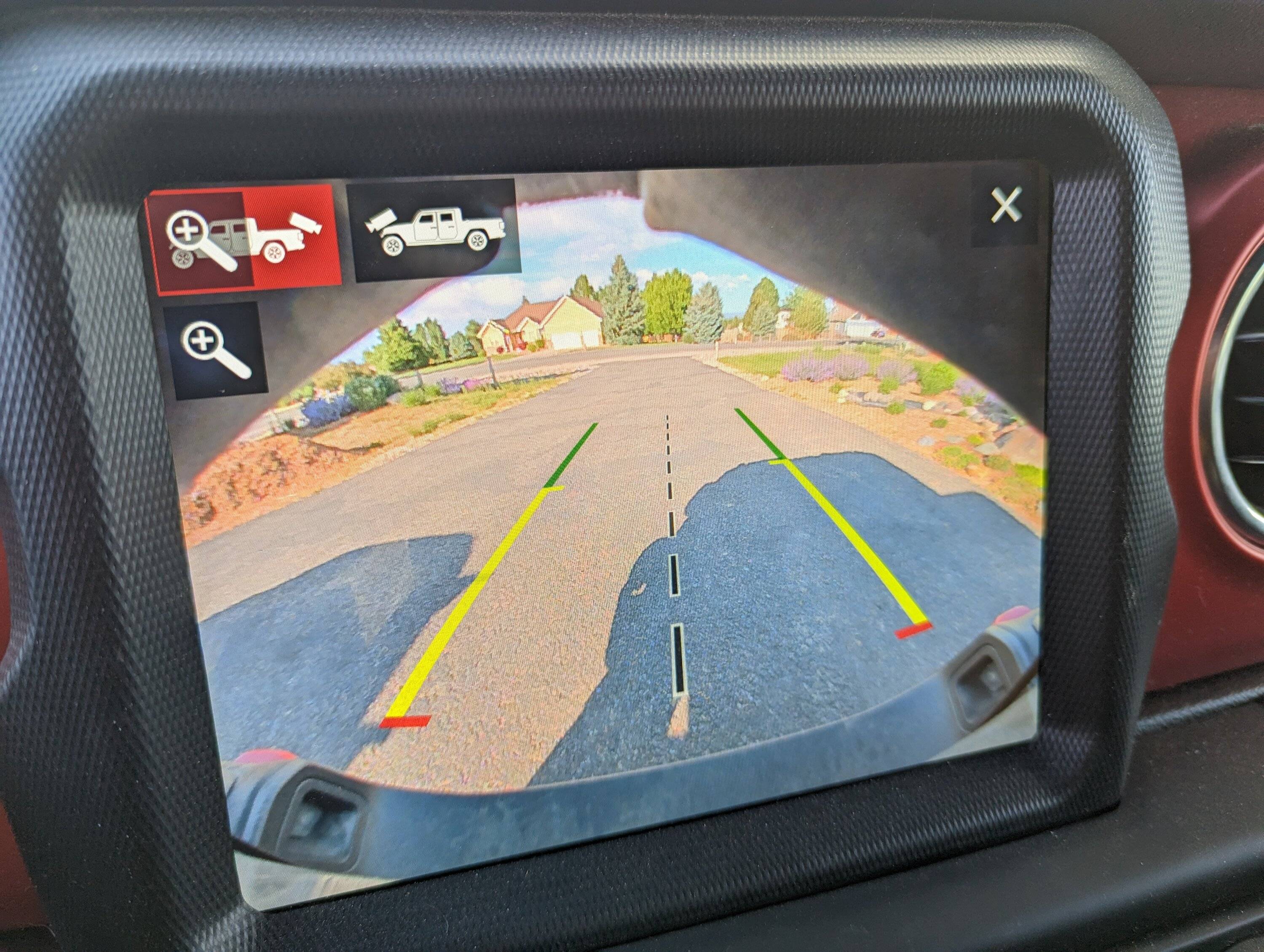
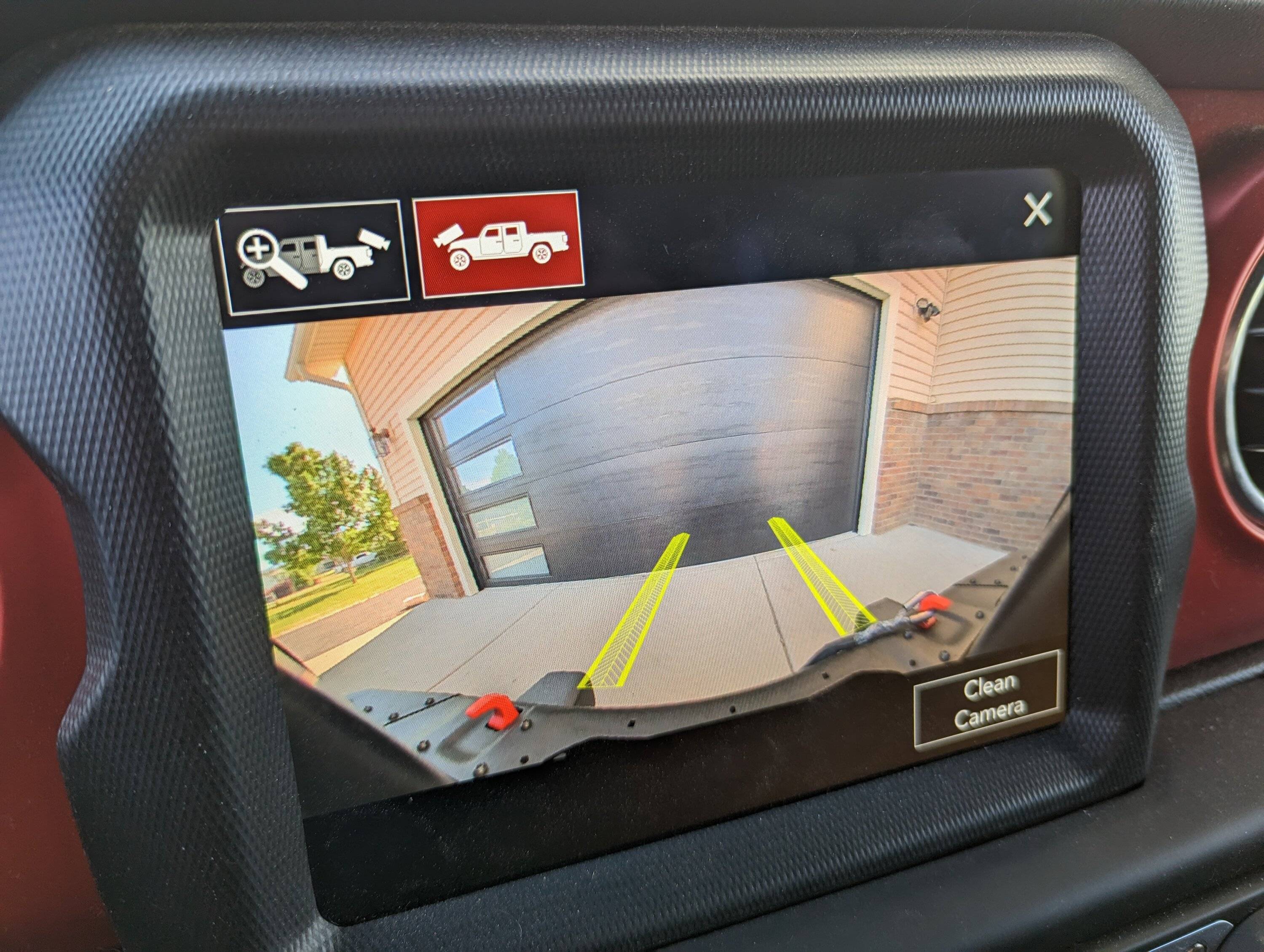
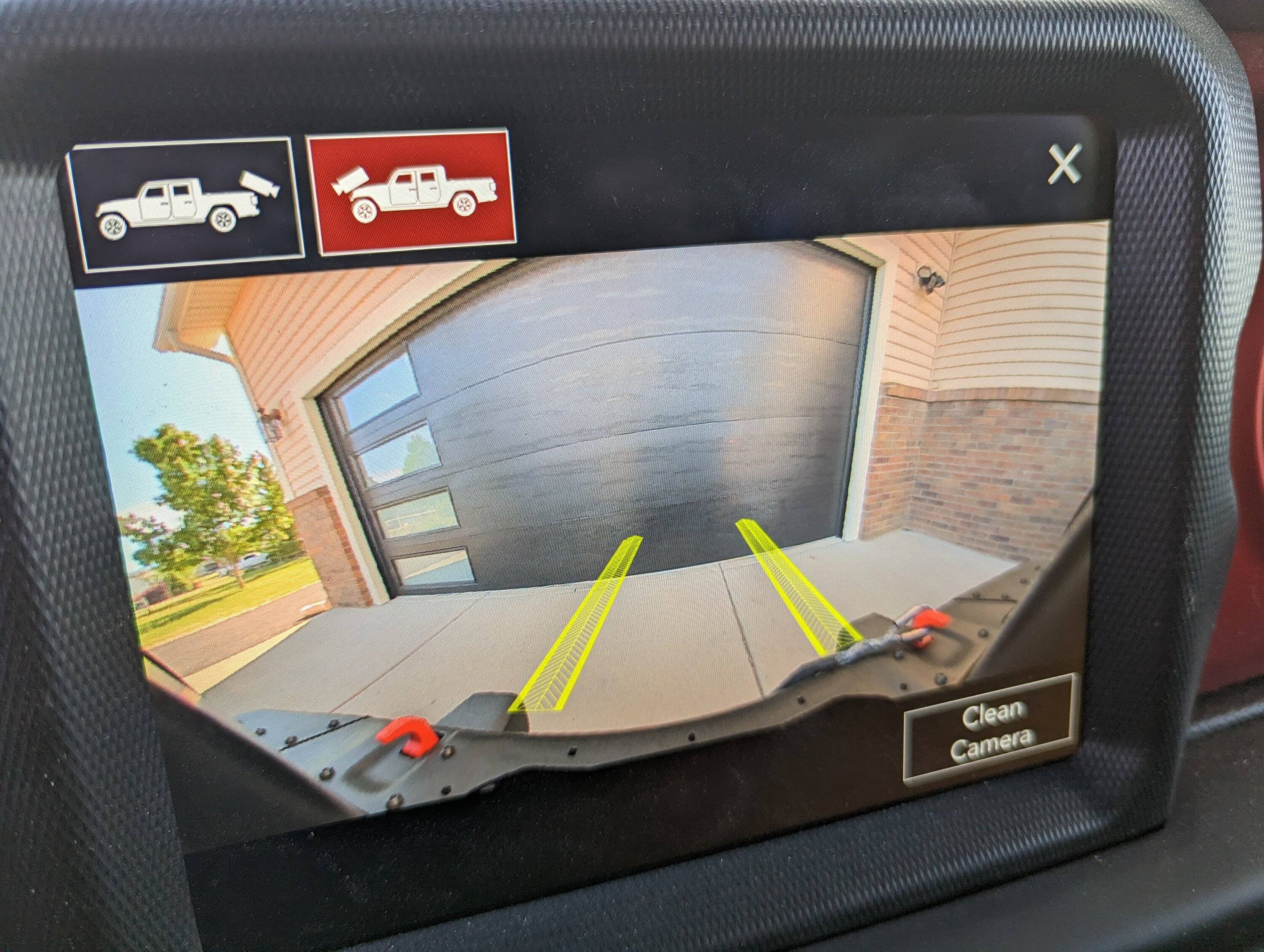
I've also got an extra zoom button if I go into the rear camera, that also persists when I push the front camera button:
Jeep Gladiator HOW TO: Add Factory Front Trail Camera to Gladiator (DIY Writeup) PXL_20230612_142939592.MP

Jeep Gladiator HOW TO: Add Factory Front Trail Camera to Gladiator (DIY Writeup) PXL_20230612_143027321.MP


It's not there if I go into the Trailcam from the front camera button:
Jeep Gladiator HOW TO: Add Factory Front Trail Camera to Gladiator (DIY Writeup) PXL_20230612_143105007.MP


So a bit of weirdness still that I hope will iron itself out, but I think I feel confident enough that I can put my interior back together!
Sponsored


Top