Sponsored

Mr._Bill

Well-Known Member
First Name
Bill
Joined
Jul 22, 2019
Threads
38
Messages
6,646
Reaction score
7,727
Location
North Las Vegas, NV
Vehicle(s)
2023 Gladiator High Altitude - 2013 Nissan Leaf SV
Vehicle Showcase
1
Nice write up, and I am interested in the update. I will check what version I have prior to a possible brick. Wife would kill me, although you may get a good deal on a used gladiator with a broken radio :LOL:. Do you know if you need to do anything if we have a Tazer hooked up? Should it be removed first?
This would be comparable to a Dealer Service visit. ZAutomotive recommends that the Tazer be unmarried and removed before any visit to the dealer.
Sponsored


ScoutVet19D

Well-Known Member
First Name
J
Joined
May 29, 2024
Threads
2
Messages
53
Reaction score
106
Location
Indiana
Vehicle(s)
20 Gladiator Rubicon, 23 Grand Cherokee L
Occupation
Veteran U.S. Army Cav Scout, former Lvl II Structural and Wildland firefighter
Thanks DailyDrivenTJ,

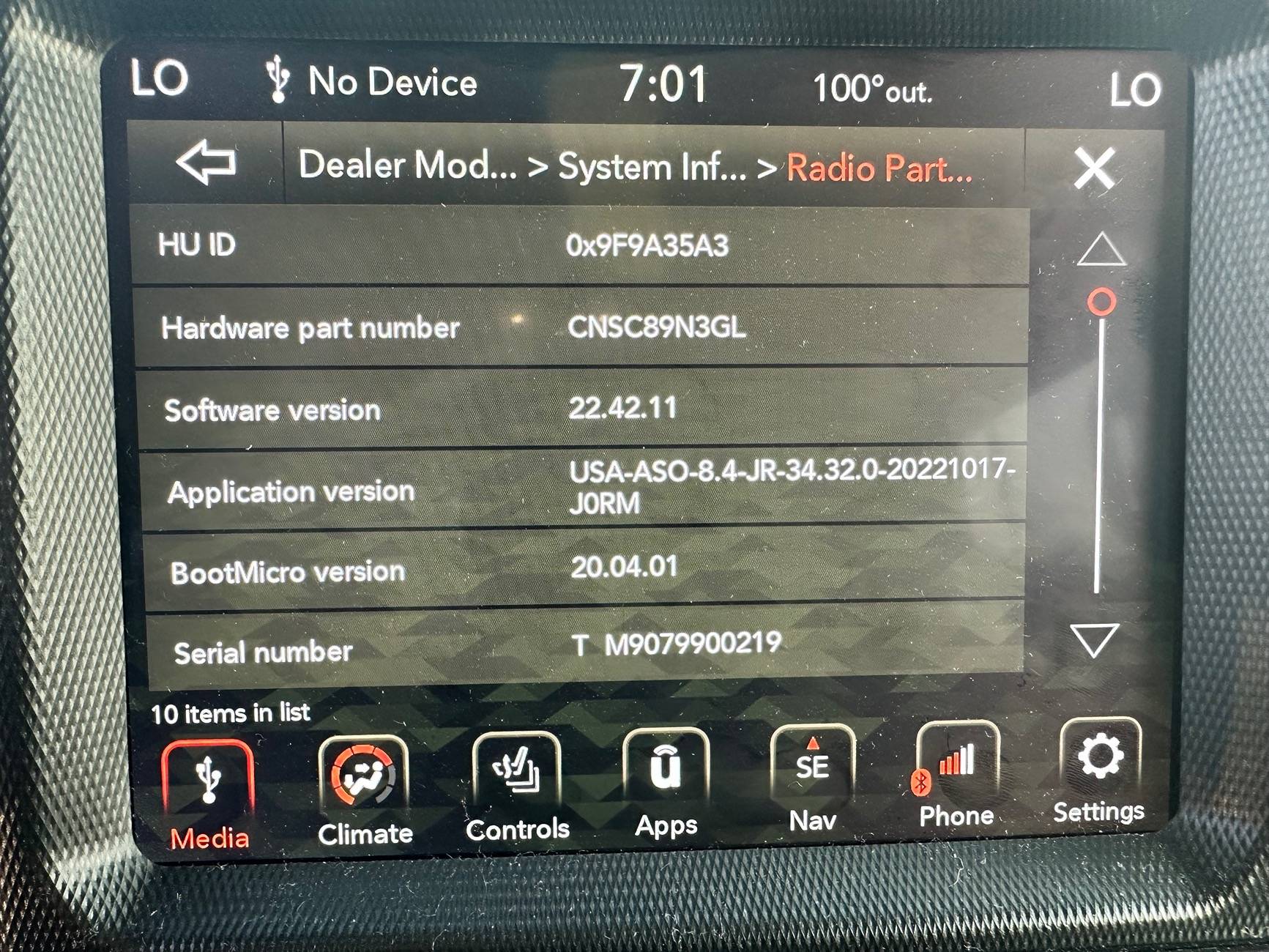
Great write up. I did the update on mine this evening following your instructions. Worked great. I bought a used 2020 JTR in April (7th Jeep I’ve owned) and I don’t know how old V 22.42.11 is but I’m guessing its a fairly old version. Only problem I had was getting the head unit to switch to the dealer service screen to see what version mine was using. Tried like six times pushing the end app buttons and then it came up.

After downloading to a USB drive I started the truck, put in the USB (2GB sandisk using FAT32) and got the count down screen, let it run till the update progress bar appeared and waited for it to complete and power of and then on the HU. Didn’t touch it during the update install. All of my stored info came back right away after the HU powered down and back on when the install was done. NAV is definitely better and CarPlay seems less glitchy. Everything else seems to respond better but can’t prove that so might just be my imagination.

Jeep Gladiator How to: Update UConnect 8.4" via USB drive. IMG_1291
 
Last edited:
OP
OP
DailyDrivenTJ

DailyDrivenTJ

Well-Known Member
First Name
Michael
Joined
Nov 19, 2023
Threads
22
Messages
319
Reaction score
226
Location
PNW
Vehicle(s)
2023 JTRD, 1999 TJ-6 HEMI, 1998TJ, 2000 XJ 4.6L
Thanks DailyDrivenTJ,

Great write up. I did the update on mine this evening following your instructions. Worked great. I bought a used 2020 JTR in April (7th Jeep I’ve owned) and I don’t know how old V 34.32 is but I’m guessing its a fairly old version. ..
...done. NAV is definitely better and CarPlay seems less glitchy. Everything else seems to respond better but can’t prove that so might just be my imagination.
I am glad it worked out for you!

@Bakerboy
You should try updating with Tazer and see if the upgrade works. I think I vaguely remember reading that someone did the upgrade with Tazer and it worked fine. BTW. If you brick it, it is still yours. ;) YMMV.
 

DivrGuy

Member
First Name
Mark
Joined
Jan 15, 2024
Threads
4
Messages
24
Reaction score
12
Location
Southern GA
Vehicle(s)
2023 Jeep Gladiator Willys
Nice write up, and I am interested in the update. I will check what version I have prior to a possible brick. Wife would kill me, although you may get a good deal on a used gladiator with a broken radio :LOL:. Do you know if you need to do anything if we have a Tazer hooked up? Should it be removed first?
A couple months ago I updated by 2019 Ram with 12" screen using this method. I have a Tazer plugged in and it worked fine. My Gladi is a 2023 so I have no need to try with it.
 

JTR178

Well-Known Member
Joined
Apr 27, 2021
Threads
8
Messages
479
Reaction score
843
Location
Goose Creek, SC
Vehicle(s)
2020 Rubicon
Occupation
5-0
I am glad it worked out for you!

@Bakerboy
You should try updating with Tazer and see if the upgrade works. I think I vaguely remember reading that someone did the upgrade with Tazer and it worked fine. BTW. If you brick it, it is still yours. ;) YMMV.
I left my Taser plugged in. No issues.
 

Sponsored

Stan H

Well-Known Member
First Name
Stanley
Joined
Oct 26, 2022
Threads
10
Messages
5,481
Reaction score
5,461
Location
WV
Vehicle(s)
Gladiator Rubicon 2021
Occupation
Safety Consultant

Stan H

Well-Known Member
First Name
Stanley
Joined
Oct 26, 2022
Threads
10
Messages
5,481
Reaction score
5,461
Location
WV
Vehicle(s)
Gladiator Rubicon 2021
Occupation
Safety Consultant
Mine has NEVER EVER received a single OTA update EVER.. it is the original version for 2021. Works just fine no problems.
 
OP
OP
DailyDrivenTJ

DailyDrivenTJ

Well-Known Member
First Name
Michael
Joined
Nov 19, 2023
Threads
22
Messages
319
Reaction score
226
Location
PNW
Vehicle(s)
2023 JTRD, 1999 TJ-6 HEMI, 1998TJ, 2000 XJ 4.6L
Mine has NEVER EVER received a single OTA update EVER.. it is the original version for 2021. Works just fine no problems.
I have never received any update for my 2023 either but my unit did not have the latest software. The Uconnect website said my VIN had the latest when it didn't.

You have version 39.62 which is not the latest.
 

Stan H

Well-Known Member
First Name
Stanley
Joined
Oct 26, 2022
Threads
10
Messages
5,481
Reaction score
5,461
Location
WV
Vehicle(s)
Gladiator Rubicon 2021
Occupation
Safety Consultant
I have never received any update for my 2023 either but my unit did not have the latest software. The Uconnect website said my VIN had the latest when it didn't.

You have version 39.62 which is not the latest.
What is the latest ?
 

Sponsored

OP
OP
DailyDrivenTJ

DailyDrivenTJ

Well-Known Member
First Name
Michael
Joined
Nov 19, 2023
Threads
22
Messages
319
Reaction score
226
Location
PNW
Vehicle(s)
2023 JTRD, 1999 TJ-6 HEMI, 1998TJ, 2000 XJ 4.6L
What is the latest ?
40.12 I believe. The update presented on this guide has more updated version than what is in your truck.
 

Gvsukids

Well-Known Member
First Name
Justin
Joined
Mar 7, 2020
Threads
26
Messages
7,265
Reaction score
6,899
Location
Grand Rapids
Website
www.youtube.com
Vehicle(s)
2020 Gladiator Sport S Max Tow
Occupation
Delivery Driver
Mine has NEVER EVER received a single OTA update EVER.. it is the original version for 2021. Works just fine no problems.
Mine updated from 34.23.
 
Last edited:

Redfour5

Well-Known Member
First Name
Karl
Joined
Nov 18, 2023
Threads
28
Messages
499
Reaction score
387
Location
Montana
Vehicle(s)
Jeep Renegade, Cherokee, Ram 2500 Hemi,
Occupation
Retired
In the midst of debugging my TrailCam installation for my 2023 JTRD, I stumbled upon updating UConnect Stereo via USB A connection available to the right side of the window controls on JL/JT and other Jeep platforms. However, I found no sepcific guide available for JTs. So here I am, writing it.

From what I read, the Over The Air (OTA) update is no longer pushed out by Uconnect/Chrysler for the newer Jeeps and that the updates are only provided by the dealers. It sorta makes sense as the update is over 1GB and that is a lot of data to push into individual vehicles.

If you have factory warranty, the dealer should provide it for free, otherwise the update is provided for a fee.

This guide is for those like to get stuff done on their own. I am sharing what I did and hope you find it useful.

Indication:

Please the attached TSB for covered vehicles, issues and repairs that the firmware update is covering.

Customers may experience one or more of the following:
• **Wi-Fi hotspot connection failure.
• Speaker popping, crackle noise during Voice Recognition (VR) response and navigation guidance.
• Mobile Station Integrated Services Digital Network (MSISDN) missing from radio, no connected services working.**
• Intermittent, black radio display screen (Rear View Camera (RVC) not affected).
• Intermittent, radio freezes (RVC not affected).
• Wireless connectivity pairing and/or connection issues. • Lost radio presets. • Radio channels change by itself.
• SXM icon inoperative.
• SXM favorite song not displaying/playing.
• Incorrect navigation address/location/directions.
• Backup camera has black display screen or only displays Check Entire Surroundings with black screen (occurs when vehicle is shifted immediately to reverse upon key-on before RVC signal is received, recoverable with key cycle) .
• High pitch chime noise.
• Contact list not loading.
• Device not supported message.
• Remote app inoperative.
• Travel-Link fuel price incorrect.
• Backup camera gridlines missing.
• Unable to adjust volume.

In addition, the following enhancement are included in this update:
• Enables map updates.
• Heavy Duty (HD) Truck USB HUB improvements.
• HDTruck heated steering wheel improvemens.


Version:

Firmware update v 40.1 (Over 1GB).


Warning:

***You can brick your headunit if you don't do it properly.**

From what I have learned is that when you try to update old unit with old firmware tends to not finish the update and falls into infinite loop. The work around is to do incremental upgrades to a safe/known version then apply the latest upgrade. I do not know of the "old but yet" safe version.

I have read that someone had successful update going from as old as v22.64 to v40.1.

How to figure out what version you have:


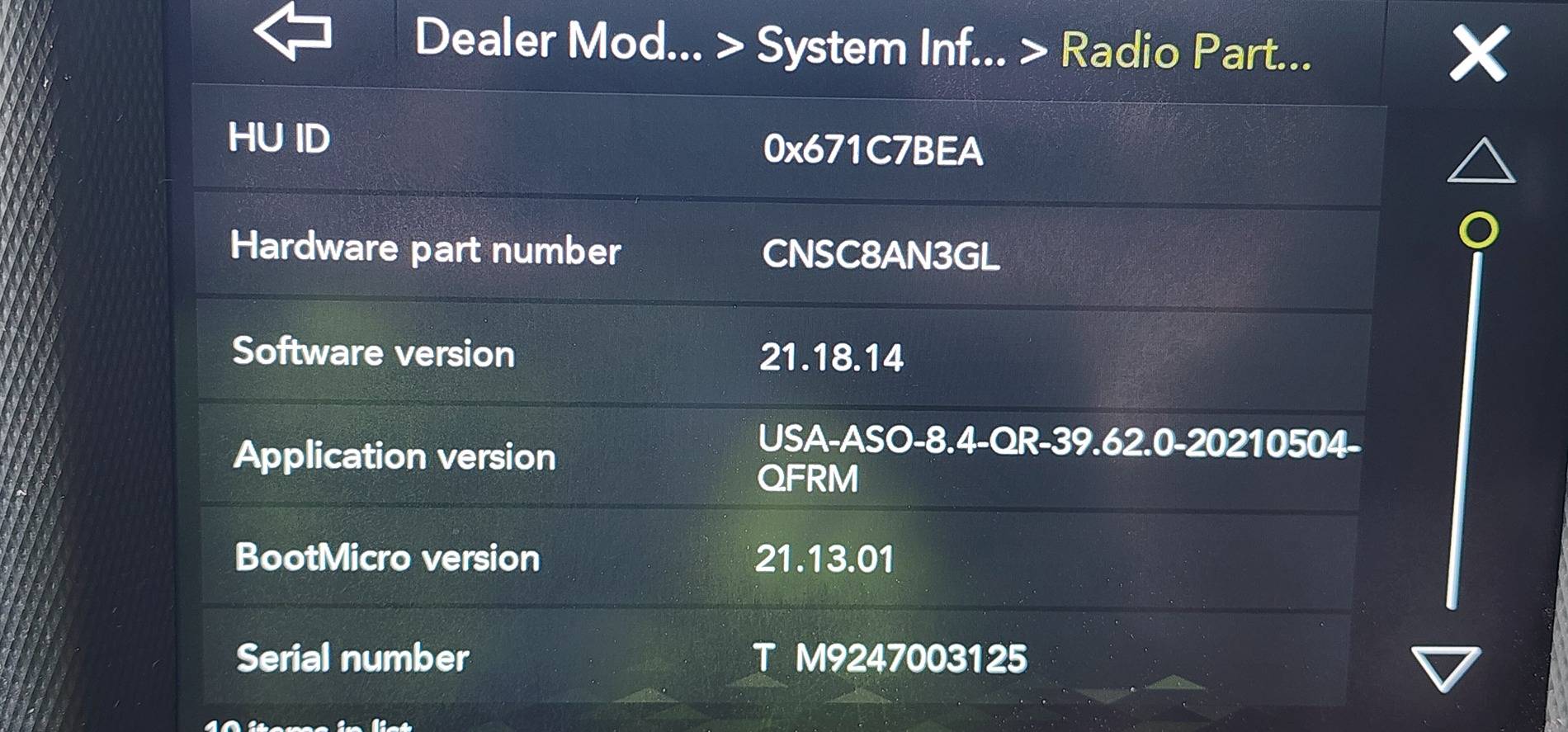
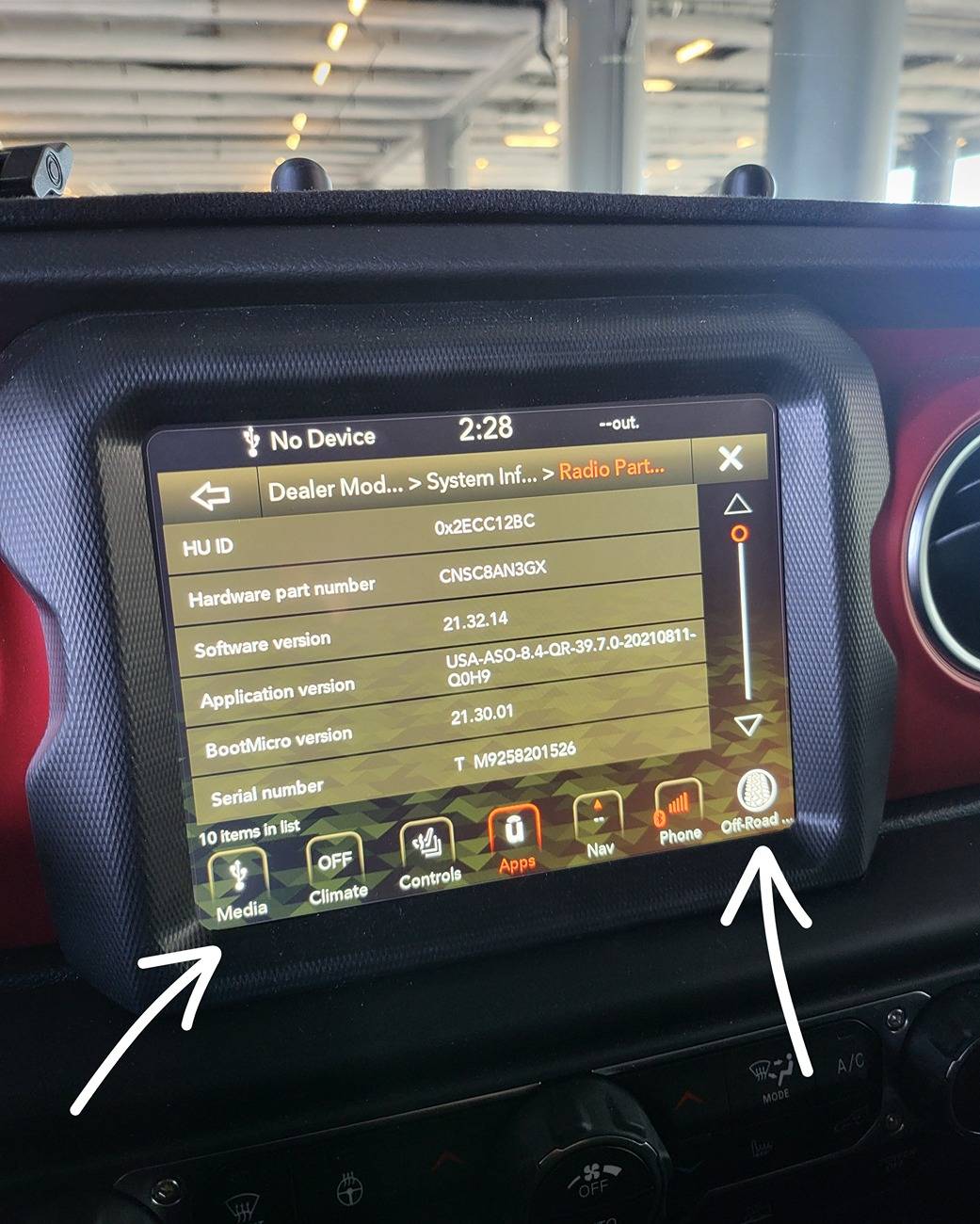
Hold the short cuts on the bottom left and right. As seen below until screen changes and you will get into "Dealer Mode".

In this mode, you want to get into the Radio Information.

You will see a very similar screen below.

In the "Application Version", you see USA-.......39.7.0-......

That "39.7" is the Application version.


Mine is relatively new, but not the latest.

1000011480.jpg


Where to get the software:

Link to the Firmware Version 40.1

https://www.mediafire.com/file/guzmk27vexkr33x/UCONNECT_UAQ_8.4_QR40.1_MY18-21.zip/file

Approximately 1.1GB. as of 7/11/2024, the file is still downloadable.

What to do next:

Take screen shots of all the important information on Uconnect. IE: SXM account number....

Download the file above.

Unzip the files while preserving the directory structure:

You will get a directory named: "\VP4R_Update\" with bunch of files inside.

Format a good functioning USB drive with enough space to Fat32.

*This is done by right clicking on the USB drive then selecting "Format". If you don't know how to do this. Then you should look it up on Google How to format USB drive to Fat32. MAKE SURE YOU DON'T FORMAT YOUR HARD DRIVE.

I personally used Sandisk 16gb USB 3.0 capable drive.
https://a.co/d/bsWqDfp

Move "\VP4R_Update\" and all of its contents into root of the USB drive.

Plug the USB drive into the dash USB A port.

I started my vehicle and kept it running as I wanted to have stable battery voltage during the entire update process.

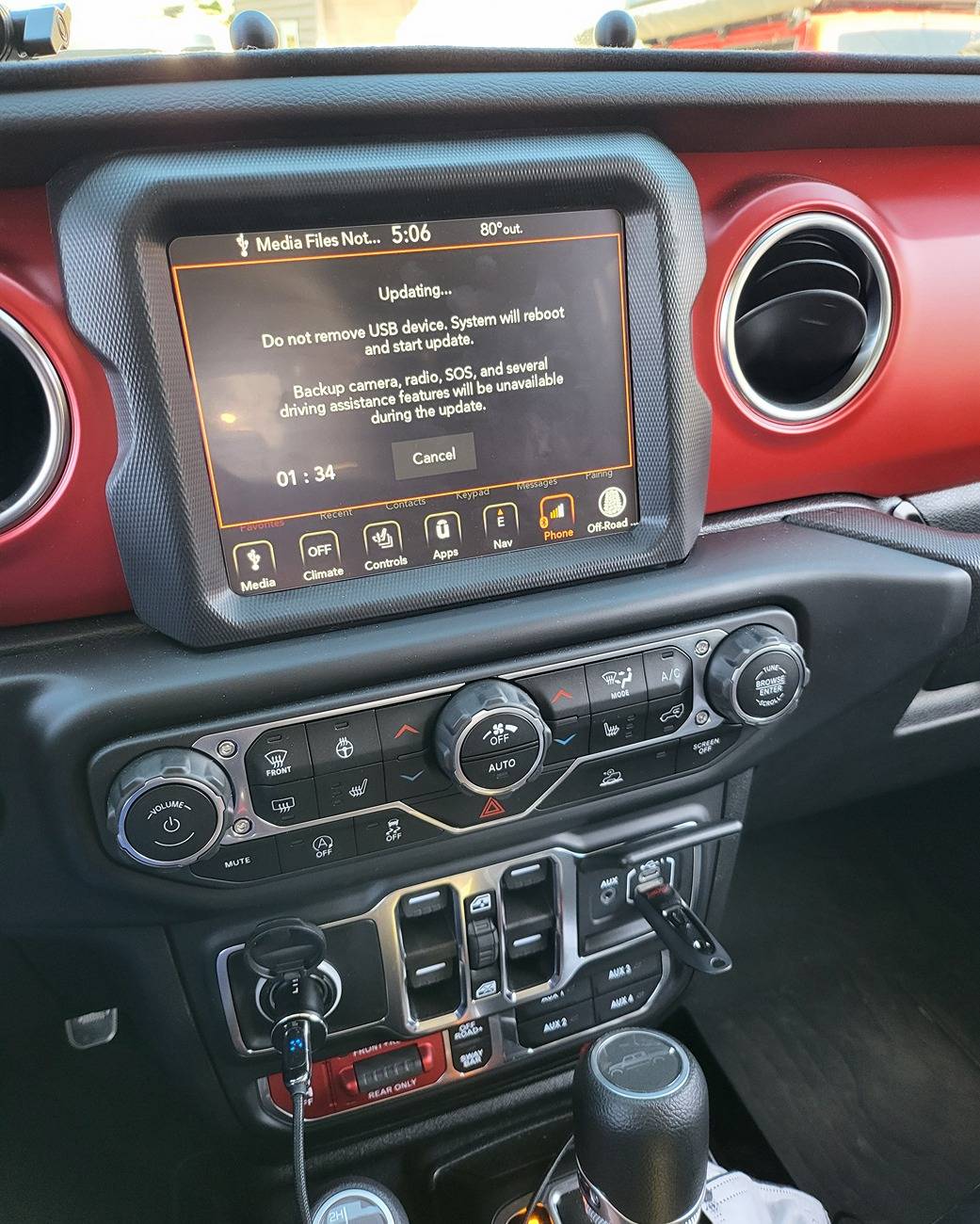
And you will get a prompt asking if you want to upgrade. Proceed through that prompt and you will get the following timer. Let the timer expire. You can see where I plugged in the USB drive.

1000011421.jpg


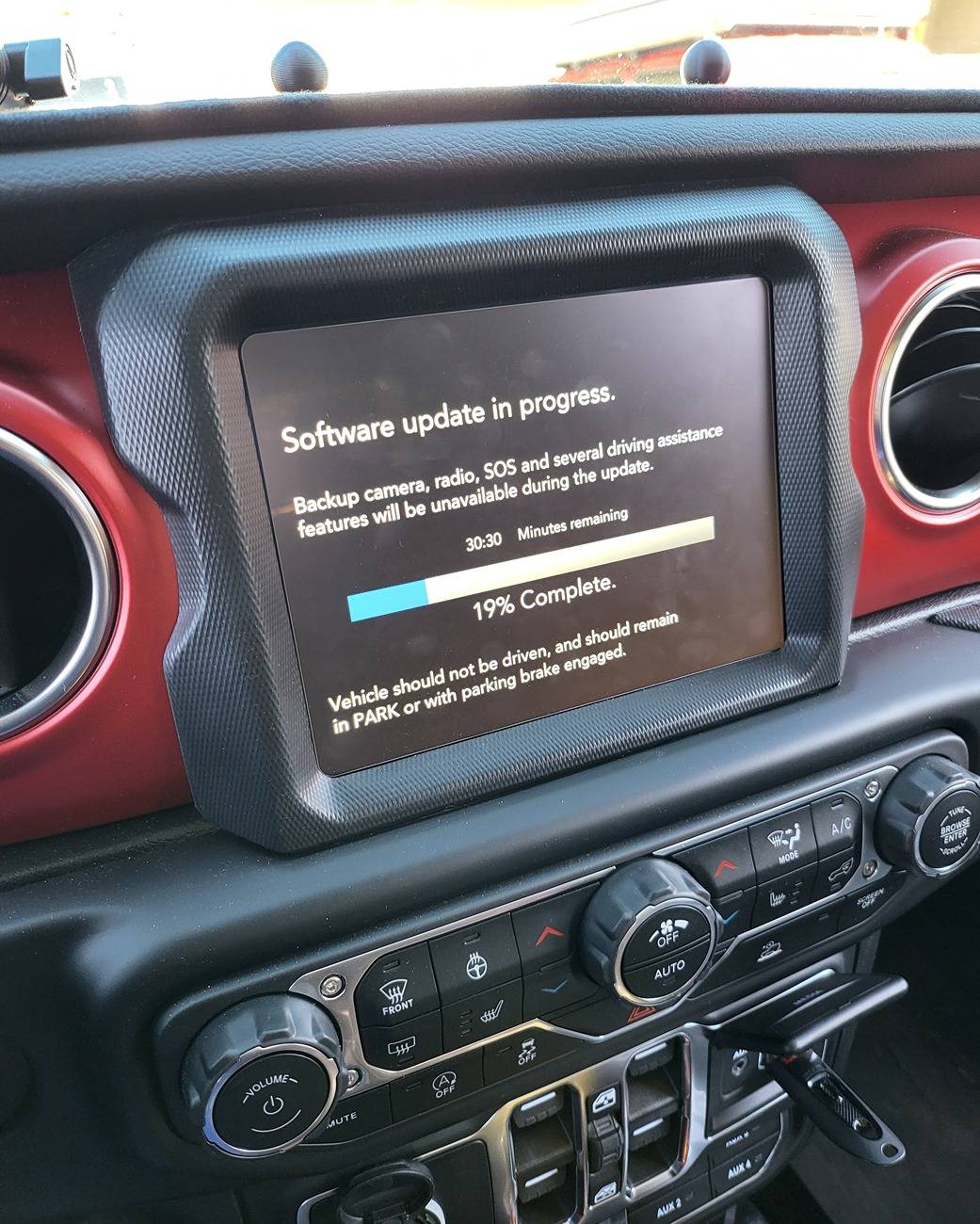
Once timer runs out, you will get the following screen.

1000011430.jpg


While the count down stated 30 plus minutes, mine took about 25min.

And the unit will reset on its own and the first screen will tell you that the update present in the USB drive is the same as the current one. This means you successfully upgraded your HU.

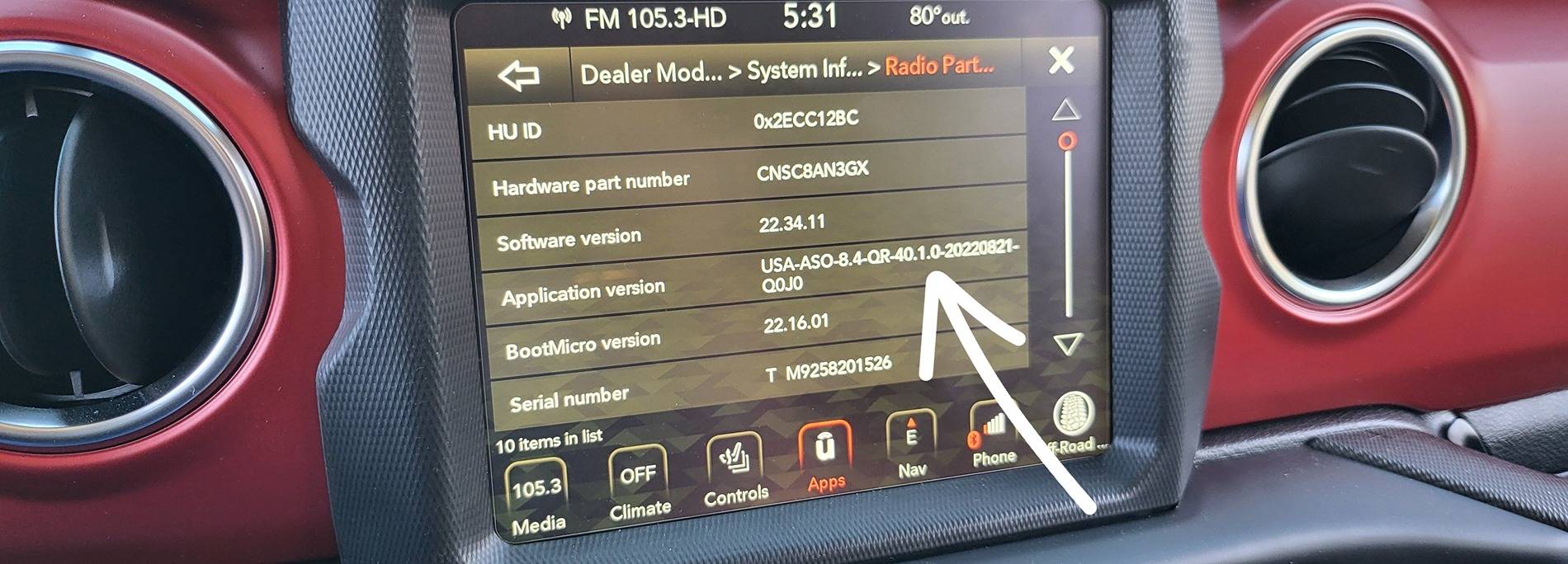
You can reaccess the dealer mode and check "Radio" information and you shall see the following screen. You can see the Application Version is now 40.1.

*IT IS POSSIBLE THAT YOU MAY NOT SEE ALL YOUR APPS RIGHT WAY. I READ PEOPLE REPORTING THEIR APPS BACK ALMOST 24 HOURS LATER and also having to reset all their settings again. Having said that, all the apps were present immediately for me.

1000011481.jpg


Impression:

I started researching into this upgrade because my parking guideline and TrailCam were functioning intermittently. The issue turned out to be because I did not seat CVPM CAN IHS connector all the way down.

Nonetheless, the upgrade made the entire interface feel more fluent and faster. Navigation loads within a few of seconds and offroad page loads faster too. Definitely an upgrade.

GOOD LUCK!

*YOU DO THIS UPGRADE AT YOUR OWN RISK. I AM MERELY SHARING MY EXPERIENCE. YOUR MILEAGE MAY VARY.

Good luck!

Reference:
https://www.jlwranglerforums.com/forum/threads/new-update-for-8-4-uconnect-radio.107222/
WHAT UPDATE? What is the date of it?
 

Trebuchet57

Member
First Name
Paul
Joined
Feb 10, 2022
Threads
1
Messages
18
Reaction score
12
Location
Waxahachie TX
Vehicle(s)
Jeep Gladiator Mojave
Occupation
Retired
In the midst of debugging my TrailCam installation for my 2023 JTRD, I stumbled upon updating UConnect Stereo via USB A connection available to the right side of the window controls on JL/JT and other Jeep platforms. However, I found no sepcific guide available for JTs. So here I am, writing it.

From what I read, the Over The Air (OTA) update is no longer pushed out by Uconnect/Chrysler for the newer Jeeps and that the updates are only provided by the dealers. It sorta makes sense as the update is over 1GB and that is a lot of data to push into individual vehicles.

If you have factory warranty, the dealer should provide it for free, otherwise the update is provided for a fee.

This guide is for those like to get stuff done on their own. I am sharing what I did and hope you find it useful.

Indication:

Please the attached TSB for covered vehicles, issues and repairs that the firmware update is covering.

Customers may experience one or more of the following:
• **Wi-Fi hotspot connection failure.
• Speaker popping, crackle noise during Voice Recognition (VR) response and navigation guidance.
• Mobile Station Integrated Services Digital Network (MSISDN) missing from radio, no connected services working.**
• Intermittent, black radio display screen (Rear View Camera (RVC) not affected).
• Intermittent, radio freezes (RVC not affected).
• Wireless connectivity pairing and/or connection issues. • Lost radio presets. • Radio channels change by itself.
• SXM icon inoperative.
• SXM favorite song not displaying/playing.
• Incorrect navigation address/location/directions.
• Backup camera has black display screen or only displays Check Entire Surroundings with black screen (occurs when vehicle is shifted immediately to reverse upon key-on before RVC signal is received, recoverable with key cycle) .
• High pitch chime noise.
• Contact list not loading.
• Device not supported message.
• Remote app inoperative.
• Travel-Link fuel price incorrect.
• Backup camera gridlines missing.
• Unable to adjust volume.

In addition, the following enhancement are included in this update:
• Enables map updates.
• Heavy Duty (HD) Truck USB HUB improvements.
• HDTruck heated steering wheel improvemens.


Version:

Firmware update v 40.1 (Over 1GB).


Warning:

***You can brick your headunit if you don't do it properly.**

From what I have learned is that when you try to update old unit with old firmware tends to not finish the update and falls into infinite loop. The work around is to do incremental upgrades to a safe/known version then apply the latest upgrade. I do not know of the "old but yet" safe version.

I have read that someone had successful update going from as old as v22.64 to v40.1.

How to figure out what version you have:


Hold the short cuts on the bottom left and right. As seen below until screen changes and you will get into "Dealer Mode".

In this mode, you want to get into the Radio Information.

You will see a very similar screen below.

In the "Application Version", you see USA-.......39.7.0-......

That "39.7" is the Application version.


Mine is relatively new, but not the latest.

1000011480.jpg


Where to get the software:

Link to the Firmware Version 40.1

https://www.mediafire.com/file/guzmk27vexkr33x/UCONNECT_UAQ_8.4_QR40.1_MY18-21.zip/file

Approximately 1.1GB. as of 7/11/2024, the file is still downloadable.

What to do next:

Take screen shots of all the important information on Uconnect. IE: SXM account number....

Download the file above.

Unzip the files while preserving the directory structure:

You will get a directory named: "\VP4R_Update\" with bunch of files inside.

Format a good functioning USB drive with enough space to Fat32.

*This is done by right clicking on the USB drive then selecting "Format". If you don't know how to do this. Then you should look it up on Google How to format USB drive to Fat32. MAKE SURE YOU DON'T FORMAT YOUR HARD DRIVE.

I personally used Sandisk 16gb USB 3.0 capable drive.
https://a.co/d/bsWqDfp

Move "\VP4R_Update\" and all of its contents into root of the USB drive.

Plug the USB drive into the dash USB A port.

I started my vehicle and kept it running as I wanted to have stable battery voltage during the entire update process.

And you will get a prompt asking if you want to upgrade. Proceed through that prompt and you will get the following timer. Let the timer expire. You can see where I plugged in the USB drive.

1000011421.jpg


Once timer runs out, you will get the following screen.

1000011430.jpg


While the count down stated 30 plus minutes, mine took about 25min.

And the unit will reset on its own and the first screen will tell you that the update present in the USB drive is the same as the current one. This means you successfully upgraded your HU.

You can reaccess the dealer mode and check "Radio" information and you shall see the following screen. You can see the Application Version is now 40.1.

*IT IS POSSIBLE THAT YOU MAY NOT SEE ALL YOUR APPS RIGHT WAY. I READ PEOPLE REPORTING THEIR APPS BACK ALMOST 24 HOURS LATER and also having to reset all their settings again. Having said that, all the apps were present immediately for me.

1000011481.jpg


Impression:

I started researching into this upgrade because my parking guideline and TrailCam were functioning intermittently. The issue turned out to be because I did not seat CVPM CAN IHS connector all the way down.

Nonetheless, the upgrade made the entire interface feel more fluent and faster. Navigation loads within a few of seconds and offroad page loads faster too. Definitely an upgrade.

GOOD LUCK!

*YOU DO THIS UPGRADE AT YOUR OWN RISK. I AM MERELY SHARING MY EXPERIENCE. YOUR MILEAGE MAY VARY.

Good luck!

Reference:
https://www.jlwranglerforums.com/forum/threads/new-update-for-8-4-uconnect-radio.107222/
It worked well for me. I did notice that there was an option to do a backup in the dealer menu. I opted not to do the backup and jumped in with USB, no issues what so ever.
 
OP
OP
DailyDrivenTJ

DailyDrivenTJ

Well-Known Member
First Name
Michael
Joined
Nov 19, 2023
Threads
22
Messages
319
Reaction score
226
Location
PNW
Vehicle(s)
2023 JTRD, 1999 TJ-6 HEMI, 1998TJ, 2000 XJ 4.6L
It worked well for me. I did notice that there was an option to do a backup in the dealer menu. I opted not to do the backup and jumped in with USB, no issues what so ever.
Glad that it worked out for you. What year and version did you upgrade from?
Sponsored


Top