Sponsored

Proximity door locks retrofit on Wrangler/Gladiator, someone figured it out (DIY writeup)

Gregj

Well-Known Member
First Name
Greg
Joined
Jul 4, 2019
Threads
2
Messages
488
Reaction score
501
Location
West Texas
Vehicle(s)
2018 JLU, 2018 JLUR, 2023 JTuRD, 2017 JKRR
He is a VERY knowledgeable guy but yea....prolly wrong.

how would I know for sure?
Post #190 in this very thread will tell you which wires to look for in the door harness. No one will be able to look through the internet at your truck and tell you if the wires are there.
Gregj
Sponsored


ShadowsPapa

Well-Known Member
First Name
Bill
Joined
Oct 12, 2019
Threads
247
Messages
40,463
Reaction score
53,913
Location
Runnells, Iowa
Vehicle(s)
'25 JTMX, '23 JLU 4xe, '82 SX4, '73 Javelin
Occupation
Retired auto mechanic, frmr gov't ntwrk security admin
Vehicle Showcase
3
He is a VERY knowledgeable guy but yea....prolly wrong.

how would I know for sure?
My bet is he's referring to the wiring under the dash, from the door harness.
That DOES exist on Overland where it doesn't on sport.
It makes sense he's thinking of that wire.

Sport owners need to do additional wiring if I have that part correct.
Overland owners only need to add the door wiring harness, the dash harness has the wires.
 

drBassman

Well-Known Member
First Name
Ryan
Joined
Aug 11, 2019
Threads
6
Messages
275
Reaction score
393
Location
NW Missouri
Vehicle(s)
2020 Jeep Gladiator; 2005 VW Passat TDI; Previous: 1978 CJ5; 1997 TJ Sport.
Has anyone considered trying AlfaOBD?
As soon as I get my door handles & wiring harnesses, I'm going to attempt to use AlfaOBD to activate proximity door locks on my 2020 JT Sport-S. I had to purchase AlfaOBD so I could perform a "PROXY alignment" in my 2020 Compass after upgrading the 7" radio to 8.4 NAV. Since I've already bought AlfaOBD ($50) for that purpose, I will try it on my JT & let you know if it works...

When I load up AlfaOBD, and select :
Jeep -> Gladiator (JT) -> Body Computer -> MY2020-21 PowerNet -> <click the car with open hood button @ bottom> -> car configuration change ->

I am able to find the "VehConfig 3: Passive Entry Present" , "Cust.Set.Menu 1: Passive Entry CSM Present", "Wireless: AP1 Left Front" , "Wireless: AP2 Right Front" options that seem to correlate to similar options on the Jscan OBD app.

It appears that AlfaOBD will also be able to activate the "off-road" pages on my 8.4" radio. I'm waiting for the Chrysler 12 + 8 cable that I ordered to arrive. I will update after I've received the cable & attempted this mod.
 

Jimmy07

Well-Known Member
First Name
Jimmy
Joined
Sep 6, 2020
Threads
3
Messages
242
Reaction score
236
Location
Illinois
Vehicle(s)
2017 Ram 2500 2019 Jeep Cherokee
As soon as I get my door handles & wiring harnesses, I'm going to attempt to use AlfaOBD to activate proximity door locks on my 2020 JT Sport-S. I had to purchase AlfaOBD so I could perform a "PROXY alignment" in my 2020 Compass after upgrading the 7" radio to 8.4 NAV. Since I've already bought AlfaOBD ($50) for that purpose, I will try it on my JT & let you know if it works...

When I load up AlfaOBD, and select :
Jeep -> Gladiator (JT) -> Body Computer -> MY2020-21 PowerNet -> <click the car with open hood button @ bottom> -> car configuration change ->

I am able to find the "VehConfig 3: Passive Entry Present" , "Cust.Set.Menu 1: Passive Entry CSM Present", "Wireless: AP1 Left Front" , "Wireless: AP2 Right Front" options that seem to correlate to similar options on the Jscan OBD app.

It appears that AlfaOBD will also be able to activate the "off-road" pages on my 8.4" radio. I'm waiting for the Chrysler 12 + 8 cable that I ordered to arrive. I will update after I've received the cable & attempted this mod.
It’ll work just fine. People have been using AlfaOBD for years enabling this feature on FCA vehicles. It’s a much more powerful tool than Jscan, having access to every individual BCM setting.
 

drBassman

Well-Known Member
First Name
Ryan
Joined
Aug 11, 2019
Threads
6
Messages
275
Reaction score
393
Location
NW Missouri
Vehicle(s)
2020 Jeep Gladiator; 2005 VW Passat TDI; Previous: 1978 CJ5; 1997 TJ Sport.
Sport owners need to do additional wiring if I have that part correct.
Overland owners only need to add the door wiring harness, the dash harness has the wires.
Now I'm confused...

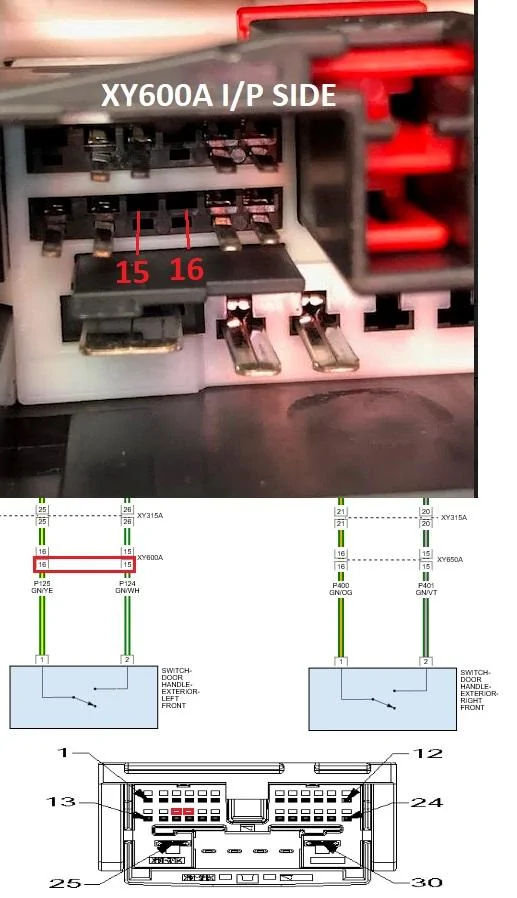
According to this post on the JL Forums, it says that Sport S needs additional wiring installed for this mod to work... I've ripped/uploaded the photo from that post below:
Jeep Gladiator Proximity door locks retrofit on Wrangler/Gladiator, someone figured it out (DIY writeup) XY600AIP


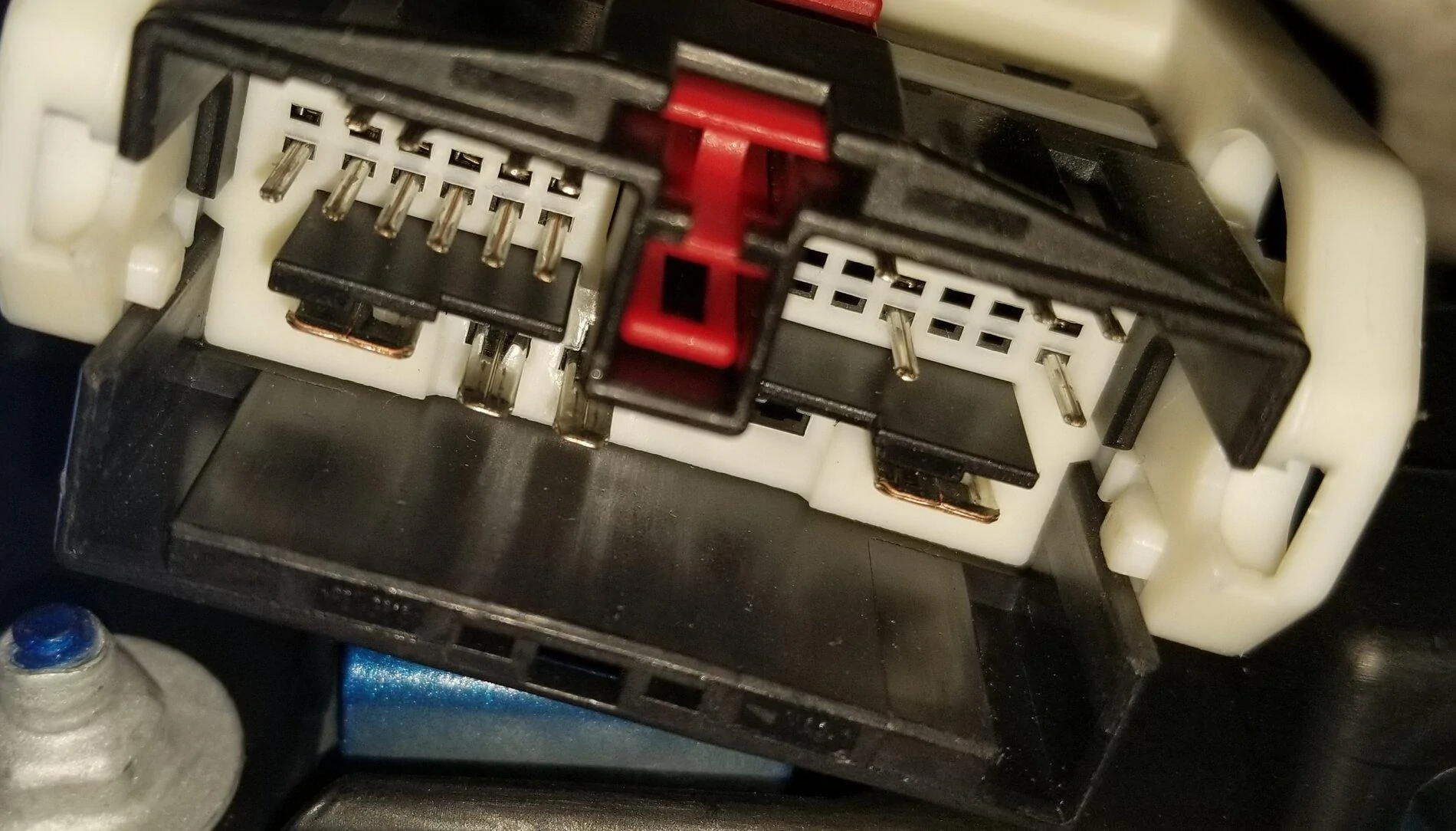
Yet, when I look at the driver side connector on my Sport S, it appears as follows:
Jeep Gladiator Proximity door locks retrofit on Wrangler/Gladiator, someone figured it out (DIY writeup) 20201118_145624

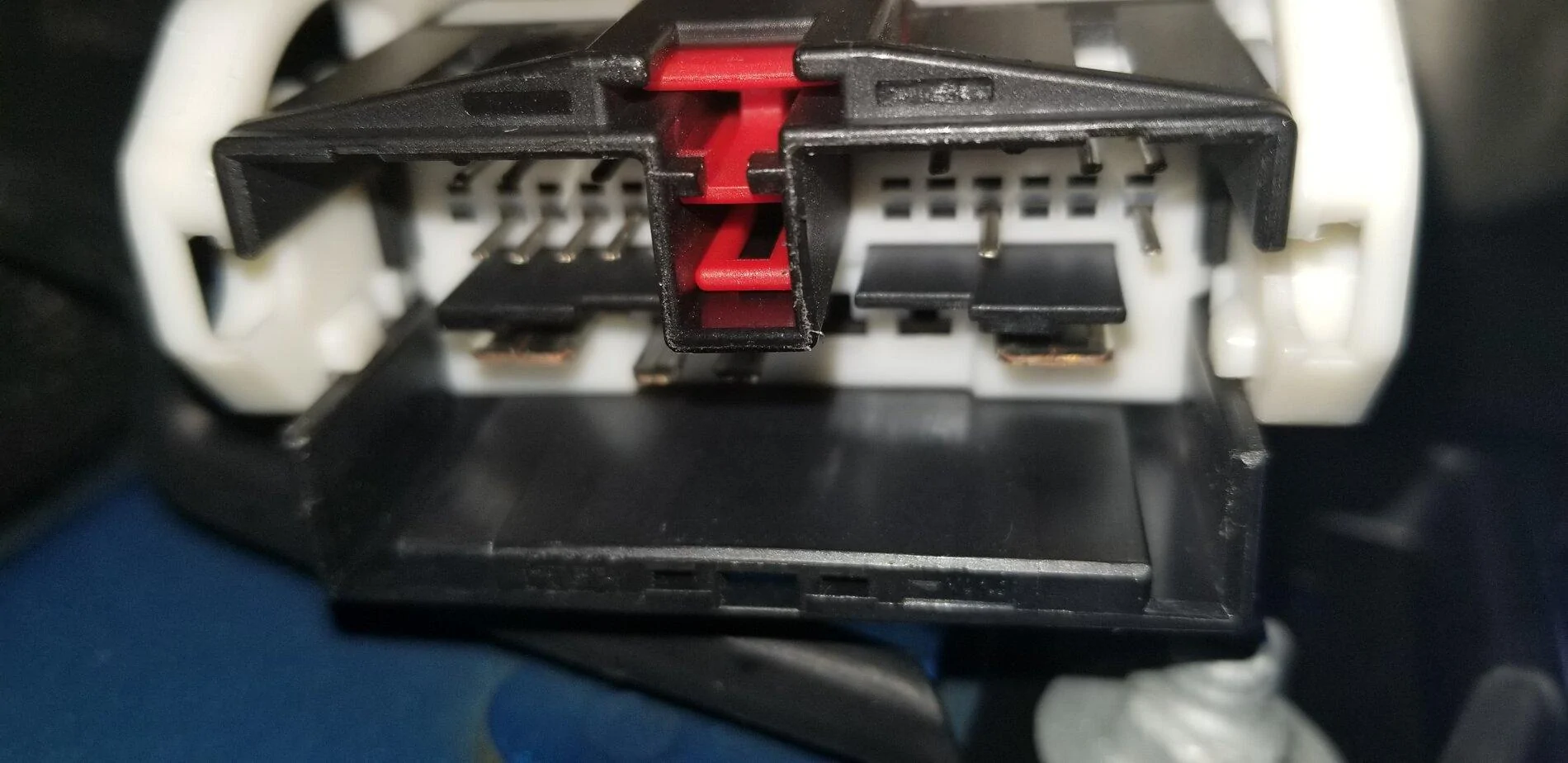
Edit: Passenger side:
Jeep Gladiator Proximity door locks retrofit on Wrangler/Gladiator, someone figured it out (DIY writeup) 20201118_153344


Does this mean my Sport S already has the wiring in place???
 
Last edited:

Sponsored

ShadowsPapa

Well-Known Member
First Name
Bill
Joined
Oct 12, 2019
Threads
247
Messages
40,463
Reaction score
53,913
Location
Runnells, Iowa
Vehicle(s)
'25 JTMX, '23 JLU 4xe, '82 SX4, '73 Javelin
Occupation
Retired auto mechanic, frmr gov't ntwrk security admin
Vehicle Showcase
3
Now I'm confused...

According to this post on the JL Forums, it says that Sport S needs additional wiring installed for this mod to work... I've ripped/uploaded the photo from that post below:
XY600AIP.jpg


Yet, when I look at the driver side connector on my Sport S, it appears as follows:
20201118_145624.jpg


Does this mean my Sport S already has the wiring in place???
Wow, sure looks like it..........
 

gt3mike

Well-Known Member
Joined
Aug 18, 2020
Threads
4
Messages
107
Reaction score
65
Location
CO, USA
Vehicle(s)
2021 Gladiator Rubicon
Is there a full list of the changes to be made using JScan for this mod somewhere? I've read through this thread, and maybe I missed it, but so far I've only come up with bits and pieces.

Like many, I've had the parts on order for a couple of months now. But once they arrive, I'd like to know what I need to do JScan-wise.

Thanks!
 

ShadowsPapa

Well-Known Member
First Name
Bill
Joined
Oct 12, 2019
Threads
247
Messages
40,463
Reaction score
53,913
Location
Runnells, Iowa
Vehicle(s)
'25 JTMX, '23 JLU 4xe, '82 SX4, '73 Javelin
Occupation
Retired auto mechanic, frmr gov't ntwrk security admin
Vehicle Showcase
3
Is there a full list of the changes to be made using JScan for this mod somewhere? I've read through this thread, and maybe I missed it, but so far I've only come up with bits and pieces.

Like many, I've had the parts on order for a couple of months now. But once they arrive, I'd like to know what I need to do JScan-wise.

Thanks!
My question, too, as there are several places that mention locks, antenna, this, that and the other thing that may or may not be connected to this.
When I looked into what was shown for trailer brakes - wow, there's at least half a dozen things in there that could impact things.
So I can imagine there's more than one place to make a change - to do it RIGHT.
Sure, maybe you can flip one setting and wow, they work - but is it RIGHT?
Or will you lose that safety feature that prevents you from locking the fob in the truck?
Right now it's literally not at all possible to lock a fob in the truck, you just can't do it.
But I've heard that after installing these things - suddenly that's gone. So is it that there are things that must be changed in order or all together for it to not just "work" but work CORRECTLY?
Putting in some parts and flipping a setting and having something "work" is one thing,
having it work RIGHT or correctly, is something else.
And there's no real path to follow, you almost just have to connect and snoop around!
 

Jimmy07

Well-Known Member
First Name
Jimmy
Joined
Sep 6, 2020
Threads
3
Messages
242
Reaction score
236
Location
Illinois
Vehicle(s)
2017 Ram 2500 2019 Jeep Cherokee
Is there a full list of the changes to be made using JScan for this mod somewhere? I've read through this thread, and maybe I missed it, but so far I've only come up with bits and pieces.

Like many, I've had the parts on order for a couple of months now. But once they arrive, I'd like to know what I need to do JScan-wise.

Thanks!
My question, too, as there are several places that mention locks, antenna, this, that and the other thing that may or may not be connected to this.
When I looked into what was shown for trailer brakes - wow, there's at least half a dozen things in there that could impact things.
So I can imagine there's more than one place to make a change - to do it RIGHT.
Sure, maybe you can flip one setting and wow, they work - but is it RIGHT?
Or will you lose that safety feature that prevents you from locking the fob in the truck?
Right now it's literally not at all possible to lock a fob in the truck, you just can't do it.
But I've heard that after installing these things - suddenly that's gone. So is it that there are things that must be changed in order or all together for it to not just "work" but work CORRECTLY?
Putting in some parts and flipping a setting and having something "work" is one thing,
having it work RIGHT or correctly, is something else.
And there's no real path to follow, you almost just have to connect and snoop around!
These are the changes, no matter which tool you use:
AP1 Left front > smart switch
AP2 right front > smart switch
Passive entry present > yes/ active
Passive entry CSM > yes/ active
Those will get the job done.
When comparing the BCM configuration logs of a passive entry JT against a non-passive entry JT, there is one other setting difference- Tip Start Present is set to yes on a passive entry factory equipped JT. Jscan can’t set this setting, but AlfaOBD can. Does this setting make a difference to how the passive entry feature functions? Probably not, but you have your answer on all the relevant settings changes to do it right. It doesn’t matter which tool you use, because the exact same bits get changed in the BCM for those settings names.
 

ShadowsPapa

Well-Known Member
First Name
Bill
Joined
Oct 12, 2019
Threads
247
Messages
40,463
Reaction score
53,913
Location
Runnells, Iowa
Vehicle(s)
'25 JTMX, '23 JLU 4xe, '82 SX4, '73 Javelin
Occupation
Retired auto mechanic, frmr gov't ntwrk security admin
Vehicle Showcase
3
These are the changes, no matter which tool you use:
AP1 Left front > smart switch
AP2 right front > smart switch
Passive entry present > yes/ active
Passive entry CSM > yes/ active
Those will get the job done.
When comparing the BCM configuration logs of a passive entry JT against a non-passive entry JT, there is one other setting difference- Tip Start Present is set to yes on a passive entry factory equipped JT. Jscan can’t set this setting, but AlfaOBD can. Does this setting make a difference to how the passive entry feature functions? Probably not, but you have your answer on all the relevant settings changes to do it right. It doesn’t matter which tool you use, because the exact same bits get changed in the BCM for those settings names.
TIP start present makes no sense as far as passive entry vs. non-passive entry as tip start is the feature that keeps cranking until the engine starts - all you need to do is press the starter button on the dash and let go. No need to keep holding it.
And if it doesn't start after so long cranking, it stops cranking.
This is also what allows a remote start to work - it cranks until it starts, or stops cranking after xx seconds.
So why would TIP start have anything at all to do with how you get into your truck???
It's the same on Ram trucks, and many other modern vehicle makes and models, not unique to Jeep. It was even present on key-equipped vehicles, turn the key to crank and release it and it keeps cranking until it starts - or xx seconds pass, which-ever comes first.
 

Sponsored

Jimmy07

Well-Known Member
First Name
Jimmy
Joined
Sep 6, 2020
Threads
3
Messages
242
Reaction score
236
Location
Illinois
Vehicle(s)
2017 Ram 2500 2019 Jeep Cherokee
TIP start present makes no sense as far as passive entry vs. non-passive entry as tip start is the feature that keeps cranking until the engine starts - all you need to do is press the starter button on the dash and let go. No need to keep holding it.
And if it doesn't start after so long cranking, it stops cranking.
This is also what allows a remote start to work - it cranks until it starts, or stops cranking after xx seconds.
So why would TIP start have anything at all to do with how you get into your truck???
It's the same on Ram trucks, and many other modern vehicle makes and models, not unique to Jeep. It was even present on key-equipped vehicles, turn the key to crank and release it and it keeps cranking until it starts - or xx seconds pass, which-ever comes first.
I understand that, but you wanted to know exactly what settings are different between a passive entry equipped and non-passive entry equipped JT. That is one setting that is different when comparing BCM configuration logs. Realistically, you don’t even have to set the AP1 and AP2 to smart switch to get passive entry to work, only passive entry present and passive entry CSM, and it will work “correctly”.
 

ShadowsPapa

Well-Known Member
First Name
Bill
Joined
Oct 12, 2019
Threads
247
Messages
40,463
Reaction score
53,913
Location
Runnells, Iowa
Vehicle(s)
'25 JTMX, '23 JLU 4xe, '82 SX4, '73 Javelin
Occupation
Retired auto mechanic, frmr gov't ntwrk security admin
Vehicle Showcase
3
I understand that, but you wanted to know exactly what settings are different between a passive entry equipped and non-passive entry equipped JT. That is one setting that is different when comparing BCM configuration logs. Realistically, you don’t even have to set the AP1 and AP2 to smart switch to get passive entry to work, only passive entry present and passive entry CSM, and it will work “correctly”.
I know - we asked, I asked - but tip start? That's weird!

I'll have to look at my settings as the truck DOES have tip start - touch the button, let go, and it cranks until it starts.
 

drBassman

Well-Known Member
First Name
Ryan
Joined
Aug 11, 2019
Threads
6
Messages
275
Reaction score
393
Location
NW Missouri
Vehicle(s)
2020 Jeep Gladiator; 2005 VW Passat TDI; Previous: 1978 CJ5; 1997 TJ Sport.
TIP start present makes no sense as far as passive entry vs. non-passive entry as tip start is the feature that keeps cranking until the engine starts - all you need to do is press the starter button on the dash and let go. No need to keep holding it.
This is NOT how it works on my manual transmission JTS. I have to have clutch down, then I have to push & hold the start button until engine started. If I let go of the button, it immediately stops cranking.
 

Gregj

Well-Known Member
First Name
Greg
Joined
Jul 4, 2019
Threads
2
Messages
488
Reaction score
501
Location
West Texas
Vehicle(s)
2018 JLU, 2018 JLUR, 2023 JTuRD, 2017 JKRR
Tip Start is the difference between an Automatic and Manual transmission. It would be an interesting experiment to see if Tip Start would work on a manual, dangerous too!
Gregj
 

Jimmy07

Well-Known Member
First Name
Jimmy
Joined
Sep 6, 2020
Threads
3
Messages
242
Reaction score
236
Location
Illinois
Vehicle(s)
2017 Ram 2500 2019 Jeep Cherokee
This is NOT how it works on my manual transmission JTS. I have to have clutch down, then I have to push & hold the start button until engine started. If I let go of the button, it immediately stops cranking.
Tip Start is the difference between an Automatic and Manual transmission. It would be an interesting experiment to see if Tip Start would work on a manual, dangerous too!
Gregj
I completely overlooked this fact when comparing the two BCM configs through WinMerge. THAT was the difference between the two- one was manual, and the other was automatic, and you definitely wouldn’t want Tip start on a manual. Sorry for introducing unnecessary confusion in the thread about this one.
Sponsored


Top