Sponsored

Mr._Bill

Well-Known Member
First Name
Bill
Joined
Jul 22, 2019
Threads
38
Messages
6,646
Reaction score
7,727
Location
North Las Vegas, NV
Vehicle(s)
2023 Gladiator High Altitude - 2013 Nissan Leaf SV
Vehicle Showcase
1
Hoping not to have to read all 43 pages on the JL forum right now - but IIUC this is only necessary once out of warranty? While covered by warranty we are receiving the software updates by default? (assuming LTE to the head unit is functional)

(my ‘22 under warranty looks to be on v40.12)
If you have a cellular equipped head unit, the OTA update is automatic if they decide you need it. The dealer will usually only install it if there is a notice you need it, a TSB for it, if the OTA update fails, or if they are attempting to fix a problem you are having.

If you order a Map Update, and they determine you need a head unit update, they will send it for you to install. You can start the order process and they will tell you if an update is needed.
Sponsored

 
OP
OP
DailyDrivenTJ

DailyDrivenTJ

Well-Known Member
First Name
Michael
Joined
Nov 19, 2023
Threads
22
Messages
319
Reaction score
226
Location
PNW
Vehicle(s)
2023 JTRD, 1999 TJ-6 HEMI, 1998TJ, 2000 XJ 4.6L
Hoping not to have to read all 43 pages on the JL forum right now - but IIUC this is only necessary once out of warranty? While covered by warranty we are receiving the software updates by default? (assuming LTE to the head unit is functional)

(my ‘22 under warranty looks to be on v40.12)
There is no OTA update being pushed per a JL owners since last April 2024. I remember reading s/he called Uconnect themselves and their website was not updated for some time. When I ran my VIN, it said I did not have any update. But I did have an update outstanding.
 
Last edited:

jwilson2899

Well-Known Member
First Name
Jeff
Joined
Nov 11, 2019
Threads
23
Messages
858
Reaction score
1,068
Location
Front Royal, VA
Vehicle(s)
2020 Gladiator Rubicon Launch Edition
Occupation
System Engineer
Vehicle Showcase
1
I’ve done multiple of these updates to mine, it’s a pretty easy and straightforward process. There is a couple places out there that have multiple versions of the firmware.
 

WK2JT

Well-Known Member
First Name
Darren
Joined
Mar 11, 2020
Threads
18
Messages
806
Reaction score
832
Location
Highlands Ranch, CO
Vehicle(s)
JTC
Vehicle Showcase
1
In the midst of debugging my TrailCam installation for my 2023 JTRD, I stumbled upon updating UConnect Stereo via USB A connection available to the right side of the window controls on JL/JT and other Jeep platforms. However, I found no sepcific guide available for JTs. So here I am, writing it.

From what I read, the Over The Air (OTA) update is no longer pushed out by Uconnect/Chrysler for the newer Jeeps and that the updates are only provided by the dealers. It sorta makes sense as the update is over 1GB and that is a lot of data to push into individual vehicles.

If you have factory warranty, the dealer should provide it for free, otherwise the update is provided for a fee.

This guide is for those like to get stuff done on their own. I am sharing what I did and hope you find it useful.

Indication:

Please the attached TSB for covered vehicles, issues and repairs that the firmware update is covering.

Customers may experience one or more of the following:
• **Wi-Fi hotspot connection failure.
• Speaker popping, crackle noise during Voice Recognition (VR) response and navigation guidance.
• Mobile Station Integrated Services Digital Network (MSISDN) missing from radio, no connected services working.**
• Intermittent, black radio display screen (Rear View Camera (RVC) not affected).
• Intermittent, radio freezes (RVC not affected).
• Wireless connectivity pairing and/or connection issues. • Lost radio presets. • Radio channels change by itself.
• SXM icon inoperative.
• SXM favorite song not displaying/playing.
• Incorrect navigation address/location/directions.
• Backup camera has black display screen or only displays Check Entire Surroundings with black screen (occurs when vehicle is shifted immediately to reverse upon key-on before RVC signal is received, recoverable with key cycle) .
• High pitch chime noise.
• Contact list not loading.
• Device not supported message.
• Remote app inoperative.
• Travel-Link fuel price incorrect.
• Backup camera gridlines missing.
• Unable to adjust volume.

In addition, the following enhancement are included in this update:
• Enables map updates.
• Heavy Duty (HD) Truck USB HUB improvements.
• HDTruck heated steering wheel improvemens.


Version:

Firmware update v 40.1 (Over 1GB).


Warning:

***You can brick your headunit if you don't do it properly.**

From what I have learned is that when you try to update old unit with old firmware tends to not finish the update and falls into infinite loop. The work around is to do incremental upgrades to a safe/known version then apply the latest upgrade. I do not know of the "old but yet" safe version.

I have read that someone had successful update going from as old as v22.64 to v40.1.

How to figure out what version you have:


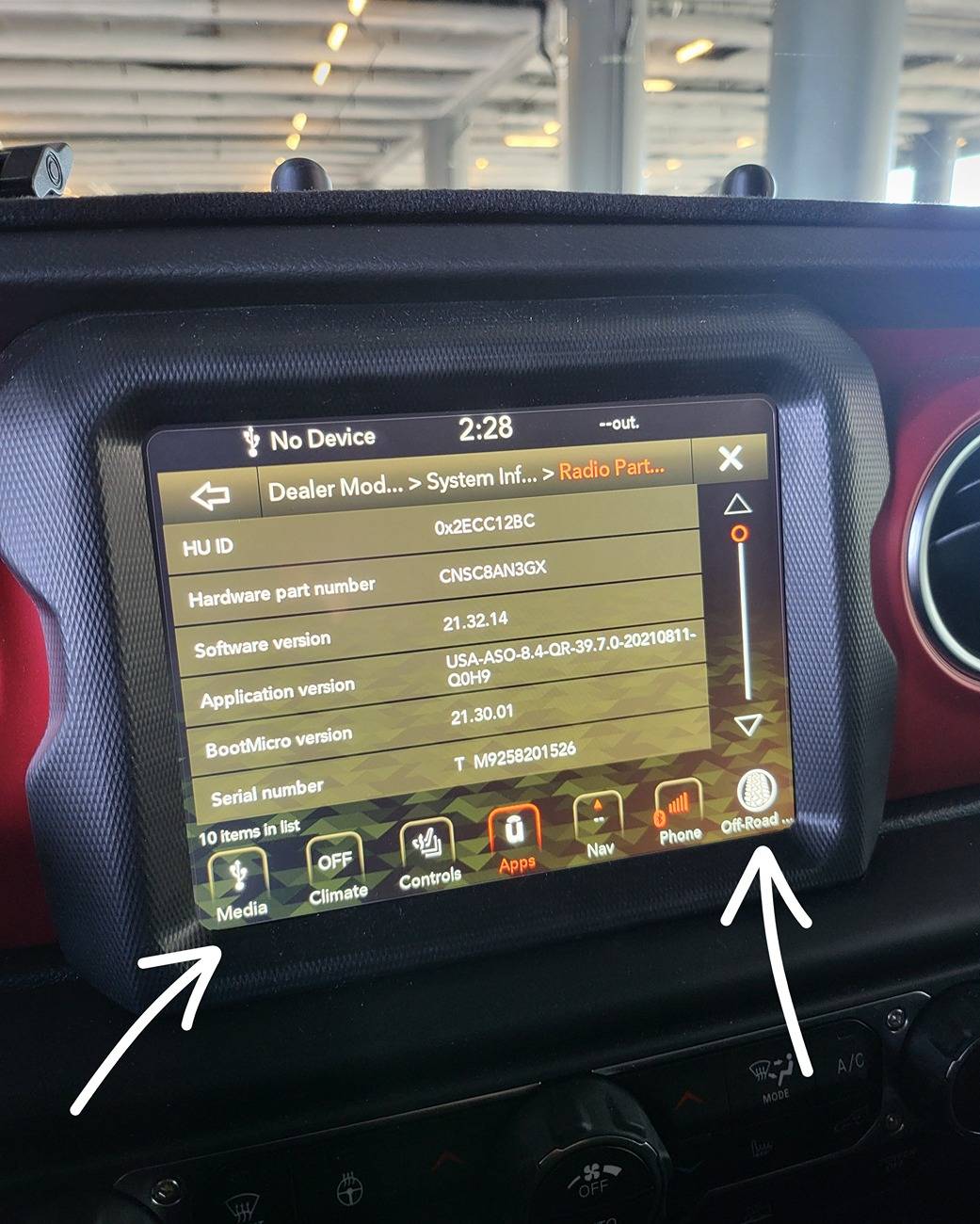
Hold the short cuts on the bottom left and right. As seen below until screen changes and you will get into "Dealer Mode".

In this mode, you want to get into the Radio Information.

You will see a very similar screen below.

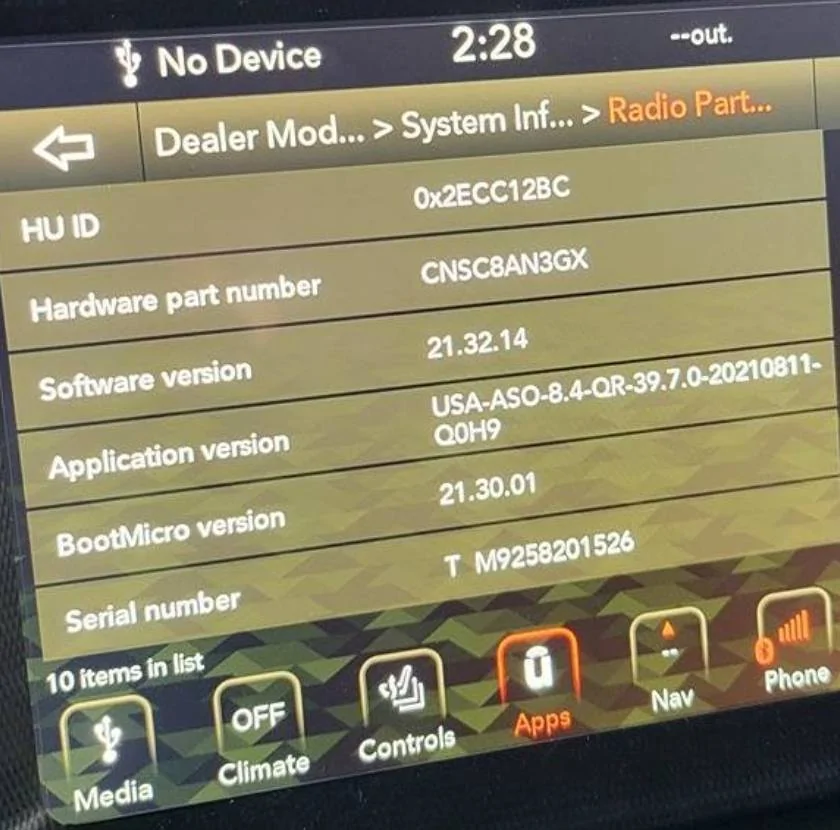
In the "Application Version", you see USA-.......39.7.0-......

That "39.7" is the Application version.

Mine is relatively new, but not the latest.

1000011480.jpg


Where to get the software:

Link to the Firmware Version 40.1

https://www.mediafire.com/file/guzmk27vexkr33x/UCONNECT_UAQ_8.4_QR40.1_MY18-21.zip/file

Approximately 1.1GB. as of 7/11/2024, the file is still downloadable.

What to do next:

Take screen shots of all the important information on Uconnect. IE: SXM account number....

Download the file above.

Unzip the files while preserving the directory structure:

You will get a directory named: "\VP4R_Update\" with bunch of files inside.

Format a good functioning USB drive with enough space to Fat32.

*This is done by right clicking on the USB drive then selecting "Format". If you don't know how to do this. Then you should look it up on Google How to format USB drive to Fat32. MAKE SURE YOU DON'T FORMAT YOUR HARD DRIVE.

I personally used Sandisk 16gb USB 3.0 capable drive.
https://a.co/d/bsWqDfp

Move "\VP4R_Update\" and all of its contents into root of the USB drive.

Plug the USB drive into the dash USB A port.

I started my vehicle and kept it running as I wanted to have stable battery voltage during the entire update process.

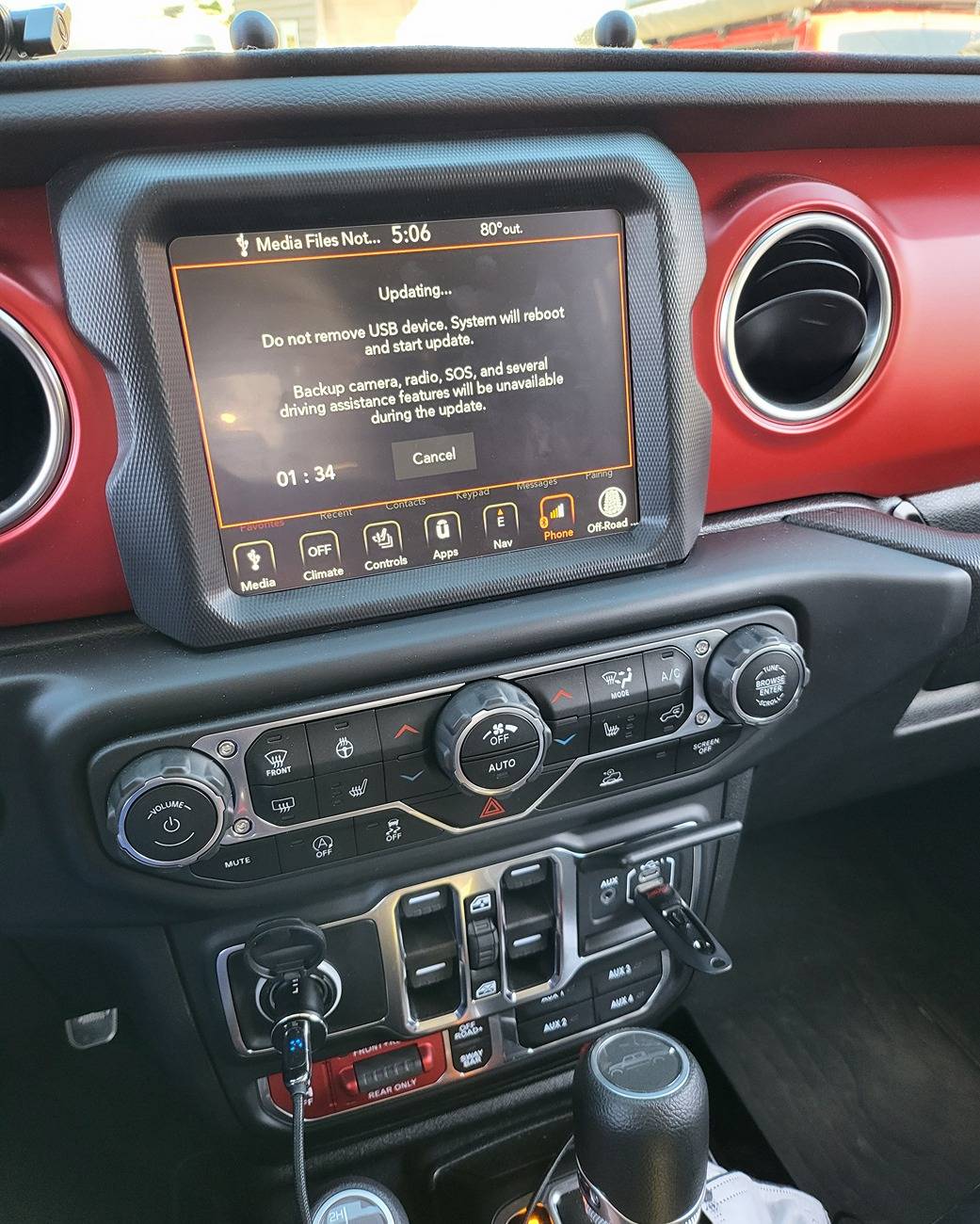
And you will get a prompt asking if you want to upgrade. Proceed through that prompt and you will get the following timer. Let the timer expire. You can see where I plugged in the USB drive.

1000011421.jpg


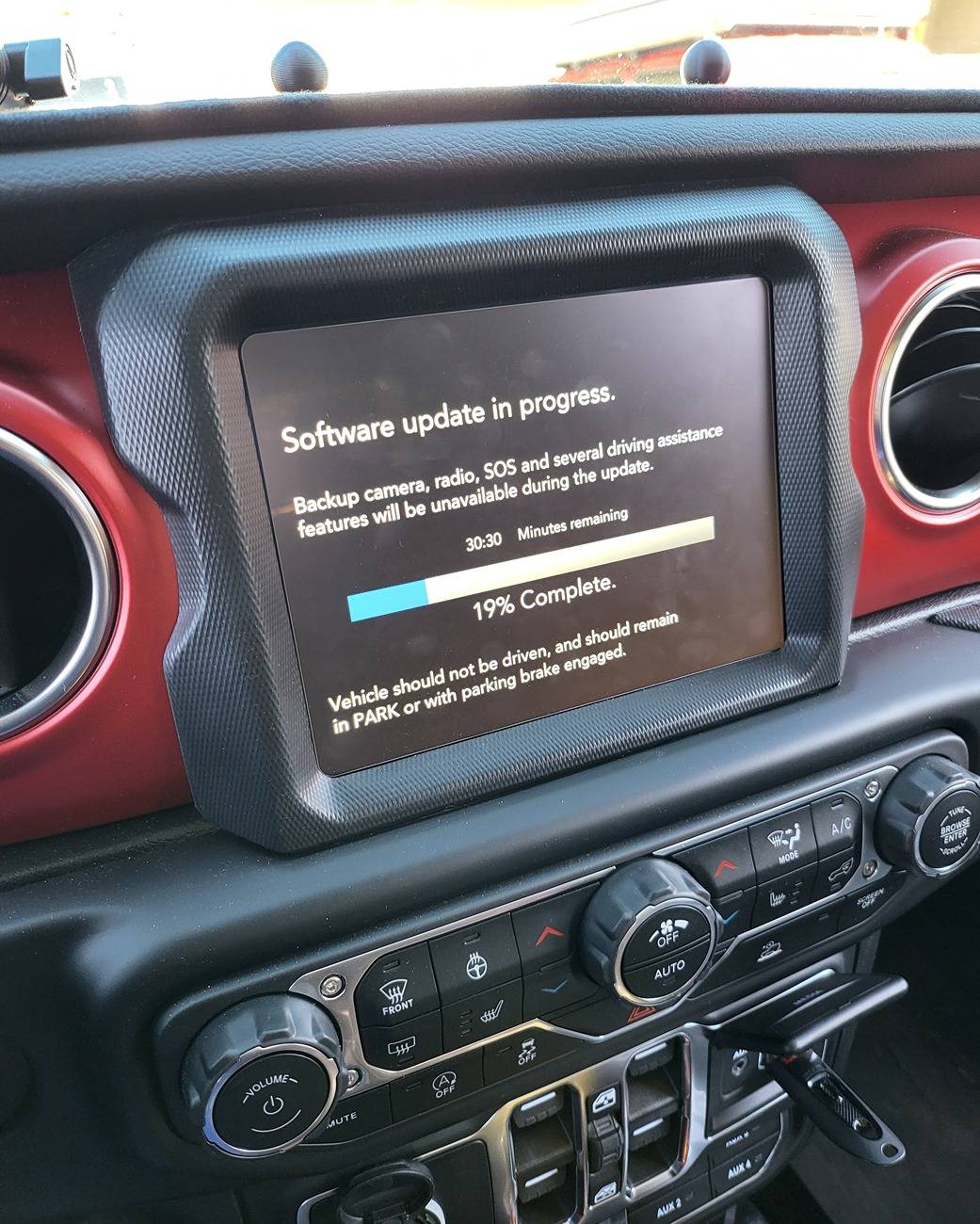
Once timer runs out, you will get the following screen.

1000011430.jpg


While the count down stated 30 plus minutes, mine took about 25min.

And the unit will reset on its own and the first screen will tell you that the update present in the USB drive is the same as the current one. This means you successfully upgraded your HU.

You can reaccess the dealer mode and check "Radio" information and you shall see the following screen. You can see the Application Version is now 40.1.

*IT IS POSSIBLE THAT YOU MAY NOT SEE ALL YOUR APPS RIGHT WAY. I READ PEOPLE REPORTING THEIR APPS BACK ALMOST 24 HOURS LATER and also having to reset all their settings again. Having said that, all the apps were present immediately for me.

1000011481.jpg


Impression:

I started researching into this upgrade because my parking guideline and TrailCam were functioning intermittently. The issue turned out to be because I did not seat CVPM CAN IHS connector all the way down.

Nonetheless, the upgrade made the entire interface feel more fluent and faster. Navigation loads within a few of seconds and offroad page loads faster too. Definitely an upgrade.

GOOD LUCK!

*YOU DO THIS UPGRADE AT YOUR OWN RISK. I AM MERELY SHARING MY EXPERIENCE. YOUR MILEAGE MAY VARY.

Good luck!

Reference:
https://www.jlwranglerforums.com/forum/threads/new-update-for-8-4-uconnect-radio.107222/
Thanks for all the leg work and write up on this. I’ve been having an issue with my self installed trail cam, so figured I’d give this a go

Everything was going fine with a few mins to go and I opened the door to check progress like a bonehead. Of course this caused the power to turn off. Luckily everything still seems to work. However, the SW version is still showing 22 on the dealer page, but when I put the USB drive back in the port, it says same version 40.

Scratching my head a bit on this one. Wondering if it just needs time to update the SW version in the dealer page… that’s a hope, more than an expectation. Just curious if you might have some insights into an interrupted update like this. Appreciate it.
 
OP
OP
DailyDrivenTJ

DailyDrivenTJ

Well-Known Member
First Name
Michael
Joined
Nov 19, 2023
Threads
22
Messages
319
Reaction score
226
Location
PNW
Vehicle(s)
2023 JTRD, 1999 TJ-6 HEMI, 1998TJ, 2000 XJ 4.6L
.... Luckily everything still seems to work. However, the SW version is still showing 22 on the dealer page, but when I put the USB drive back in the port, it says same version 40.

Scratching my head a bit on this one. Wondering if it just needs time to update the SW version in the dealer page… that’s a hope, more than an expectation. Just curious if you might have some insights into an interrupted update like this. Appreciate it.
This is why I kept the engine running to prevent something like this from happening.

Post up the screen. Are you reading your version number correct?

WRT Trail Cam, I would be happy to think through it with you. You can post it up on my other HowTo post. I feel pretty good about installing the TrailCam.
 

Sponsored

WK2JT

Well-Known Member
First Name
Darren
Joined
Mar 11, 2020
Threads
18
Messages
806
Reaction score
832
Location
Highlands Ranch, CO
Vehicle(s)
JTC
Vehicle Showcase
1
[QUOTE="WK2JT, post: 1351966,] .... Luckily everything still seems to work. However, the SW version is still showing 22 on the dealer page, but when I put the USB drive back in the port, it says same version 40.

Scratching my head a bit on this one. Wondering if it just needs time to update the SW version in the dealer page… that’s a hope, more than an expectation. Just curious if you might have some insights into an interrupted update like this. Appreciate it.
This is why I kept the engine running to prevent something like this from happening.

Post up the screen. Are you reading your version number correct?

WRT Trail Cam, I would be happy to think through it with you. You can post it up on my other HowTo post. I feel pretty good about installing the TrailCam.
[/QUOTE]
Yeah, I was thinking that right as I grabbed the handle. I’ll take a pic of the dealer screen and post it.

The trail cam was working fine, but it would intermittently throw a green or black screen after short stints. A restart would fix it, so seems like a SW issue.
 

WK2JT

Well-Known Member
First Name
Darren
Joined
Mar 11, 2020
Threads
18
Messages
806
Reaction score
832
Location
Highlands Ranch, CO
Vehicle(s)
JTC
Vehicle Showcase
1
Okay, it’s late and I’m stupid. It did update. I was looking at the SW version instead of the application version. App version indicates 40.

I’ll move over to the trail cam thread and see if we can figure that out.
 

Hootbro

Well-Known Member
First Name
Don
Joined
Apr 13, 2019
Threads
57
Messages
10,176
Reaction score
19,943
Location
Delaware
Vehicle(s)
2025 Gladiator Sport
There is no OTA update being pushed per a JL owners since last April 2024. I remember reading s/he called Uconnect themselves and their website was not updated for some time. When I ran my VIN, it said I did not have any update. But I did have an update outstanding.
To my knowledge, the Uconnect website has never given a downloadable update file for our radios since the Gladiator launch in 2019. I suspect it is because in some cases, these is a two step bootstrap load to get to latest version and if done out of sequence, it will brick the head unit
 

Reddog

Well-Known Member
First Name
Mike
Joined
Jul 10, 2023
Threads
1
Messages
278
Reaction score
386
Location
Alexandria, Virginia
Vehicle(s)
2023 Jeep Gladiator Rubicon
Occupation
Retired Army. Retired Construction Manager / Contracting Officer
You guys are braver than me. Remember if this update freezes, you may be looking at bricking the headunit. I did not make up this instruction. I pieced them together after reading information scattered throughout 8 different posts across two different platforms.

I used this USB Drive after reading someone reporting success with it.

SanDisk 16GB Ultra USB 3.0 Flash Drive - SDCZ48-016G-GAM46, Black https://a.co/d/bsWqDfp

Entire 7 dollars invested and I got it next day. Mind you I live in Seattle, WA.
Thanks for your post. Have had my unit updated twice due to slow functioning of features and ap loading. I have finally decided its a lost cause and just accept that if I want a JT with an uptodate computer I must need to spend $100,000 on a different vehicle to get one. The operating system used in the JT's explains what happened to all those old Tandy computer drives of a by gone era. I like my JT very much but for $61K, I expected a state of the art operating system. Didn't get it.
 

Stan H

Well-Known Member
First Name
Stanley
Joined
Oct 26, 2022
Threads
10
Messages
5,481
Reaction score
5,461
Location
WV
Vehicle(s)
Gladiator Rubicon 2021
Occupation
Safety Consultant
In the midst of debugging my TrailCam installation for my 2023 JTRD, I stumbled upon updating UConnect Stereo via USB A connection available to the right side of the window controls on JL/JT and other Jeep platforms. However, I found no sepcific guide available for JTs. So here I am, writing it.

From what I read, the Over The Air (OTA) update is no longer pushed out by Uconnect/Chrysler for the newer Jeeps and that the updates are only provided by the dealers. It sorta makes sense as the update is over 1GB and that is a lot of data to push into individual vehicles.

If you have factory warranty, the dealer should provide it for free, otherwise the update is provided for a fee.

This guide is for those like to get stuff done on their own. I am sharing what I did and hope you find it useful.

Indication:

Please the attached TSB for covered vehicles, issues and repairs that the firmware update is covering.

Customers may experience one or more of the following:
• **Wi-Fi hotspot connection failure.
• Speaker popping, crackle noise during Voice Recognition (VR) response and navigation guidance.
• Mobile Station Integrated Services Digital Network (MSISDN) missing from radio, no connected services working.**
• Intermittent, black radio display screen (Rear View Camera (RVC) not affected).
• Intermittent, radio freezes (RVC not affected).
• Wireless connectivity pairing and/or connection issues. • Lost radio presets. • Radio channels change by itself.
• SXM icon inoperative.
• SXM favorite song not displaying/playing.
• Incorrect navigation address/location/directions.
• Backup camera has black display screen or only displays Check Entire Surroundings with black screen (occurs when vehicle is shifted immediately to reverse upon key-on before RVC signal is received, recoverable with key cycle) .
• High pitch chime noise.
• Contact list not loading.
• Device not supported message.
• Remote app inoperative.
• Travel-Link fuel price incorrect.
• Backup camera gridlines missing.
• Unable to adjust volume.

In addition, the following enhancement are included in this update:
• Enables map updates.
• Heavy Duty (HD) Truck USB HUB improvements.
• HDTruck heated steering wheel improvemens.


Version:

Firmware update v 40.1 (Over 1GB).


Warning:

***You can brick your headunit if you don't do it properly.**

From what I have learned is that when you try to update old unit with old firmware tends to not finish the update and falls into infinite loop. The work around is to do incremental upgrades to a safe/known version then apply the latest upgrade. I do not know of the "old but yet" safe version.

I have read that someone had successful update going from as old as v22.64 to v40.1.

How to figure out what version you have:


Hold the short cuts on the bottom left and right. As seen below until screen changes and you will get into "Dealer Mode".

In this mode, you want to get into the Radio Information.

You will see a very similar screen below.

In the "Application Version", you see USA-.......39.7.0-......

That "39.7" is the Application version.


Mine is relatively new, but not the latest.

1000011480.jpg


Where to get the software:

Link to the Firmware Version 40.1

https://www.mediafire.com/file/guzmk27vexkr33x/UCONNECT_UAQ_8.4_QR40.1_MY18-21.zip/file

Approximately 1.1GB. as of 7/11/2024, the file is still downloadable.

What to do next:

Take screen shots of all the important information on Uconnect. IE: SXM account number....

Download the file above.

Unzip the files while preserving the directory structure:

You will get a directory named: "\VP4R_Update\" with bunch of files inside.

Format a good functioning USB drive with enough space to Fat32.

*This is done by right clicking on the USB drive then selecting "Format". If you don't know how to do this. Then you should look it up on Google How to format USB drive to Fat32. MAKE SURE YOU DON'T FORMAT YOUR HARD DRIVE.

I personally used Sandisk 16gb USB 3.0 capable drive.
https://a.co/d/bsWqDfp

Move "\VP4R_Update\" and all of its contents into root of the USB drive.

Plug the USB drive into the dash USB A port.

I started my vehicle and kept it running as I wanted to have stable battery voltage during the entire update process.

And you will get a prompt asking if you want to upgrade. Proceed through that prompt and you will get the following timer. Let the timer expire. You can see where I plugged in the USB drive.

1000011421.jpg


Once timer runs out, you will get the following screen.

1000011430.jpg


While the count down stated 30 plus minutes, mine took about 25min.

And the unit will reset on its own and the first screen will tell you that the update present in the USB drive is the same as the current one. This means you successfully upgraded your HU.

You can reaccess the dealer mode and check "Radio" information and you shall see the following screen. You can see the Application Version is now 40.1.

*IT IS POSSIBLE THAT YOU MAY NOT SEE ALL YOUR APPS RIGHT WAY. I READ PEOPLE REPORTING THEIR APPS BACK ALMOST 24 HOURS LATER and also having to reset all their settings again. Having said that, all the apps were present immediately for me.

1000011481.jpg


Impression:

I started researching into this upgrade because my parking guideline and TrailCam were functioning intermittently. The issue turned out to be because I did not seat CVPM CAN IHS connector all the way down.

Nonetheless, the upgrade made the entire interface feel more fluent and faster. Navigation loads within a few of seconds and offroad page loads faster too. Definitely an upgrade.

GOOD LUCK!

*YOU DO THIS UPGRADE AT YOUR OWN RISK. I AM MERELY SHARING MY EXPERIENCE. YOUR MILEAGE MAY VARY.

Good luck!

Reference:
https://www.jlwranglerforums.com/forum/threads/new-update-for-8-4-uconnect-radio.107222/
I dont think I could get it to work mine is software version 21.18.14
Boot micro 21.13.01
 

Sponsored

JTR178

Well-Known Member
Joined
Apr 27, 2021
Threads
8
Messages
479
Reaction score
843
Location
Goose Creek, SC
Vehicle(s)
2020 Rubicon
Occupation
5-0
Worked for me. I was able to upgrade from 34.2 Seems like my Off Road pages shortcut shows up in the dock much faster now.
 

Mr._Bill

Well-Known Member
First Name
Bill
Joined
Jul 22, 2019
Threads
38
Messages
6,646
Reaction score
7,727
Location
North Las Vegas, NV
Vehicle(s)
2023 Gladiator High Altitude - 2013 Nissan Leaf SV
Vehicle Showcase
1
Thanks for your post. Have had my unit updated twice due to slow functioning of features and ap loading. I have finally decided its a lost cause and just accept that if I want a JT with an uptodate computer I must need to spend $100,000 on a different vehicle to get one. The operating system used in the JT's explains what happened to all those old Tandy computer drives of a by gone era. I like my JT very much but for $61K, I expected a state of the art operating system. Didn't get it.
It was state of the art, when it was designed, back in 2017.
 

MaximusTX

Well-Known Member
Joined
Sep 15, 2023
Threads
8
Messages
696
Reaction score
998
Location
TX
Vehicle(s)
22 JTRD, 24 Mini Cooper JCW, 13 Ford Raptor, 87 Samurai JX SE
Build Thread
Link
Vehicle Showcase
1

Bakerboy

Well-Known Member
First Name
Bradley
Joined
Apr 29, 2023
Threads
15
Messages
134
Reaction score
245
Location
Eastern Shore MD
Vehicle(s)
2023 White Mojave
Occupation
See User Name 😁
Nice write up, and I am interested in the update. I will check what version I have prior to a possible brick. Wife would kill me, although you may get a good deal on a used gladiator with a broken radio :LOL:. Do you know if you need to do anything if we have a Tazer hooked up? Should it be removed first?
 
OP
OP
DailyDrivenTJ

DailyDrivenTJ

Well-Known Member
First Name
Michael
Joined
Nov 19, 2023
Threads
22
Messages
319
Reaction score
226
Location
PNW
Vehicle(s)
2023 JTRD, 1999 TJ-6 HEMI, 1998TJ, 2000 XJ 4.6L
I dont think I could get it to work mine is software version 21.18.14
Boot micro 21.13.01
Check your Application Version as written on the 1st page.

I spent a lot of time writing it up so that every step is spelled out like a cook book. Hated reading through all the posts for hours trying to figure out what the hell needed to happen, no one needs to go through that again.

I started with this version.

Jeep Gladiator How to: Update UConnect 8.4" via USB drive. 1000011492
Sponsored


Top